 وحدة جاهزية هيئة الزكاة والضريبة والجمارك
بيانات الفاتورة غير جاهزة للامتثال
تظهر المشكلة عند QR أو XML، لكن السبب غالبًا في بيانات البائع أو العميل أو الضريبة أو الفرع قبل إصدار الفاتورة.
فحص قبل العرض: حضّر فاتورة بها تصحيح أو نقص بيانات ضريبية.
وحدة جاهزية هيئة الزكاة والضريبة والجمارك
إكس فاتورة يساعد فرق المالية والامتثال والتقنية على ضبط بيانات البائع والعميل والفاتورة، مراجعة QR وXML، تجهيز المرحلة الثانية، وفصل مسار هيئة الزكاة والضريبة والجمارك السعودي عن الفوترة الأوروبية.
تنبيه: هذه صفحة تشغيلية للمساعدة في الجاهزية، وليست استشارة قانونية. يجب مراجعة الإعداد النهائي حسب متطلبات شركتك والجهات المختصة.
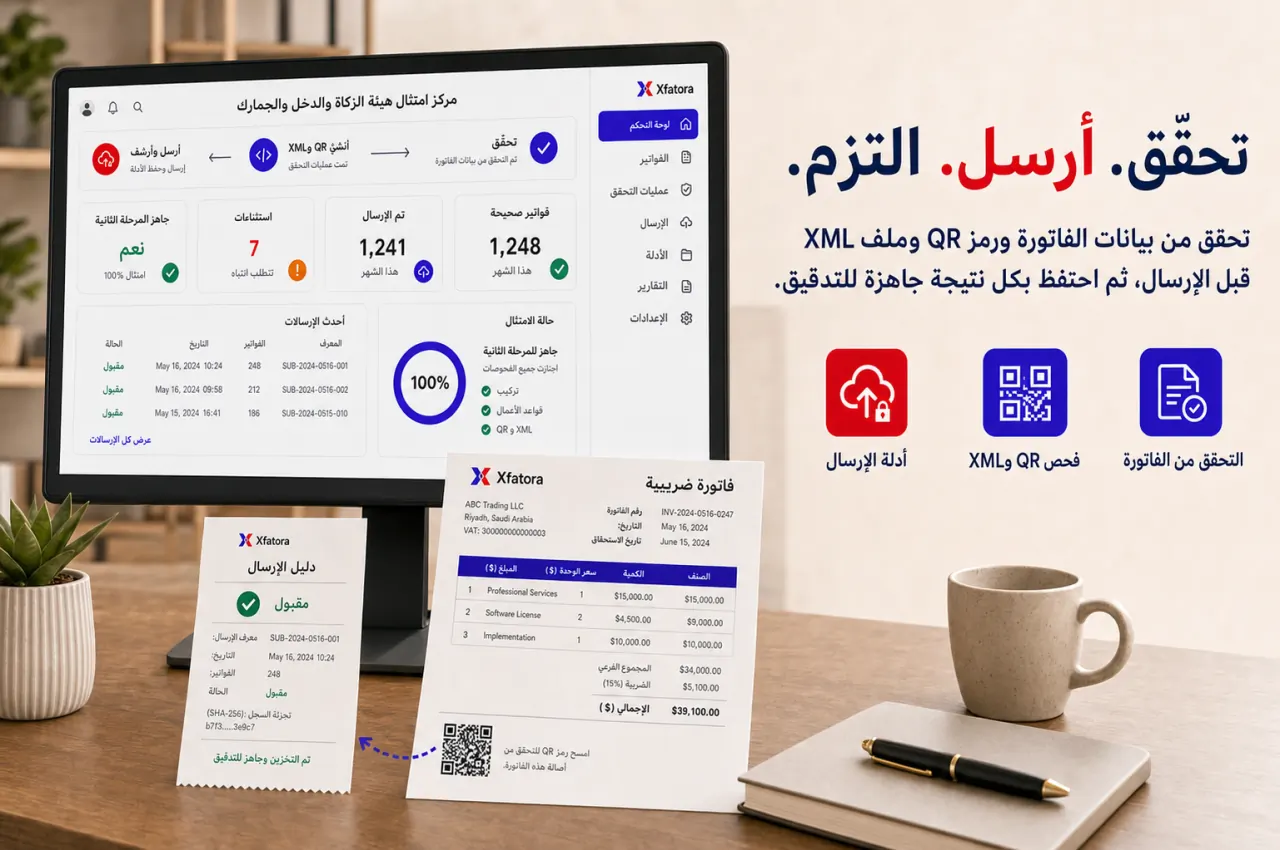
متى تبدأ بهيئة الزكاة والضريبة والجمارك؟
هذه العلامات تكشف هل المشكلة في البيانات، أو QR وXML، أو ملكية المرحلة الثانية، أو فصل المسارات.
تظهر المشكلة عند QR أو XML، لكن السبب غالبًا في بيانات البائع أو العميل أو الضريبة أو الفرع قبل إصدار الفاتورة.
فحص قبل العرض: حضّر فاتورة بها تصحيح أو نقص بيانات ضريبية.
الفاتورة تصدر من مسار، وأدلة QR وXML تحفظ في مكان آخر، فيصعب تتبع المسؤولية عند المراجعة.
فحص قبل العرض: راجع أين يتم حفظ PDF وXML ودليل القبول حاليًا.
يبدأ الفريق في CSID وOTP والشهادات قبل تثبيت ملكية البيانات وسيناريوهات الاختبار والاستثناءات.
فحص قبل العرض: حدد من يملك بيانات البائع والعميل والفاتورة قبل الربط.
يتم التعامل مع ZATCA وE-Invoicing EU كأنهما نفس المسار، فتختلط متطلبات السعودية مع ملفات الفوترة الأوروبية.
فحص قبل العرض: حدد هل السيناريو سعودي أم أوروبي قبل العرض.
نطاق التحكم
الهدف أن يكون QR وXML والمسار الضريبي نتيجة لسجل فاتورة مضبوط، لا عملًا منفصلًا بعد الإصدار.
بيانات البائع والرقم الضريبي والفرع وسجل الشركة.
جاهزية بيانات العميل والفاتورة والضريبة قبل الإصدار.
مراجعة QR على الفاتورة وPDF.
جاهزية XML وربطه بسجل الفاتورة.
فصل sandbox عن production.
إدارة CSID وOTP والشهادات وPrivate Key بمسؤولية واضحة.
تحديد مسارات الإبلاغ أو المقاصة حسب نوع الفاتورة.
حفظ أدلة الإطلاق والمراجعة الشهرية.
آخر مراجعة للمصادر: 1 أغسطس 2026. تعتمد المواعيد والمتطلبات النهائية على إشعار منشأتك ونوع الفاتورة وأحدث وثائق هيئة الزكاة والضريبة والجمارك.
تسلسل التطبيق
ابدأ ببيانات الفاتورة، ثم اختبر سيناريوهات حقيقية، ثم جهّز المرحلة الثانية، ثم وسّع بعد ثبات الأدلة والاستثناءات.
راجع البائع والعميل والضريبة والبنود والإجمالي قبل التفكير في الربط.
اختبر فاتورة عادية، فاتورة مبسطة، فاتورة ضريبية، إشعار دائن، وحالة بيانات ناقصة.
تأكد أن QR يظهر في المعاينة وPDF وأن القيم تعكس بيانات الفاتورة.
حدد البيئة ومالك CSID وOTP والشهادات وPrivate Key قبل الاستخدام الحي.
احتفظ بعينات PDF وXML ونتائج المسار وملاحظات الاستثناءات قبل التوسع.
نقاط التسليم
بهذا تبقى بيانات العميل والفاتورة والضريبة وQR وXML ضمن سجل واحد قابل للمراجعة.
CRM ← هيئة الزكاة والضريبة والجمارك
بيانات العميل والرقم الضريبي وسياق الفاتورة تبدأ من سجل العميل والمبيعات.
المحاسبة ← هيئة الزكاة والضريبة والجمارك
الضريبة والذمم والتصحيحات والإقفال تحتاج دليل فاتورة مرتبط بالسجل المالي.
هيئة الزكاة والضريبة والجمارك ← Data Exporter
حزم المراجعة يمكن أن تشمل عينات فواتير وQR وXML ونتائج الإبلاغ أو المقاصة.
هيئة الزكاة والضريبة والجمارك ← E-Invoicing EU
المساران منفصلان: هيئة الزكاة والضريبة والجمارك للسعودية، والفوترة الأوروبية لملفات EU وXML الأوروبية.
أدلة ومراجعة
الفائدة ليست في إنتاج ملف فقط، بل في وجود دليل قابل للتكرار والمراجعة عند الإغلاق أو التدقيق.
عينات فواتير تحتوي QR.
ملفات XML مرتبطة برقم الفاتورة.
نتائج الإبلاغ أو المقاصة حسب الفاتورة.
قائمة نقص بيانات البائع أو العميل.
مراجعة إعدادات البيئة وCSID.
أدلة onboarding وOTP عند الحاجة.
سجل الاستثناءات وإعادة المعالجة.
حزمة مراجعة شهرية للمالية والامتثال.
لا. التقنية مهمة، لكن الاستقرار يعتمد على بيانات البائع والعميل والفاتورة والضريبة والملكية والاختبار والاستثناءات.
جهّز بيانات الشركة والفروع، أنواع الفواتير، بيانات العملاء، منطق الضريبة، QR، XML، CSID، OTP، الشهادات، وسيناريوهات الاختبار.
نعم. يجب فصل نطاق هيئة الزكاة والضريبة والجمارك عن الفواتير غير السعودية وعن مسار الفوترة الإلكترونية الأوروبية.
هما مساران مختلفان لمعالجة الفواتير. يجب تحديد المنطق حسب نوع الفاتورة مع مسؤولية واضحة لأي override.
جهّز بيانات البائع والرقم الضريبي، عينات فواتير، إشعار دائن، حالة نقص بيانات، وأسئلة المرحلة الثانية وQR وXML.
شاركنا بيانات البائع والرقم الضريبي، فاتورة عادية، فاتورة مبسطة أو ضريبية، إشعار دائن، وحالة نقص بيانات. سنراجع أين تتعطل الجاهزية وما نطاق البداية المناسب.