Module

Feedback & Surveys

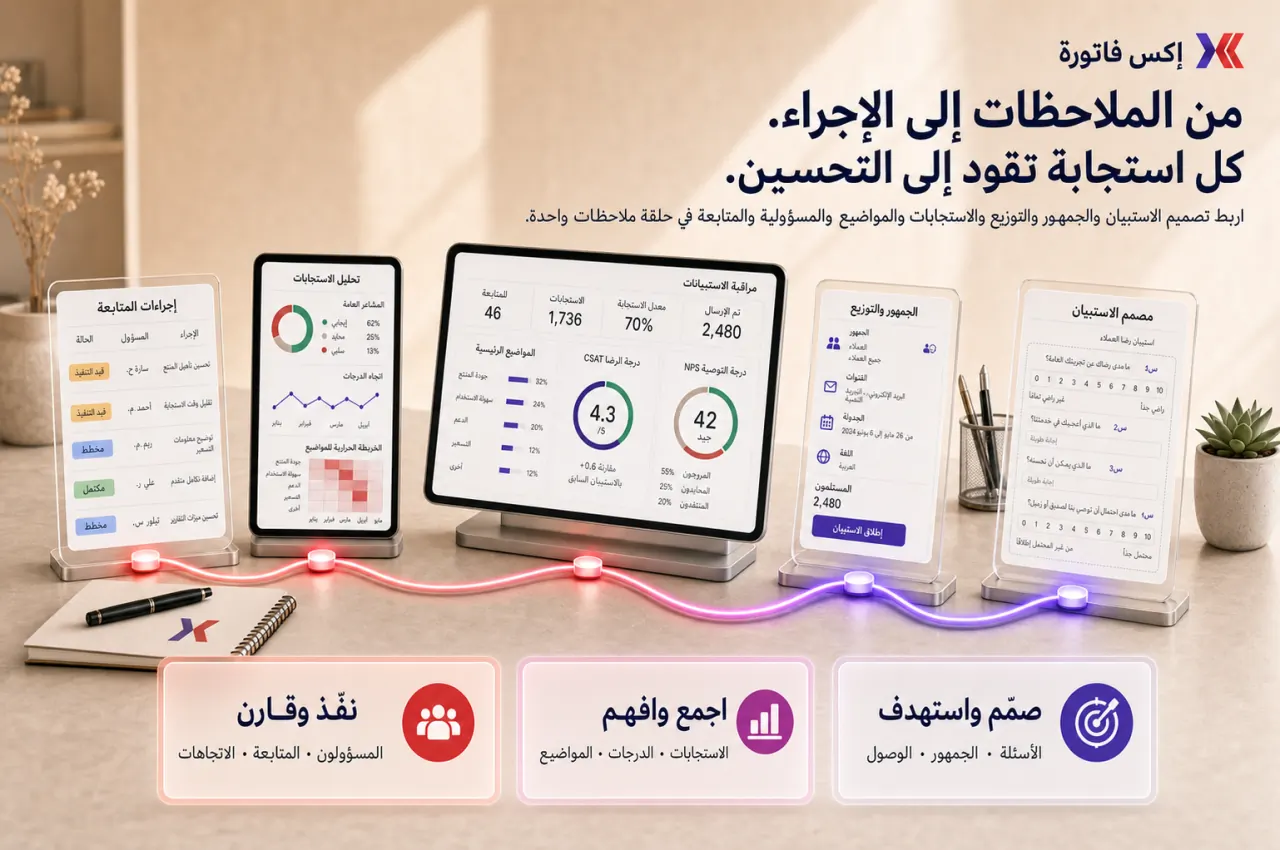
Run repeatable feedback programs using structured surveys for customers, employees, and internal teams.

Feedback & Surveys helps organizations standardize how they collect feedback, publish surveys, review Results, and convert repeated response cycles into measurable operational improvements.

What this module helps you control

Survey creation and template reuse
Question structure and Required fields
Publish/unpublish status and active controls
Internal vs external audience targeting
Distribution by survey link and Mail Lists
Results review across counts and open-text feedback
Repeated measurement and trend comparison by period
Ownership of follow-up actions after each survey cycle

Business outcomes teams expect

Create consistent feedback collection workflows instead of ad hoc messages and scattered spreadsheets.
Improve customer satisfaction and internal pulse measurement with repeatable Survey structures.
Track trends across repeated Surveys instead of one-off campaigns with no comparison baseline.
Surface recurring issues through structured Question responses and open-text review.
Assign clear owners to post-survey actions so feedback review leads to visible changes.
Run customer and internal programs from one operational module without mixing tools.
Strengthen post-delivery and post-support review discipline with scheduled survey cycles.
Prepare management-ready summaries based on Total Participants, response patterns, and top themes.
Build stronger evidence for process improvement decisions using repeated feedback history.
Keep survey governance clear around who can create, publish, and review Results.

What teams use most in this module

Practical capabilities that make day-to-day execution faster, cleaner, and easier to govern.

Survey Creation and Templates

Create a New Survey with a clear Survey subject and Survey description, then reuse proven structures across teams.

New Survey setup workflow
Survey subject and Survey description fields
Short description / view description support
Reusable templates for repeat programs
Draft-to-publish lifecycle with ownership checks

Questions and Response Design

Design Questions for both quantitative and qualitative feedback with clear response types and completion discipline.

Question builder for operational feedback
Required controls for key fields
Checkbox and Radio options
Input Field and Text area responses
Balanced design for scores and comments

Publishing and Access Control

Control when surveys are active, disabled, or restricted based on audience and participation rules.

Published and active status controls
Disabled state for paused campaigns
Only for logged in participants option
Audience targeting by survey purpose
Controlled access without creating friction

Distribution and Survey Links

Distribute surveys through links and campaign workflows that match customer or internal communication patterns.

Include survey link in description when needed
Link-based distribution for external and internal audiences
Redirect URL after completion
Email-ready sharing patterns
Campaign-oriented survey rollout support

Internal and External Feedback Programs

Run a single survey operating model across customer and employee feedback scenarios.

Customer satisfaction surveys
Support follow-up surveys
Onboarding feedback
Internal pulse surveys
Project retrospective and training feedback

Results and Response Review

Review structured outputs for each Survey to combine score visibility with open-text interpretation.

View Results for each survey cycle
Total Participants and Total Questions visibility
Text questions result review
View all answers for deeper validation
Action-oriented review of both counts and comments

Mail Lists and Survey Reach

Use Mail Lists to organize distribution reach for repeat campaigns across customer and staff segments.

Mail Lists for campaign planning
Customer and staff audience lists
Imported recipients where enabled
Controlled send patterns for survey campaigns
Recurring audience reuse for periodic surveys

Repeated Measurement and Trend Tracking

Rerun surveys on a fixed cadence to compare feedback patterns and monitor improvement progress.

Repeated survey cycles by month or quarter
Compare response patterns by period
Trend review for recurring issues
Improvement tracking from cycle to cycle
More useful history than one-off surveys

Governance and Ownership

Define permissions and operating rules so survey programs stay controlled and accountable.

Define who can create Surveys
Define who can publish Surveys
Define who can review Results
Naming conventions for reusable templates
Review cadence and action ownership controls

Reports and Exports

Generate grounded survey outputs for recurring operational and management review.

Response lists by survey cycle
Total response counts and participant summaries
Text answer review for qualitative signals
Trend summaries where available
Export or external analysis workflows where deployment allows

Start with this workflow

Follow these structured steps to launch one controlled process first, then expand.

Create a reusable Survey template

1

Create a New Survey

2

Set Survey subject and short description

3

Add Questions in the required structure

4

Mark Required questions

5

Save and document as reusable template basis

Publish and distribute a customer Survey

1

Publish the survey

2

Generate or copy the distribution link

3

Send to target audience

4

Monitor participation progress

5

Review Results and top comments

Run an internal pulse Survey

1

Create internal survey

2

Define identified vs internal-only response policy

3

Distribute on fixed cadence

4

Review trends by period

5

Assign follow-up actions with owners

Support-quality follow-up Survey

1

Prepare post-service or post-ticket survey

2

Distribute after resolution

3

Review satisfaction patterns

4

Identify recurring service issues

5

Update process or training actions

Project retrospective Survey

1

Create retrospective survey

2

Share with project stakeholders

3

Collect responses

4

Group themes and findings

5

Convert findings into improvement actions

Repeat a Survey to measure improvement

1

Reuse same or similar survey

2

Run in next cycle

3

Compare participation and response patterns

4

Review whether actions improved results

5

Document next-step actions

Who this module is for

Customer success and service-quality teams
Support managers
HR / People Operations teams
Project leads
Operations leaders
Management reviewers who need structured feedback programs

Common problems this module helps solve

Feedback arriving through scattered channels
No consistent customer satisfaction process
No repeatable internal pulse mechanism
Open-text complaints without structured follow-up
One-off surveys that cannot be compared over time
Weak ownership of improvement actions
Low response discipline and poor review cadence
Confusion between survey workflows and generic forms tools

Where teams apply this module

Customer satisfaction measurement programs
Support quality feedback after case resolution
Internal pulse and engagement checks
Onboarding and training feedback cycles
Project retrospectives and delivery reviews
Operations improvement programs that need repeated feedback evidence

Connected records across modules

CRM and Sales helps define external audience segments for survey campaigns
Support Desk informs post-ticket survey triggers and review loops
People Records supports internal pulse and employee-feedback audience design
Projects supports retrospective survey programs after key milestones
Data Exporter supports deeper external response analysis when needed

Built-in Reports & Analytics

Survey responses list by cycle
Response totals and participant counts
Text-answer review and grouped themes
Repeated survey trend comparison by period
Internal and customer feedback summary outputs
Action review status after each survey cycle

FAQ

Can we use the same module for customer and internal surveys?

Yes. The module supports both external and internal feedback programs using the same Survey operating model.

Can we create reusable Survey templates?

Yes. Teams can save and reuse standardized Survey structures for repeated programs.

Can we share surveys by public link?

Yes. Link-based distribution is supported, and teams can include survey link in description where useful.

Can some surveys be limited to logged-in participants?

Yes. Access control can be configured, including Only for logged in participants where required.

Can we review both counts and open-text answers?

Yes. Teams can review totals and text responses together to balance metrics and narrative context.

Can we repeat surveys to compare results over time?

Yes. Repeated cycles are a core practice for trend review and improvement tracking.

Can we manage survey campaigns with Mail Lists?

Yes. Mail Lists can help control audience reach for recurring campaigns where enabled.

How is this different from general forms tools?

This module is built for repeatable feedback programs, Results review cadence, and action ownership—not one-off form collection.

How is this different from Support Desk?

Support Desk handles ticket workflows, while Feedback & Surveys manages structured feedback collection and repeated analysis cycles.

Who should own publishing and Results review?

Define clear ownership by role, typically a Survey manager for operations and leadership reviewers for cross-cycle decisions.

Plans that include this module

Confirm commercial fit before rollout planning.

Business Plan
Enterprise Plan

Ready to evaluate Feedback & Surveys with your team?

We will map this module to your current process, owners, controls, and rollout timeline.

User guide

How to use Feedback & Surveys

Setup checklist, key workflows, reports, and troubleshooting.

Talk to our solution team

Tell us what you need and we will reply with a rollout plan and recommended modules.

Fields marked with * are required.

Related content

Related Modules

Often fits plan: Enterprise

Accounting

Central financial control with chart of accounts, journal entries, receivables, payables, reconciliation, and financial reporting.

Often fits plan: Enterprise

AI Sales Assistant

AI-assisted calling and qualification workflows for inbound and outbound conversations.

Often fits plan: Enterprise

Asset Management

Control asset records, custody, locations, maintenance, audits, and depreciation from one lifecycle workspace.

Related Use Cases

Accelerate Order to Cash

Connect sales, fulfillment, invoicing, and collections to reduce revenue leakage and improve cash conversion.

order-to-cash revenue-operations cash-flow

Control Production Costs

Tie material usage, labor capture, and overhead allocation to each production order for reliable margins.

manufacturing-management costing inventory-warehousing

Related Industries

ERP for Manufacturing

Manufacturing ERP guidance for production scheduling, material planning, quality control, and real-time shop floor visibility.

manufacturing production inventory

ERP for Clinics and Outpatient Networks

Sector playbook covering pain points, workflows, module fit, and buying checklist for erp for clinics and outpatient networks.

industry operations erp

Related Guides

Build ZATCA audit trail controls for SMB finance teams

Practical guide for build zatca audit trail controls for smb finance teams with execution steps and buying support links.

zatca saudi compliance

ERP Implementation Playbook

A practical, phased guide to planning, launching, and scaling ERP adoption across teams with measurable outcomes.

implementation operations change-management