 وحدة إدارة الضمان وخدمة ما بعد البيع
مطالبات الضمان تصل بلا دليل كافٍ
المكالمة أو الرسالة موجودة، لكن رقم الفاتورة أو serial أو الصور أو تقرير الفحص غير مكتمل.
فحص قبل العرض: حضّر مطالبة ضمان ناقصة الدليل أو احتاجت سؤال العميل أكثر من مرة.
وحدة إدارة الضمان وخدمة ما بعد البيع
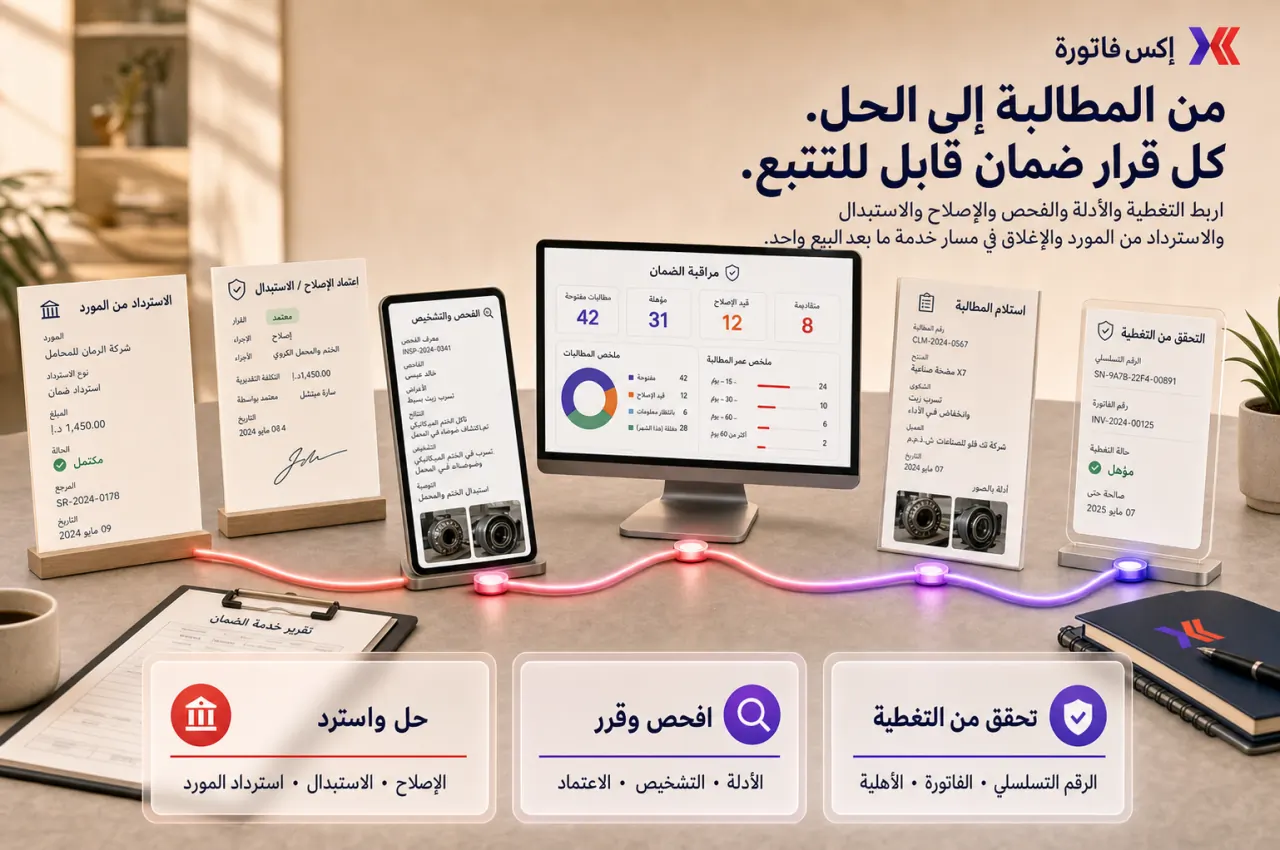
إكس فاتورة يساعد فرق الدعم وخدمة ما بعد البيع والعمليات والمخزن والمالية على إدارة تغطية الضمان، فحص الأهلية، مطالبة العميل، قرار الإصلاح أو الاستبدال، وضمان المورد من سجل واحد.
ابدأ بثلاث حالات: إصلاح مقبول، مطالبة مرفوضة، واستبدال له أثر على المخزون أو المالية.

اربط منسقي الخدمة بالفنيين في مسار واحد للمهام المسندة والفحص وتشخيص العطل وتنفيذ العمل وقطع الغيار ووقت المهمة وإثبات التنفيذ وتوقيع العميل والإغلاق وتقرير الخدمة.
متى تحتاج Warranty Management؟
هذه العلامات تكشف هل المشكلة في خدمة العميل فقط، أم في التغطية والدليل والموافقة والتكلفة.
المكالمة أو الرسالة موجودة، لكن رقم الفاتورة أو serial أو الصور أو تقرير الفحص غير مكتمل.
فحص قبل العرض: حضّر مطالبة ضمان ناقصة الدليل أو احتاجت سؤال العميل أكثر من مرة.
الخدمة تقرر، المخزن يصرف، والمالية تراجع لاحقًا بدون سجل موافقة واضح.
فحص قبل العرض: اختر حالة استبدال احتاجت موافقة مخزن أو مالية أو إدارة.
بعد حل مشكلة العميل، لا يتابع أحد استرداد التكلفة أو المطالبة من المورد أو المصنع.
فحص قبل العرض: جهّز حالة كان يمكن الرجوع فيها للمورد أو المصنع ولم تُغلق بوضوح.
كل مطالبة تُغلق منفصلة، ولا تظهر أسباب التكرار أو المنتجات الأعلى تكلفة في الضمان.
فحص قبل العرض: حضّر منتجًا أو فئة تكررت معها مطالبات أو إصلاحات.
نطاق التحكم
الهدف أن تكون كل مطالبة لها تغطية واضحة، مالك، دليل، قرار، تكلفة، وإغلاق قابل للمراجعة.
تسجيل تغطية الضمان ومدته والمنتج أو الأصل المرتبط.
ربط المطالبة بالعميل والفاتورة والرقم التسلسلي عند الحاجة.
إدارة فحص الأهلية والاستثناءات وسوء الاستخدام والمستندات الناقصة.
توثيق الفحص والإصلاح وقطع الغيار وتكلفة الخدمة.
تسجيل قرار الإصلاح أو الاستبدال أو الرفض مع السبب.
ربط الاستبدال بالمخزون والتسليم وحركة القطعة.
متابعة ضمان المورد أو المصنع دون فقدان سياق العميل.
تقارير المطالبات المفتوحة والمتأخرة والمتكررة وتكلفة الضمان.
تسلسل التطبيق
أفضل بداية هي الحالات الأعلى تكرارًا أو تكلفة ثم إضافة ضمان المورد والاستبدال المالي تدريجيًا.
حالة إصلاح مقبولة، مطالبة مرفوضة، وحالة استبدال لها أثر على المخزون أو المالية.
حدد أنواع الضمان، مدة التغطية، الاستثناءات، والبيانات المطلوبة قبل قبول المطالبة.
حدد من يفحص، ما الدليل المطلوب، وكيف يتم تسجيل سبب العطل والتوصية.
اربط القرار بالمخزون والمالية حتى لا تُصرف القطعة خارج سجل المطالبة.
تابع أسباب التكرار وتكلفة الإصلاح والاستبدال وضمان المورد أسبوعيًا.
نقاط التسليم
هذه الروابط تمنع المطالبة من التحول إلى قرار منفصل بلا دليل أو تكلفة واضحة.
الدعم ← الضمان
تتحول تذكرة العميل إلى مطالبة ضمان دون فقدان المحادثة أو سياق SLA.
الضمان ← المخزون
الاستبدال وقطع الغيار والمرتجعات تبقى مرتبطة بالمطالبة وحركة المخزون.
الضمان ← المالية
تكلفة الإصلاح والاستبدال والائتمان أو الشطب تظهر بسياق واضح للمراجعة.
الضمان ← المورد
استرداد تكلفة المورد أو مطالبة المصنع لا تضيع بعد إغلاق مشكلة العميل.
تقارير الضمان
راقب التغطية، الدليل، عمر المطالبة، التكرار، تكلفة الإصلاح، الاستبدال، وضمان المورد.
المطالبات المفتوحة والمتأخرة والمغلقة.
عمر المطالبة حسب العميل أو المنتج أو المالك.
أسباب المطالبات المتكررة.
تكلفة الإصلاح والاستبدال.
مطالبات ناقصة الدليل أو الرقم التسلسلي.
حالات ضمان المورد أو المصنع.
مطالبات لها أثر مخزون أو مالية.
حزمة مراجعة الضمان للإدارة.
لا. يمكن استخدامها أيضًا لخدمات ما بعد البيع، معدات العملاء، التركيبات، الصيانة الميدانية، وقطع الغيار.
على الأقل: العميل، المنتج أو الأصل، الرقم التسلسلي إن وجد، مرجع الفاتورة أو التسليم، وصف المشكلة، الصور أو تقرير الفحص، وقرار الإغلاق.
نعم عندما يوجد استبدال أو قطع غيار أو مرتجعات أو مخزون تالف يحتاج تاريخ حركة واضح.
يعتمد على سياسة الشركة وقيمة الحالة وأثر المخزون والمالية. غالبًا تشترك الخدمة والعمليات والمخزن والمالية في القرار.
شاركنا ثلاث حالات حديثة: إصلاح مقبول، مطالبة مرفوضة، واستبدال له أثر على المخزون أو المالية. سنقترح نطاق البداية والمالكين والتقارير المطلوبة.