Recipient records, reusable address book, contact quality, sender and receiver context, and repeated-delivery accuracy
 Module
Logistics management and delivery operations ERP software
Control recipients, pre-alerts, packages, shipments, pickups, consolidation, delivery confirmation, proof of delivery, exceptions, and logistics reporting.
Xfatora Logistics Management helps operations, warehouse, dispatch, fleet, customer service, sales, and finance teams manage shipment movement from intake to delivery confirmation with clear ownership and evidence.
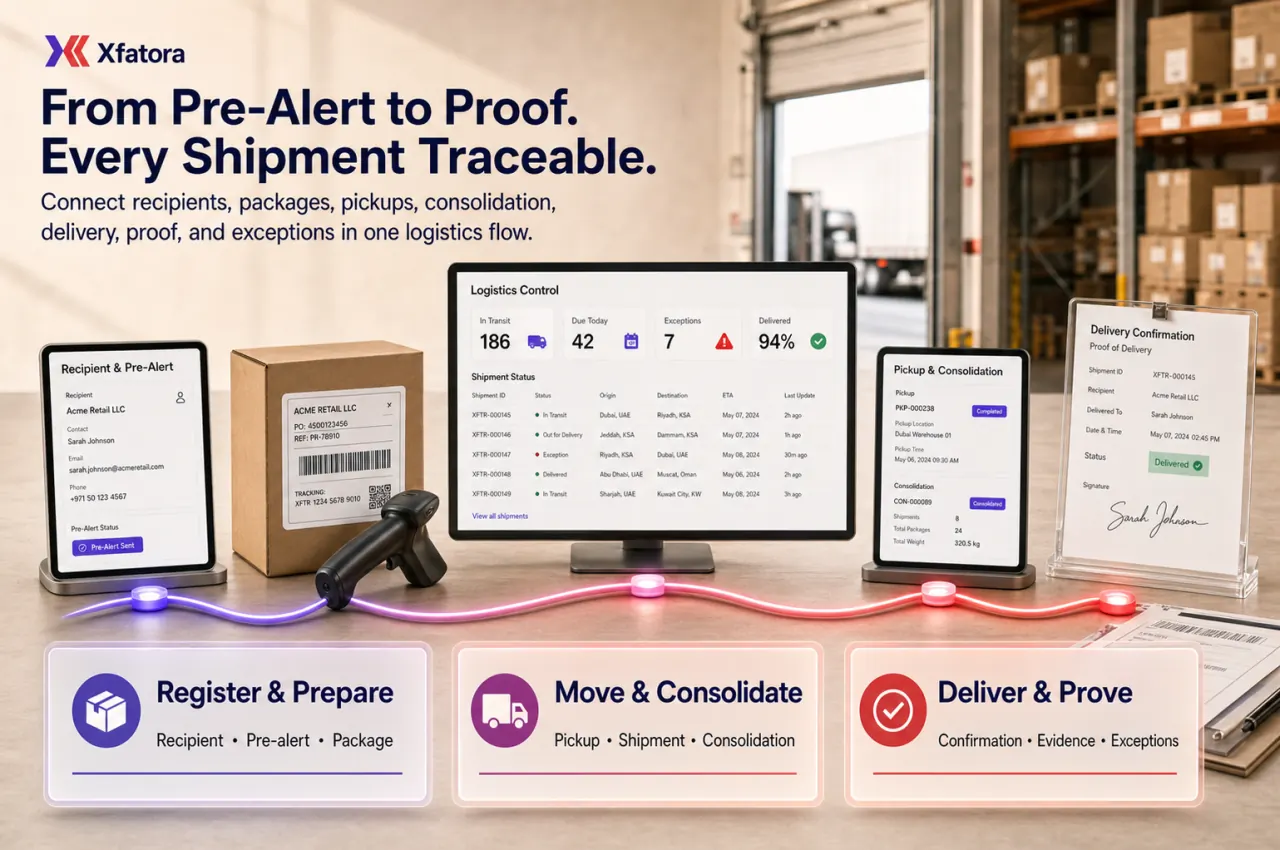
What this module helps you control
Pre-alert intake, supplier or invoice documents, early shipment intent, approval state, and conversion readiness
Package registration with package type, dimensions, weight, volumetric weight, amount, description, and handling notes
Shipment creation, shipping number governance, sender-recipient details, origin office, service path, and shipment status
Pickup workflows, pickup approvals, rejected pickups, owner assignment, collection status, and movement into shipment flow
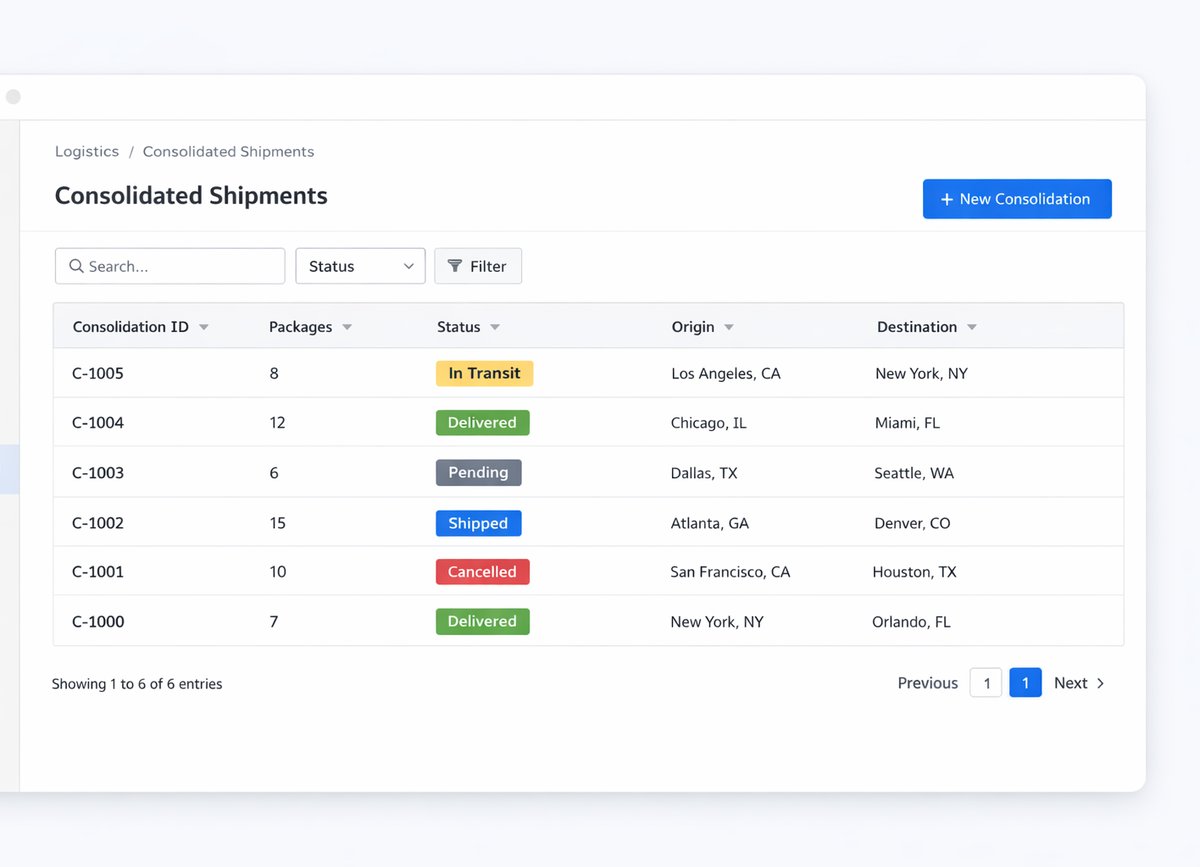
Consolidated shipments, grouped package handling, consolidation date, grouped delivery rules, and package-level traceability
Shipping company, shipping mode, shipping time, logistics service, default shipping info, rates, and service settings
Delivery confirmation, receiver details, signature, proof of delivery, delivery date, final state, and handover evidence
Tracking history, user action history, exception reasons, failed delivery, reschedule, return, rejection, and cancellation handling
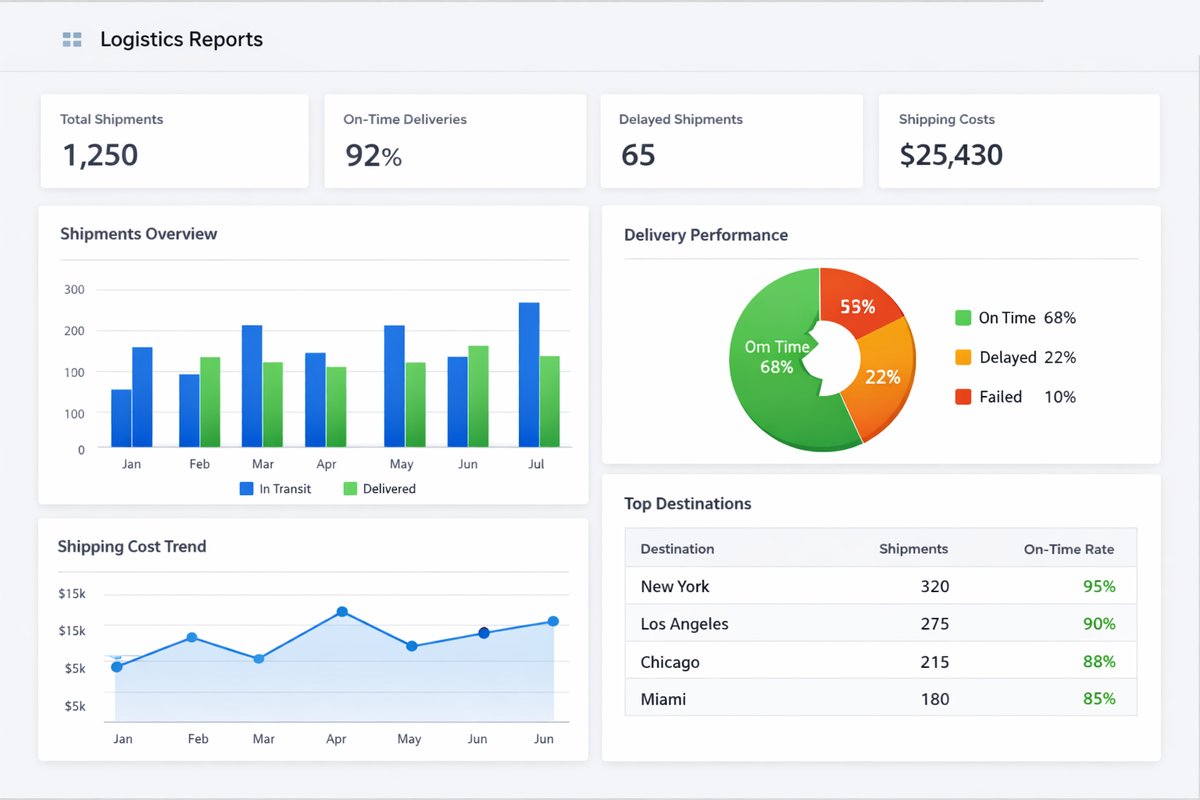
Operational reports for status distribution, backlog, throughput, monthly trends, exception closure, and customer-facing updates
Business outcomes teams expect
Reduce shipping-data errors by standardizing recipient and package intake fields before shipment creation.
Improve repeatability for Recipients and Address Book usage in day-to-day delivery operations.
Capture missing details earlier through Pre alert workflows and conversion checks.
Maintain cleaner package-to-shipment traceability across single and multi-package flows.
Coordinate Pickup and Consolidated handling without running ad hoc side processes.
Strengthen proof-of-delivery accountability with Delivery shipment, receiver details, and Signature records.
Get clearer visibility across pending, approved, delivered, rejected, pickup, consolidated, cancelled, and exception states.
Enable faster customer-service responses with Tracking history and User action history context.
Review operational performance by period using status-based Logistics reports.
Keep logistics teams aligned on one structured shipping and delivery workflow.
Screenshots
Real screens from the platform.
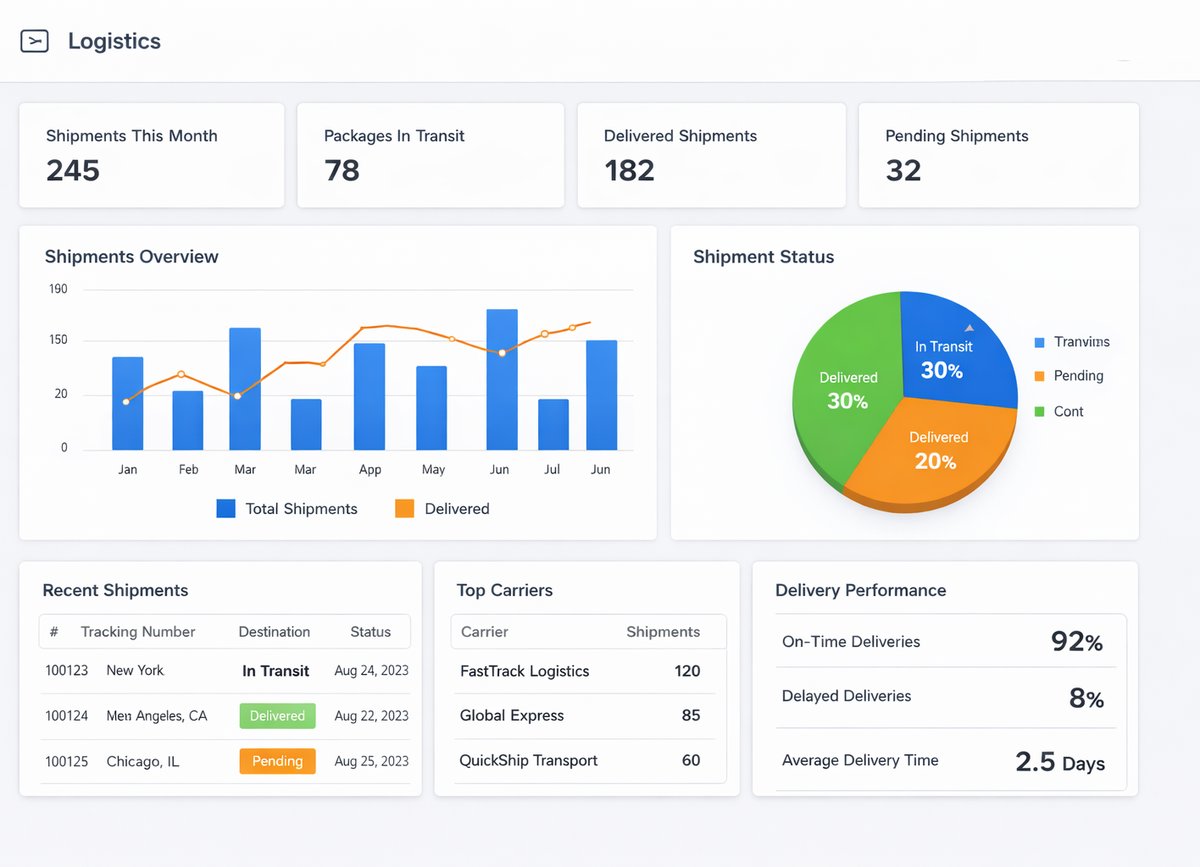
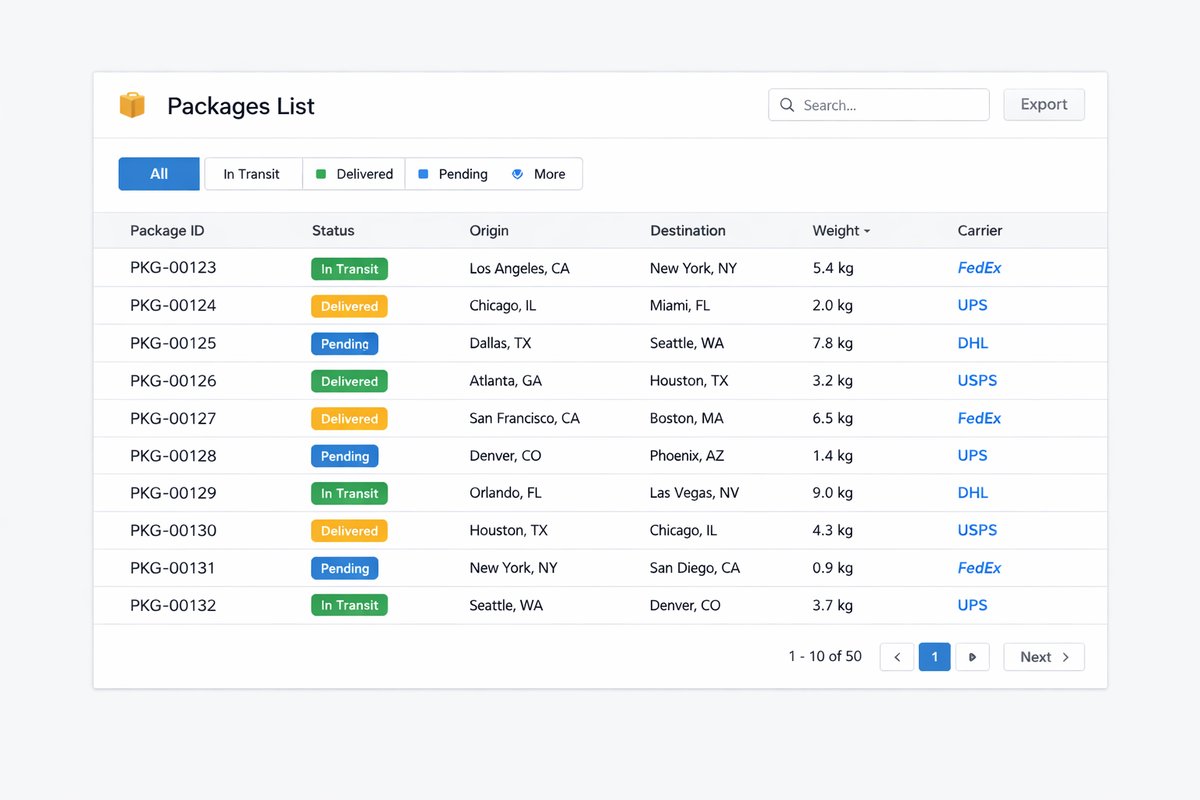
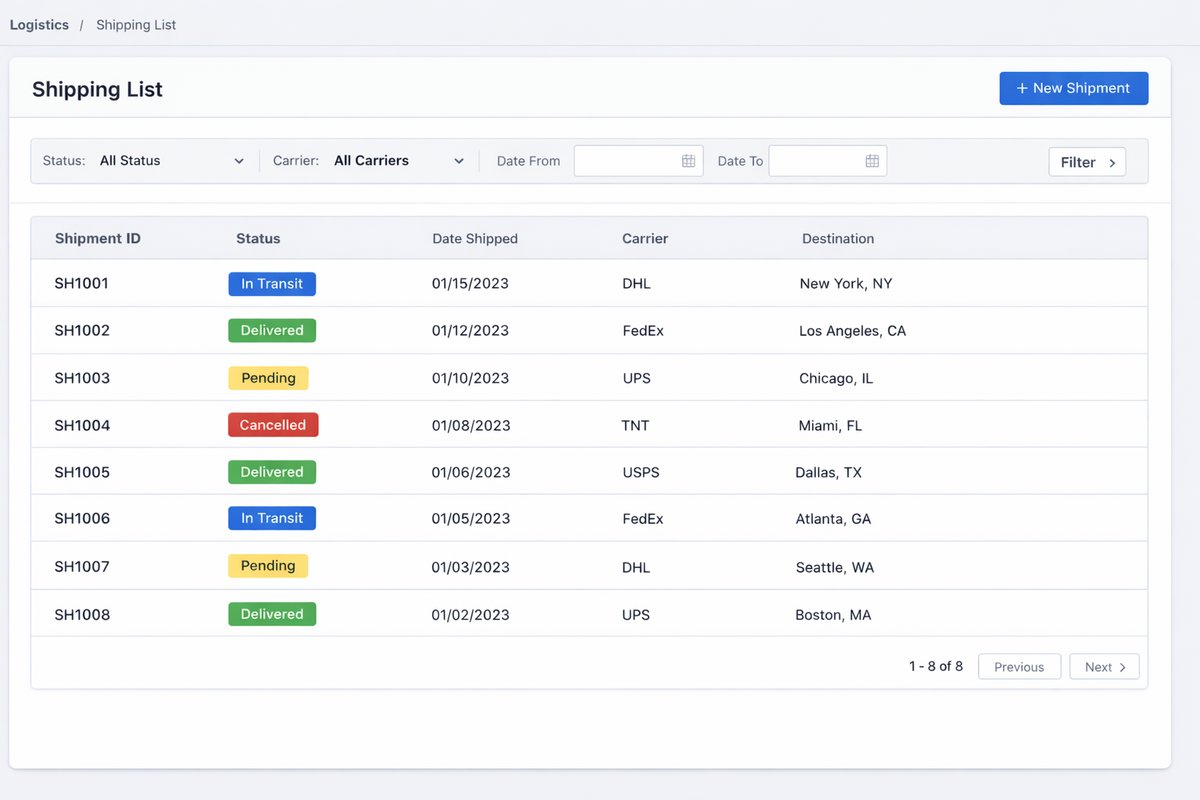
What teams use most in this module
Practical capabilities that make day-to-day execution faster, cleaner, and easier to govern.
Recipients and Address Book
Manage Recipient and Recipients data with reusable address records so repeat deliveries are faster and less error-prone.
Recipient records with core delivery profile fields
Recipient addresses and Address Book reuse for repeat deliveries
Customer-linked recipient handling where operationally used
Less free-text entry and fewer manual address errors
Consistent recipient handling across dispatchers and delivery teams
Pre-alert Intake
Capture shipping intent early through Pre alert and Pre alert list workflows, then convert validated records into packages.
Pre alert list visibility for incoming shipping intent
Pre alert creation with invoice or supplier-document attachment
Status management before conversion decisions
Convert approved pre-alerts to package records
Earlier data capture before shipment creation
Package Registration
Register packages with operational and dimensional details for accurate handling and shipment readiness.
Package registration with package type and package description
Amount and quantity-oriented handling fields where used
Weight, length, width, and height capture for execution accuracy
Volumetric weight reference for service selection
Package-level traceability from intake to delivery
Shipping Creation and Shipment Management
Create and manage Shipping records with controlled numbering, sender-recipient details, and status updates.
Create shipment with Shipping prefix and number logic
Office of origin and sender-recipient details where used
Shipment status controls and remarks through each stage
Shipment update flow for operational handoffs
Support one-to-one and multi-package shipment handling
Pickup Workflows
Run Pickup as a distinct controlled flow before final shipment progression when collection is required.
Pickup creation and ownership assignment
Pickup approval and rejection path
Distinct status handling for collection activity
Coordination checks before advancing shipment flow
Clear pickup history for audit and service review
Consolidated Shipments
Combine eligible packages into Consolidated delivery records while preserving traceability.
Create consolidation from at least two packages
Consolidated shipment details and consolidation date tracking
Grouped delivery logic for operational efficiency
Status updates at consolidation and package context levels
Audit trail for combined handling decisions
Service Modes, Shipping Companies, and Delivery Time
Define and apply service-path settings that match operational promises and route choices.
Shipping Company selection by operational path
Shipping Mode choices aligned to service commitments
Shipping Time references for expected delivery windows
Logistics Service assignment for process consistency
Structured service-path decisions instead of ad hoc selection
Tracking and Billing Information
Maintain the operational linkage between Tracking and billing information without turning logistics into a finance module.
Tracking and billing information in shipment context
Delivery prefix and tracking number governance
Invoice linkage where it exists operationally
Declared value, tax, customs, and insurance context fields where used
Payment terms visibility tied to shipment traceability
Delivery Confirmation and Proof of Handover
Confirm Delivery shipment completion with accountable handover records and proof artifacts.
Delivery date and receive by capture
Signed and not signed outcomes with Signature support
Proof-of-delivery evidence retention where required
Clear accountability for final handover actions
Operational confidence for customer communication and audit
Status Tracking and History
Use Delivery status, Tracking history, and User action history to manage execution quality and exceptions.
Pending / approved / delivered / rejected governance
Pickup / consolidated / cancelled and exception state handling
Remarks requirements for non-standard outcomes
Final-state governance controlled by authorized roles
End-to-end history across operational updates
Logistics Dashboard and Reports
Review logistics workload, status distribution, and period trends for daily and monthly decisions.
Dashboard visibility for Packages and Shipping by status
Consolidated by status and Pickup summary outputs
Monthly trends for demand and execution patterns
Backlog and throughput review for planning
Exception-focused operational follow-up
Settings, Rates, and Defaults
Configure default shipping structures and Shipping rates list controls without overshadowing the operational workflow.
Default shipping info and default service settings
Shipping rates list maintenance where applicable
Payment terms defaults for shipping context
Default Delivery status controls and governance
Tracking number pattern setup for consistency
Start with this workflow
Follow these structured steps to launch one controlled process first, then expand.
Logistics rollout readiness
1
Prepare one real shipment flow: recipient, address, package, dispatch owner, delivery status, proof of delivery, and exception case
2
Define required data: recipient, address, package dimensions, service path, shipment status, pickup owner, proof rules, and final state owner
3
Test pre-alert, package creation, shipment creation, pickup, consolidation, delivery confirmation, failed delivery, and reschedule
4
Validate handoffs to Inventory, Fleet, CRM, Accounting, Support, Procurement, and Data Exporter
5
Agree weekly metrics: delayed shipments, failed deliveries, missing recipient data, proof completion, backlog, and exception closure time
Pre-alert to package to shipment
1
Create pre-alert
2
Attach invoice or supplier document
3
Validate recipient and address
4
Convert to package
5
Create shipment
6
Move shipment through status updates
7
Confirm final delivery
Register package directly
1
Create package
2
Fill sender, recipient, and package details
3
Choose Logistics Service and Shipping Mode
4
Assign shipment path
5
Save and track status
Pickup request flow
1
Create Pickup request
2
Review and approve or reject
3
Assign handling owner if needed
4
Complete pickup
5
Move record into shipment flow
Consolidate multiple packages
1
Select eligible packages
2
Create consolidated shipment
3
Verify grouped delivery rules
4
Update status across the consolidation
5
Complete delivery with final history preserved
Delivery confirmation with evidence
1
Open shipment or delivery record
2
Mark delivered
3
Record receiver details
4
Add signature or proof where required
5
Verify Tracking history and final state
Exception handling and reschedule
1
Mark exception status
2
Add remarks and evidence
3
Choose next action: reschedule, return, reject, or escalate
4
Update final outcome
5
Keep traceability for audit and customer communication
Who this module is for
Logistics Admin
Dispatchers and Coordinators
Warehouse or package-processing staff
Delivery staff and drivers
Customer-service teams reviewing shipment status
Operations managers monitoring throughput
Common problems this module helps solve
Shipment requests arrive with missing recipient, address, package, document, or service-path data
Recipients and addresses are re-entered repeatedly and create delivery errors
Teams cannot tell whether a package is still pending, picked up, consolidated, shipped, delivered, rejected, or delayed
Pickup requests happen outside the logistics workflow and lose approval or rejection history
Consolidated deliveries are handled manually and package-level traceability is lost
Customer service cannot answer shipment questions because tracking history lives in chat or spreadsheets
Proof of delivery, receiver name, signature, or handover evidence is missing when finance or the customer asks
Delivery exceptions are closed without clear reason, owner, next action, or final outcome
Fleet, warehouse, sales, support, and finance see different shipment status or evidence
Where teams apply this module
Package and shipment management for delivery, distribution, e-commerce, service logistics, branch movement, and internal transfers
Recipient and address book governance for repeated deliveries and customer-facing shipment preparation
Pre-alert to package to shipment workflows for operations that need early intake before final shipment creation
Pickup request and pickup approval workflows before shipment progression
Consolidated delivery workflows where multiple packages move together while preserving traceability
Delivery confirmation with receiver details, signature, proof of delivery, and final status governance
Customer service shipment visibility using tracking history and user action history
Operations reporting for delayed shipments, failed deliveries, missing data, backlog, throughput, and exception closure
Connected records across modules

Inventory and Warehouse: stock readiness, picking, packing, transfer, and dispatch context can feed logistics execution.
Fleet Management: vehicle availability, driver assignment, and fleet readiness can support delivery planning when transport resources are managed internally.

CRM and Sales: customer, sender, receiver, order, and account context can support shipment preparation and customer follow-up.

Accounting: delivery confirmation, shipment references, billing context, and proof of delivery can support invoice readiness and dispute review.
Support Desk: support teams can use shipment status, tracking history, and proof of delivery to answer customer questions.

Procurement: supplier documents, inbound movement, and purchase-related shipping references can support receiving and tracking.

Data Exporter: package, shipment, pickup, delivery proof, exception, and throughput datasets can be exported for operations review.
Built-in Reports & Analytics
Packages by status, package type, date, owner, recipient, and service path
Shipping by status, shipment number, sender, recipient, origin, destination, and period
Pre-alert list, approved pre-alerts, converted records, pending data, and missing documents
Pickup summary by approval state, owner, pickup date, rejection reason, and completion status
Consolidated shipments by grouped packages, consolidation date, status, and delivery outcome
Delivery confirmation evidence, receiver details, signature state, and missing proof review
Tracking history and user action history for customer communication and audit review
Failed delivery, rejected shipment, rescheduled movement, return, cancellation, and unresolved exception review
Monthly volume, throughput, backlog, status distribution, and bottleneck trends
Logistics management review pack for operations, warehouse, dispatch, fleet, customer service, finance, and leadership
Compliance & Implementation Resources
Practical guides to help you rollout and validate workflows.
Logistics Management Implementation Checklist
Prepare package workflows, shipment statuses, recipient data, delivery evidence, exception handling, and reporting ownership.
Read guideLogistics User Guide
Operational setup, workflow controls, role governance, reporting, and troubleshooting for Logistics.
Read guideFAQ
Can we manage both packages and shipments in one module?
Yes. Logistics supports package registration and shipment creation in one operational flow with shared status governance and history.
Can we keep reusable recipient and address records?
Yes. Recipient records and the Address Book improve repeatability and reduce manual re-entry for recurring deliveries.
Can we capture pre-alerts before package registration?
Yes. Pre alert workflows let teams capture intent early, attach documents, and convert to package records when ready.
Can we handle pickups separately from standard shipments?
Yes. Pickup can run as its own controlled workflow with approval and rejection before shipment progression.
Can we consolidate multiple packages into one delivery flow?
Yes. Consolidated workflows group eligible packages into one managed delivery path with preserved audit history.
Can we keep proof of delivery and signatures?
Yes. Delivery shipment records can include delivery date, receiver details, Signature status, and handover evidence where required.
Can customer service review shipment history?
Yes. Tracking history and User action history help support teams answer shipment questions with context.
How is this different from Inventory?
Inventory focuses on stock control and valuation, while Logistics focuses on recipient handling, shipping execution, delivery status, and proof of handover.
How is this different from Fleet Operations?
Fleet Operations manages vehicles, drivers, and maintenance, while Logistics governs shipment intake, package flow, status tracking, and delivery confirmation.
Who should control final delivery status changes?
Assign final delivered and exception status permissions to trusted operational roles to preserve accountability and audit quality.
Is Logistics Management only for delivery companies?
No. It is useful for any business that manages shipments, packages, recipients, warehouse dispatch, internal transfers, branch movement, equipment movement, or delivery confirmation.
How is Logistics different from Fleet Management?
Fleet Management controls vehicles, drivers, maintenance, fuel, and readiness. Logistics controls shipment intake, package flow, recipient handling, delivery status, proof of delivery, and exceptions.
How is Logistics different from Inventory?
Inventory controls stock quantities and movements. Logistics controls delivery execution, shipment status, recipients, packages, pickup, consolidation, and proof of handover.
What should we prepare before a Logistics demo?
Prepare one real shipment flow: package creation, recipient data, dispatch ownership, delivery status, proof of delivery, and one failed or delayed delivery case.
What should managers review first?
Start with delayed shipments, failed deliveries, missing recipient data, proof-of-delivery completion, unresolved exceptions, and exception closure time.
Plans that include this module
Confirm commercial fit before rollout planning.
Business Plan
Enterprise Plan
Ready to evaluate Logistics management and delivery operations ERP software with your team?
We will map this module to your current process, owners, controls, and rollout timeline.
User guide
How to use Logistics management and delivery operations ERP software
Setup checklist, key workflows, reports, and troubleshooting.
Talk to our solution team
Tell us what you need and we will reply with a rollout plan and recommended modules.
Fields marked with * are required.
Related content
Related Modules
Often fits plan: Enterprise
AI Sales Assistant
Use AI-assisted calling and qualification workflows to improve first-contact consistency, lead follow-up, call summaries, and CRM handoff discipline.
Often fits plan: Enterprise
Asset Management
Control asset records, custody, locations, maintenance, audits, depreciation, and lifecycle accountability from one controlled workspace.
Often fits plan: Enterprise
Asset Management
Manage company assets, custody, locations, maintenance, audits, depreciation, and lifecycle accountability from one controlled workspace.
Related Use Cases
Accelerate Order to Cash
Connect sales, fulfillment, invoicing, and collections to reduce revenue leakage and improve cash conversion.
order-to-cash
revenue-operations
cash-flow
Control Production Costs
Tie material usage, labor capture, and overhead allocation to each production order for reliable margins.
manufacturing-management
costing
inventory-warehousing
Related Industries
ERP for Manufacturing Operations
Manufacturing ERP for production planning, MRP, inventory, quality, costing, and shop-floor control across growing factories.
manufacturing
mrp
production
ERP for Clinics and Outpatient Networks
Sector playbook covering pain points, workflows, module fit, and buying checklist for erp for clinics and outpatient networks.
industry
operations
erp
Related Guides
Build ZATCA audit trail controls for SMB finance teams
Practical guide for build zatca audit trail controls for smb finance teams with execution steps and buying support links.
zatca
saudi
compliance
ERP Implementation Playbook
A practical, phased guide to planning, launching, and scaling ERP adoption across teams with measurable outcomes.
implementation
operations
change-management