 وحدة الاستبيانات والتغذية الراجعة
آراء العملاء موجودة لكن بلا إجراء
يتم جمع الردود ثم لا يعرف الفريق من يراجع النتائج أو من يملك التحسين.
فحص قبل العرض: حضّر استبيانًا أو نموذج feedback لم ينتج عنه إجراء واضح.
وحدة الاستبيانات والتغذية الراجعة
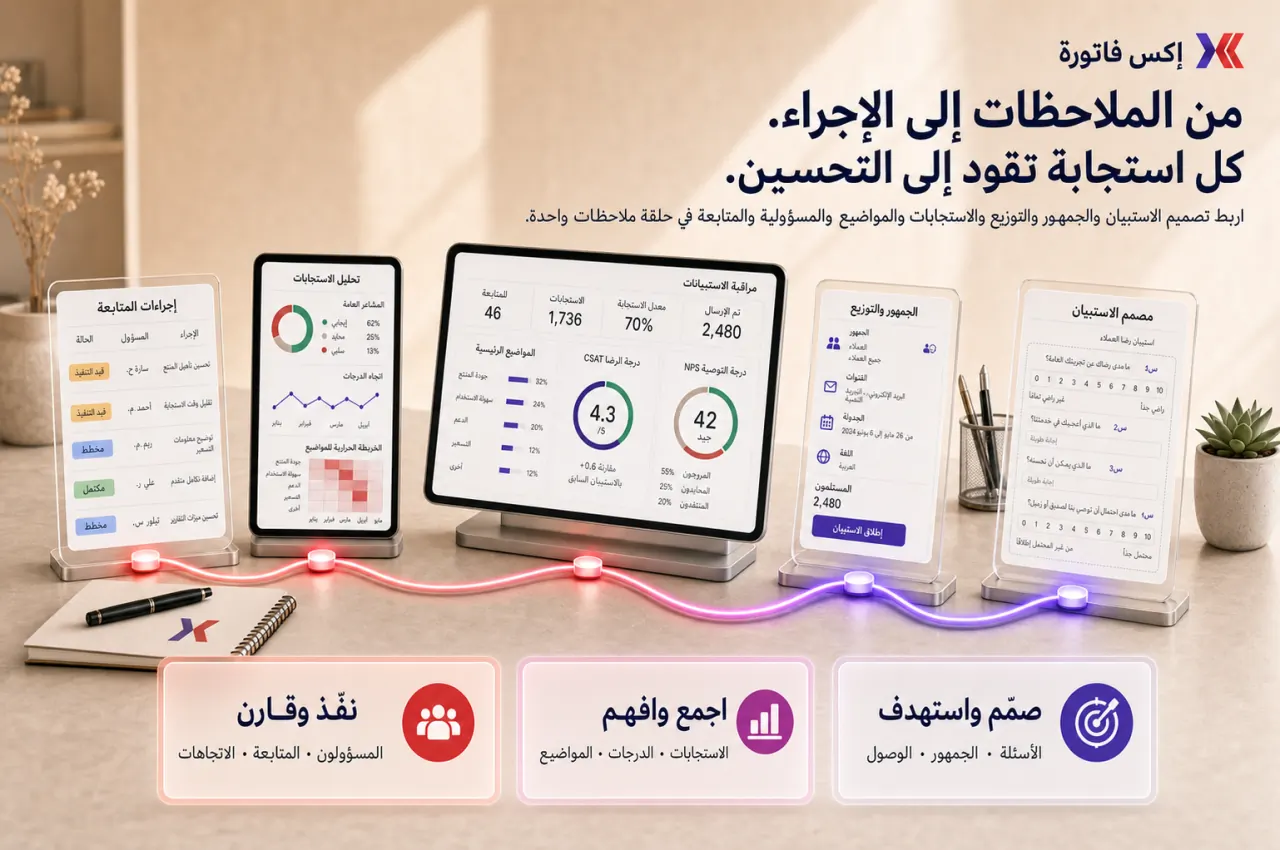
إكس فاتورة يساعدك على إنشاء استبيانات متكررة، قياس رضا العملاء، متابعة الردود، تحليل التعليقات، وتعيين مالك لإجراءات التحسين بعد كل دورة.
ابدأ بنموذج feedback حالي ورد سلبي وتقرير تريد أن تراه الإدارة.
متى تحتاج Surveys؟
هذه العلامات تكشف هل المشكلة في الهدف أو الجمهور أو التوقيت أو متابعة التحسين.
يتم جمع الردود ثم لا يعرف الفريق من يراجع النتائج أو من يملك التحسين.
فحص قبل العرض: حضّر استبيانًا أو نموذج feedback لم ينتج عنه إجراء واضح.
يتم إرسال استبيان مرة واحدة ولا توجد مقارنة شهرية أو ربع سنوية لمعرفة هل التحسن حدث فعلاً.
فحص قبل العرض: اختر مؤشر رضا لا يمكن مقارنته بدورة سابقة.
التقرير يعرض متوسطًا جيدًا، لكن الشكاوى المتكررة في التعليقات لا تتحول إلى متابعة.
فحص قبل العرض: جهّز ردًا سلبيًا مهمًا لم يتم التعامل معه.
الدعم والمبيعات وHR والمشاريع يستخدمون أدوات أو جداول مختلفة، فتضيع الرؤية الموحدة.
فحص قبل العرض: حضّر مثالين من فرق مختلفة يجمعان feedback بطرق منفصلة.
نطاق التحكم
الهدف أن يكون لكل استبيان هدف وجمهور وتوقيت ونتيجة ومالك تحسين.
إنشاء استبيانات وقوالب متكررة.
أسئلة إلزامية وتقييمات وتعليقات نصية.
استبيانات العملاء والموظفين والتدريب وما بعد الخدمة.
قياس رضا العملاء وNPS وCSAT عند الحاجة.
نشر الاستبيان ومشاركة الرابط وتحديد الجمهور.
متابعة عدد المشاركين ومعدل الاستجابة والنتائج.
تحليل التعليقات السلبية والموضوعات المتكررة.
تعيين مالك لإجراءات التحسين بعد كل دورة.
تسلسل التطبيق
ابدأ بهدف واحد قابل للقياس، ثم اربط النتائج بمالكي التحسين قبل زيادة عدد الاستبيانات.
اختر رضا الخدمة، تقييم ما بعد البيع، pulse داخلي، تدريب، أو مراجعة مشروع.
حدد من سيجيب ومتى يتم إرسال الاستبيان وهل الرد مجهول أم مرتبط بسجل.
لا تسأل بدافع الفضول فقط. كل سؤال يجب أن يساعد في قرار أو تحسين.
اجمع المؤشرات مثل CSAT أو معدل الاستجابة مع التعليقات النصية والأسباب المتكررة.
عيّن مالكًا لكل إجراء، ثم قارن الدورة التالية بالدورة السابقة.
نقاط التسليم
بهذا لا يبقى feedback رقمًا في تقرير، بل يصبح مسار تحسين مرتبطًا بسجل وتشغيل.
الاستبيانات ← CRM
ردود العملاء تساعد مسؤولي الحسابات على فهم المخاطر والفرص والمتابعة.
الاستبيانات ← الدعم
تقييم ما بعد التذكرة يكشف جودة الخدمة والأسباب المتكررة للشكاوى.
الاستبيانات ← قاعدة المعرفة
الأسئلة المتكررة أو التعليقات السلبية تكشف المقالات أو الإجابات التي تحتاج تحسينًا.
الاستبيانات ← المشاريع
استبيان ما بعد التسليم يساعد في مراجعة جودة التنفيذ وقبول العميل.
تقارير الاستبيانات
راجع النتائج كمؤشرات وتعليقات وإجراءات مفتوحة، لا كمتوسطات فقط.
معدل الاستجابة وعدد المشاركين.
رضا العملاء أو CSAT أو NPS حسب دورة القياس.
التعليقات السلبية والأسباب المتكررة.
نتائج الاستبيان حسب الجمهور أو الحملة.
اتجاهات الرضا عبر الشهور أو الأرباع.
إجراءات التحسين المفتوحة والمغلقة.
تقارير تجربة العميل للإدارة.
حزم تصدير الردود للتحليل.
نعم. يمكن استخدامها لرضا العملاء، تقييم الخدمة، التدريب، onboarding، pulse داخلي، ومراجعات المشاريع.
نعم، إذا كان أسلوب عملك يستخدم NPS أو CSAT يمكن بناء أسئلة ودورات قياس مناسبة ومراجعتها بانتظام.
يعتمد على الهدف. استبيانات الموظفين قد تحتاج إخفاء الهوية، بينما تقييم خدمة العملاء غالبًا يحتاج ردًا مرتبطًا بسجل للمتابعة.
جهّز نموذج feedback حالي، ردًا سلبيًا، جمهورًا مستهدفًا، تقريرًا مطلوبًا، وإجراء تحسين تريد تتبعه.
شاركنا نموذج feedback حالي، ردًا سلبيًا، جمهورًا مستهدفًا، وتقريرًا مطلوبًا. سنقترح هيكل الأسئلة ودورة المراجعة ومالكي التحسين.