 وحدة تصدير البيانات وCSV
كل فريق يبني ملفه بطريقته
نفس السؤال الإداري ينتج عنه أكثر من ملف CSV بأعمدة وفترات وتعريفات مختلفة.
فحص قبل العرض: حضّر ملفين من إدارتين يجيبان عن نفس السؤال بأرقام مختلفة.
وحدة تصدير البيانات وCSV
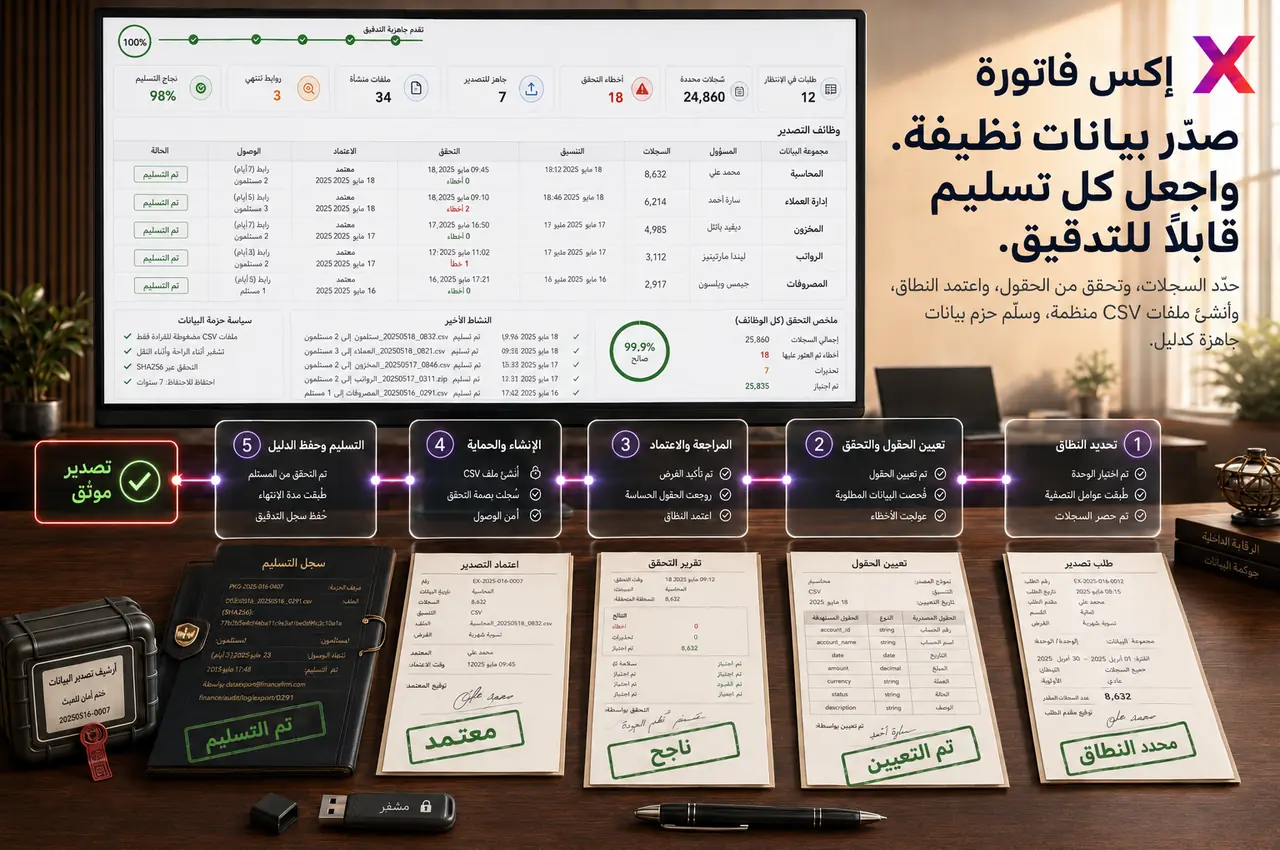
إكس فاتورة يساعد الإدارة والمالية والعمليات وBI على تصدير بيانات منظمة من الوحدات، مع ضوابط للمالك والفترة والتخزين والمشاركة والمراجعة.
ابدأ بحزمة تصدير واحدة متكررة، ثم وسّع الحوكمة حسب احتياج المالية والتدقيق والعمليات.
متى تحتاج Data Exporter؟
هذه العلامات تساعدك على تحديد هل التصدير المنظم هو الخطوة التالية لدعم التقارير والتدقيق وBI.
نفس السؤال الإداري ينتج عنه أكثر من ملف CSV بأعمدة وفترات وتعريفات مختلفة.
فحص قبل العرض: حضّر ملفين من إدارتين يجيبان عن نفس السؤال بأرقام مختلفة.
عند طلب المراجعة يبدأ الفريق في جمع الفواتير والحركات والعقود والملفات من أكثر من مكان.
فحص قبل العرض: اختر طلب تدقيق سابق احتاج تجميعًا يدويًا.
ملفات العملاء أو الموردين أو الرواتب أو المالية تُرسل بلا ضوابط واضحة للتخزين والمشاركة والاحتفاظ.
فحص قبل العرض: راجع من يستطيع تصدير بيانات حساسة وأين تُحفظ الملفات.
مشروعات التنظيف أو BI تبدأ من نسخ غير موثوقة، فتزيد إعادة العمل ومقارنات الأرقام.
فحص قبل العرض: جهّز مثال export مستخدم في BI أو migration وسبب عدم الثقة فيه.
نطاق التحكم
الهدف ليس زيادة التنزيلات، بل جعل استخراج البيانات متكررًا وآمنًا وقابلًا للمراجعة.
اختيار نوع التصدير حسب الغرض والمالك والجمهور.
فترات جاهزة وتواريخ مخصصة From / To.
تصدير CSV من وحدات متعددة بنفس منطق الحوكمة.
حزم مالية للتسوية والإقفال الشهري.
حزم تدقيق ومراجعة داخلية وخارجية.
حزم هجرة وتنظيف بيانات وتحليل BI.
صلاحيات تصدير وتخزين ومشاركة واحتفاظ.
مطابقة ملفات التصدير مع تقارير النظام والسجلات الأصلية.
تسلسل التطبيق
أفضل بداية هي حزمة حقيقية تُستخدم شهريًا أو في التدقيق وتسبب اختلافًا أو عملًا يدويًا.
اختر حزمة مالية، حزمة تشغيلية، وحزمة بيانات حساسة بدل فتح كل أنواع التصدير.
حدد من يطلب، من يصدّر، من يراجع، ومن يعتمد مشاركة الملف.
اتفق على الفترة، اسم الملف، مكان التخزين، ومدة الاحتفاظ قبل الاستخدام المتكرر.
قارن عينة CSV مع تقرير النظام والسجل الأصلي قبل اعتمادها.
راجع من يصدّر ماذا ولماذا، وهل أصبحت الملفات نسخة بديلة عن النظام أم لا.
نقاط التسليم
هذه نقاط الربط التي تمنع ملفات CSV من التحول إلى نسخ متضاربة خارج النظام.
التصدير ← المالية
الفواتير والمدفوعات والمصروفات وفواتير الموردين تدعم الإقفال والتسوية.
التصدير ← التدقيق
حزم الأدلة تساعد على مراجعة النطاق والفترة والبيانات بدون جمع يدوي.
التصدير ← BI
ملفات CSV المنظمة تغذي التحليل ولوحات الإدارة بدون إعادة بناء الأعمدة كل مرة.
التصدير ← الهجرة
تساعد الصادرات على بناء خط أساس واكتشاف التكرارات والتحقق بعد التنظيف.
حزم التصدير
النجاح هو أن يعرف كل فريق أي ملف يستخدم، لأي فترة، ومن اعتمده، وأين يتم حفظه.
حزمة الإقفال المالي الشهرية.
حزمة تدقيق حسب الفترة والنطاق.
حزمة تسوية بين CSV وتقرير النظام.
حزمة مخزون وحركات ومستودعات.
حزمة مشتريات وموردين ومدفوعات.
حزمة HR ورواتب وملفات حساسة.
حزمة CRM وفواتير وتحصيل.
حزمة BI أو هجرة وتنظيف بيانات.
لا. التقارير واللوحات للمتابعة داخل النظام، أما التصدير فهو لاستخراج CSV منظم للتدقيق والتسوية والهجرة والتحليل.
الأفضل أن تبقى الصلاحية لدى الإدارة أو مالك بيانات محدد لأن الملفات قد تحتوي بيانات مالية أو عملاء أو موظفين حساسة.
ثبّت تعريف الحقول والفترة والمالك وراجع عينة CSV مع تقرير النظام قبل اعتمادها كحزمة متكررة.
جهّز ملف تصدير شهري، طلب تدقيق، ملف بيانات حساس، ملف BI، ومثال اختلاف بين CSV وتقرير داخل النظام.
شاركنا حزمة تصدير شهرية، طلب تدقيق، ملف بيانات حساس، استخدام BI، ومثال اختلاف بين CSV وتقرير النظام. سنقترح نطاق البداية والباقات المناسبة.
