 وحدة الرواتب ومسير الأجور
الرواتب تبدأ قبل جاهزية المدخلات
الحضور والإجازات والعمل الإضافي والتعديلات تصل متأخرة، فتزيد إعادة التشغيل والتصحيحات.
فحص قبل العرض: حضّر دورة رواتب حدثت فيها تعديلات بعد الإقفال.
وحدة الرواتب ومسير الأجور
إكس فاتورة يساعد فرق الموارد البشرية والرواتب والمالية على تشغيل دورة رواتب شهرية أكثر انضباطًا، من جاهزية الموظف إلى كشف الراتب وحزمة المراجعة المالية.
ابدأ بدورة رواتب واحدة، ثم وسّع القواعد عندما تصبح بيانات الموظفين والحضور والمكونات مستقرة.
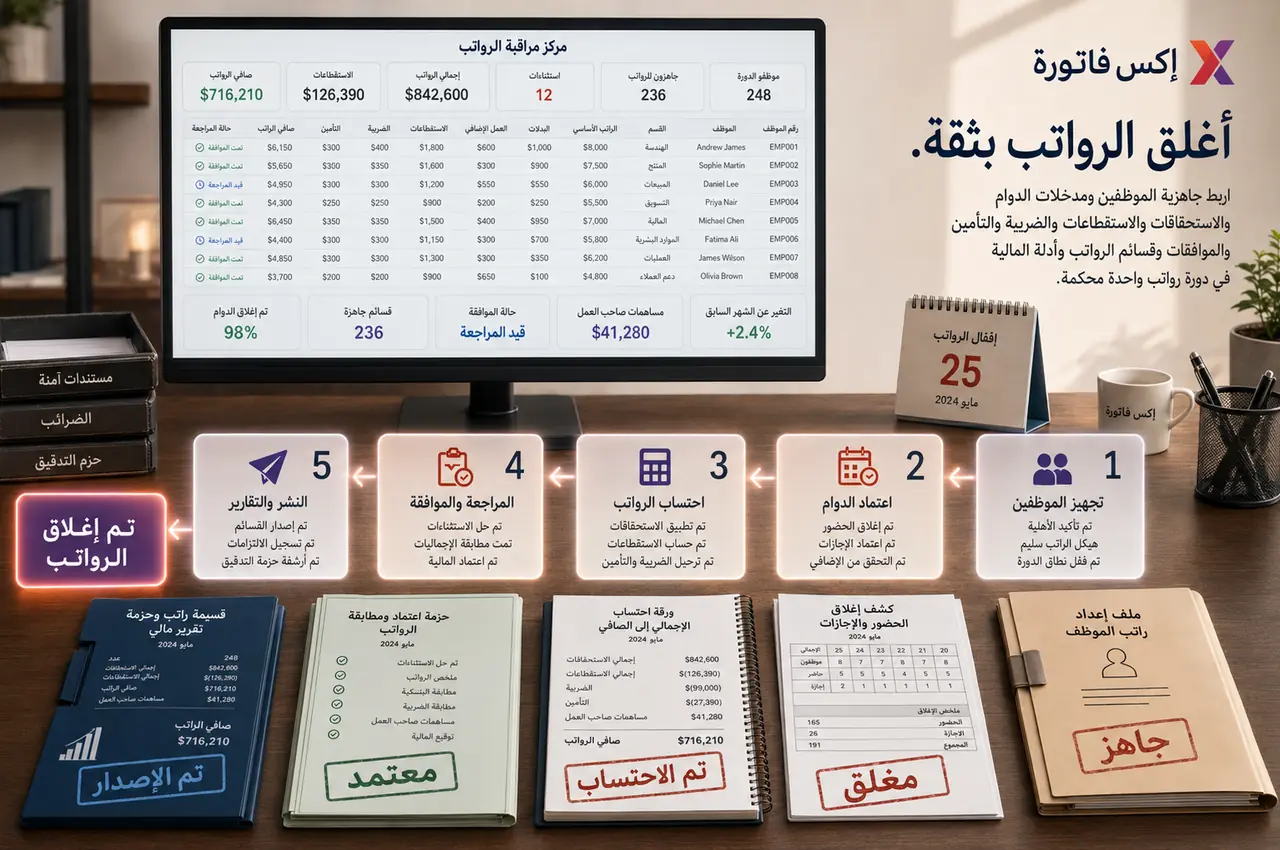

قرّب الحضور والإجازات والجداول وسجلات الموظفين والوصول المصرح به للرواتب والأعباء والأهداف من كل دور.
متى تبدأ بالرواتب؟
هذه العلامات تساعدك على تحديد هل الرواتب هي نقطة البداية التالية بعد الحضور وسجلات الموظفين.
الحضور والإجازات والعمل الإضافي والتعديلات تصل متأخرة، فتزيد إعادة التشغيل والتصحيحات.
فحص قبل العرض: حضّر دورة رواتب حدثت فيها تعديلات بعد الإقفال.
الراتب والبدلات والاستقطاعات والضرائب والتأمينات يتم احتسابها أو مراجعتها في ملفات منفصلة.
فحص قبل العرض: راجع موظفًا لديه أكثر من بدل أو استقطاع أو تعديل.
الموظف أو المالية لا يرى بسهولة من أين جاءت القيم: إجمالي، استقطاعات، تأمين، ضريبة، وصافي.
فحص قبل العرض: اختر كشف راتب احتاج شرحًا أو تصحيحًا.
إجماليات الرواتب لا تكفي وحدها؛ المالية تحتاج ملخصًا ومراجعة واستثناءات وأدلة قبل الترحيل.
فحص قبل العرض: جهّز تقرير رواتب أو مراجعة مالية لدورة سابقة.
نطاق التحكم
الهدف هو تقليل إعادة التشغيل والتصحيحات وجعل كشف الراتب والتقارير قابلة للمراجعة.
جاهزية الموظف للرواتب والراتب الأساسي ومكونات الأجر.
البدلات والمكافآت والعمولات والتعديلات لمرة واحدة.
الاستقطاعات وقواعدها ونسبها وظهورها في كشف الراتب.
الضرائب والشرائح والإعفاءات وأثرها قبل الإقفال.
التأمينات ومساهمات الشركة والتكلفة الإجمالية.
مدخلات الحضور والإجازات والعمل الإضافي قبل التشغيل.
دورة رواتب شهرية بإقفال ومراجعة واعتماد واضح.
كشوف رواتب وقوالب وتقارير جاهزة للمراجعة.
تسلسل التطبيق
أفضل بداية هي دورة واحدة فيها حضور وإجازات وبدلات واستقطاعات وتصحيح متأخر.
حدد فترة الرواتب وموعد الإقفال ومن يملك كل مدخل قبل التشغيل.
رتّب الرواتب والبدلات والاستقطاعات والضرائب والتأمينات قبل أول دورة.
لا تبدأ التشغيل قبل إقفال الحضور والإجازات والعمل الإضافي.
استخدم دورة فيها تعديل أو استثناء أو تصحيح متأخر لاختبار الحوكمة.
راجع الإجماليات والاستثناءات والتأمينات والتقارير قبل إصدار كشوف الرواتب.
نقاط التسليم
هذه نقاط الربط التي تمنع الرواتب من الاعتماد على ملفات منفصلة أو تصحيحات متأخرة.
سجلات الموظفين ← الرواتب
بيانات الموظف والعقد والراتب والقسم يجب أن تكون جاهزة قبل التشغيل.
الحضور ← الرواتب
الحضور والإجازات والعمل الإضافي يجب أن تصل بعد الإقفال والمراجعة.
الرواتب ← المالية
الإجماليات والتأمينات والاستثناءات تساعد المالية على الاعتماد بثقة.
الرواتب ← الموظف
كشف الراتب يجب أن يوضح المكونات والاستقطاعات والصافي بدون غموض.
تقارير الرواتب
النجاح هو أن ترى الإدارة والمالية مكونات الرواتب والاستثناءات والإجماليات قبل إصدار الكشوف.
ملخص دورة الرواتب حسب الفترة.
إجمالي الراتب والاستقطاعات وصافي الراتب.
الرواتب حسب القسم أو الموظف.
تقرير البدلات والمكافآت والعمولات.
تقرير التأمينات ومساهمات الشركة.
تقرير الضرائب أو الشرائح عند الاستخدام.
استثناءات الحضور والإجازات قبل الرواتب.
حزمة مراجعة واعتماد للمالية.
يجب أن تعتمد الرواتب على حضور وإجازات وعمل إضافي مغلق ومراجع قبل بدء دورة الرواتب.
نعم. يمكن ضبط الراتب والبدلات والاستقطاعات والضرائب والتأمينات والتعديلات قبل إصدار كشف الراتب.
نعم. يمكن مراجعة إجماليات الرواتب والتأمينات والاستقطاعات والتقارير وحزمة الأدلة قبل الاعتماد النهائي.
جهّز دورة رواتب حقيقية، موظفين، رواتب، بدلات، استقطاعات، حضور وإجازات، تأمينات، ضرائب إن وجدت، ومثال تصحيح متأخر.
شاركنا دورة رواتب حقيقية، الموظفين، مكونات الراتب، الحضور والإجازات، التأمينات، الضرائب إن وجدت، وحالة تصحيح متأخر. سنقترح نطاق البداية والباقات المناسبة.