 وحدة إدارة اللوجستيات والشحن والتسليم
الشحنة تبدأ ببيانات ناقصة
اسم المستلم أو العنوان أو بيانات الطرد أو المستندات تأتي من محادثات متفرقة، فتبدأ الأخطاء قبل الشحن.
فحص قبل العرض: حضّر شحنة تأخرت بسبب نقص بيانات المستلم أو الطرد أو المستندات.
وحدة إدارة اللوجستيات والشحن والتسليم
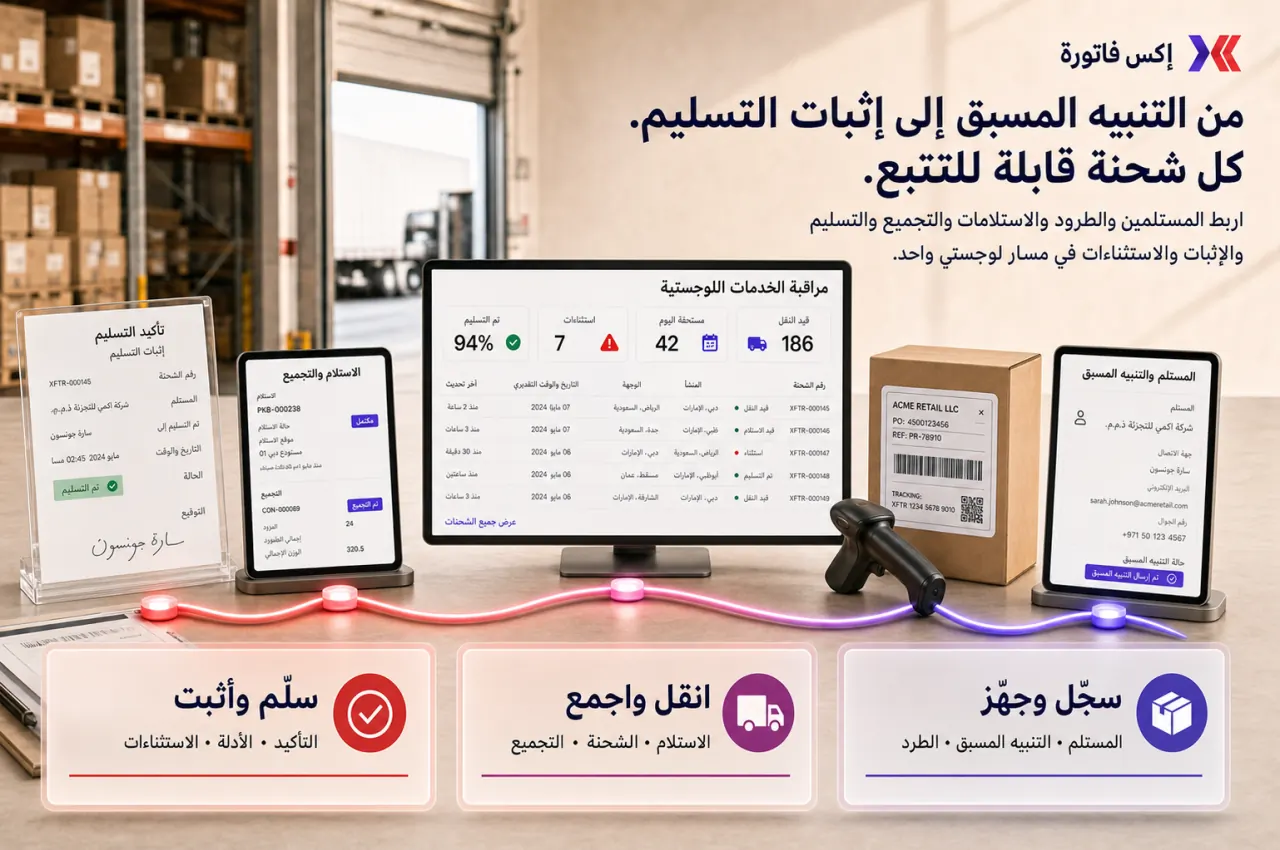
إكس فاتورة يساعد فرق العمليات والمستودعات والتوزيع وخدمة العملاء والمالية على متابعة الشحنة من البيانات الأولى حتى التسليم أو الاستثناء، مع سجل واضح للحالة والدليل والمالك.
ابدأ بشحنة حقيقية: مستلم، عنوان، طرد، حالة، تسليم، دليل، واستثناء إن وجد.
متى تحتاج Logistics Management؟
هذه العلامات تكشف هل المشكلة في بيانات المستلم، أو حالة الشحنة، أو إثبات التسليم، أو إدارة الاستثناءات.
اسم المستلم أو العنوان أو بيانات الطرد أو المستندات تأتي من محادثات متفرقة، فتبدأ الأخطاء قبل الشحن.
فحص قبل العرض: حضّر شحنة تأخرت بسبب نقص بيانات المستلم أو الطرد أو المستندات.
كل فريق يعرف حالة مختلفة: تجهيز، استلام، شحن، تسليم، فشل، أو استثناء بدون سجل واحد.
فحص قبل العرض: اختر شحنة احتاجت سؤال أكثر من شخص لمعرفة حالتها الحقيقية.
عند سؤال العميل أو المالية عن التسليم، لا تظهر بيانات المستلم أو التوقيع أو دليل التسليم بسرعة.
فحص قبل العرض: جهّز حالة تسليم احتاجت إثباتًا أو توقيعًا أو ملاحظات استلام.
الشحنة تفشل أو تتأخر أو تُعاد، لكن سبب الفشل والمالك والخطوة التالية غير موثقين.
فحص قبل العرض: حضّر حالة فشل تسليم أو إعادة أو تأجيل لم تُغلق بوضوح.
نطاق التحكم
الهدف أن تكون كل حركة لها مستلم واضح، طرد واضح، حالة واضحة، مالك، ودليل تسليم أو سبب استثناء.
سجلات المستلمين ودفتر العناوين لتقليل أخطاء التكرار.
التنبيهات المسبقة قبل تحويلها إلى طرد أو شحنة.
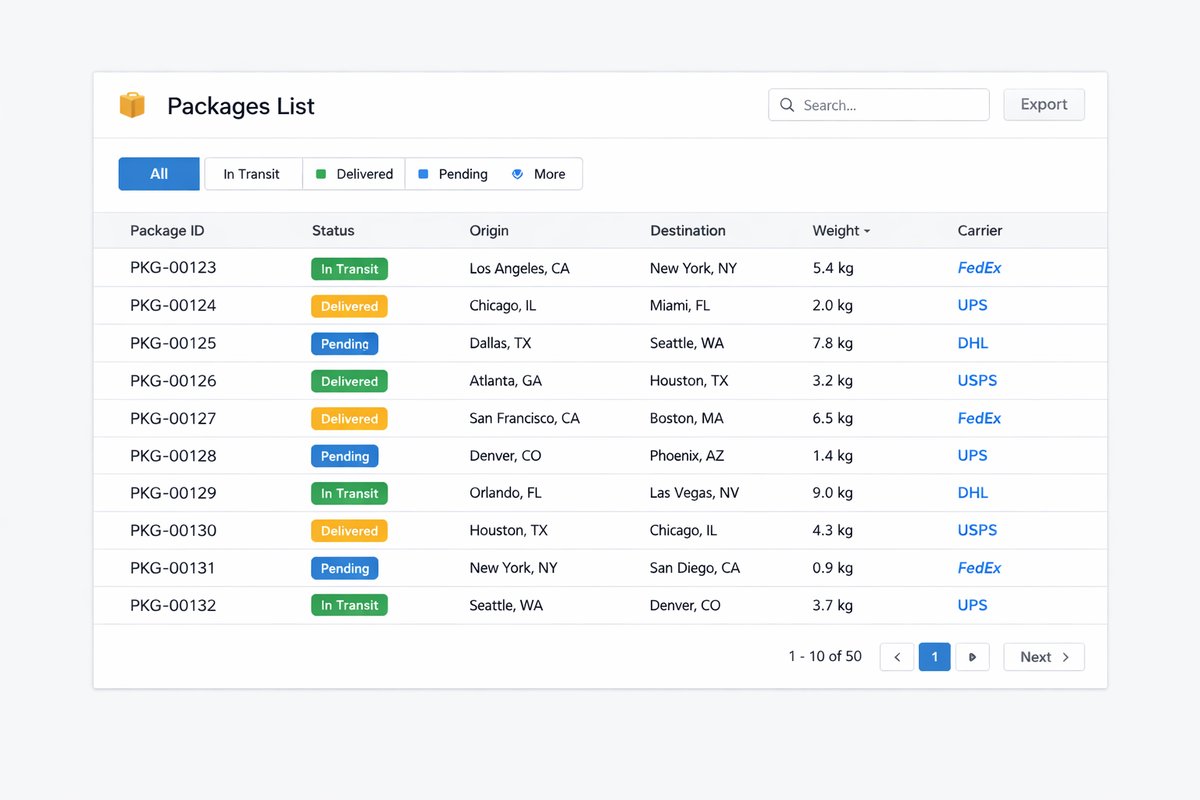
تسجيل الطرود والأوزان والأبعاد والوصف ونوع الخدمة.
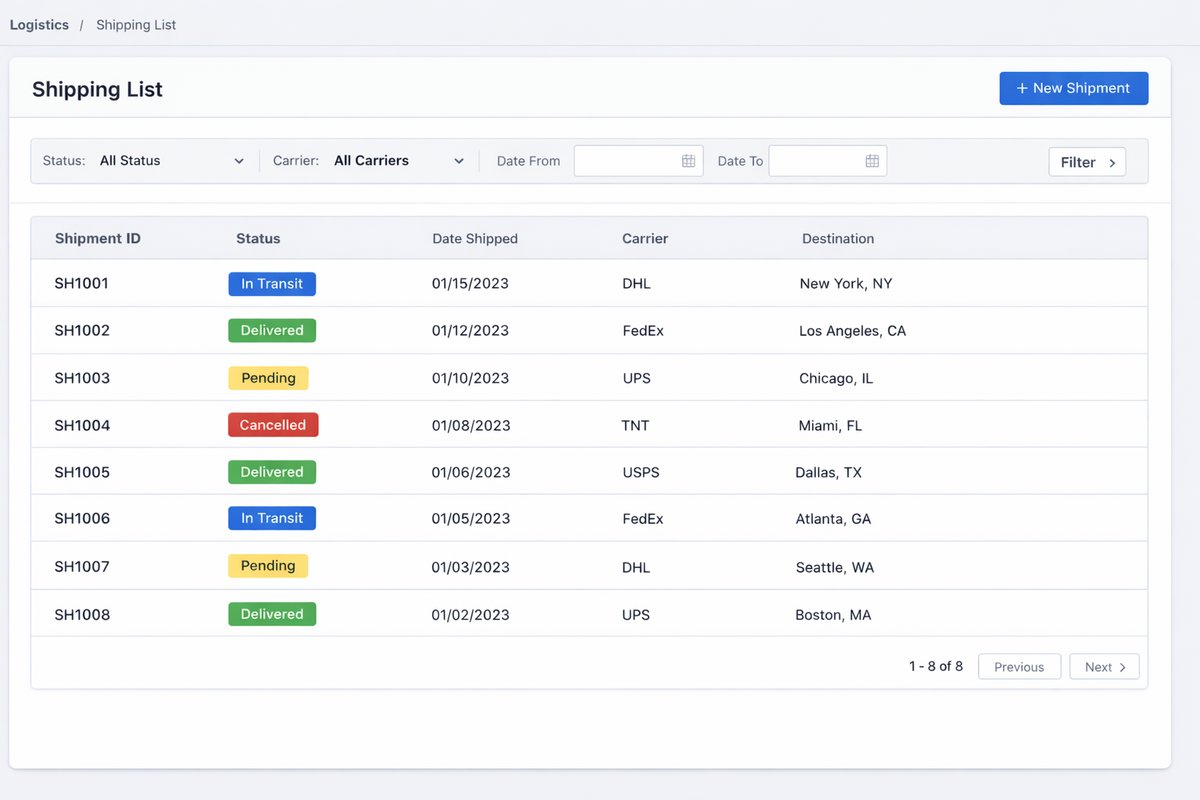
إنشاء الشحنات وأرقام التتبع وحالة الشحنة.
طلبات الاستلام Pickup والموافقات أو الرفض.
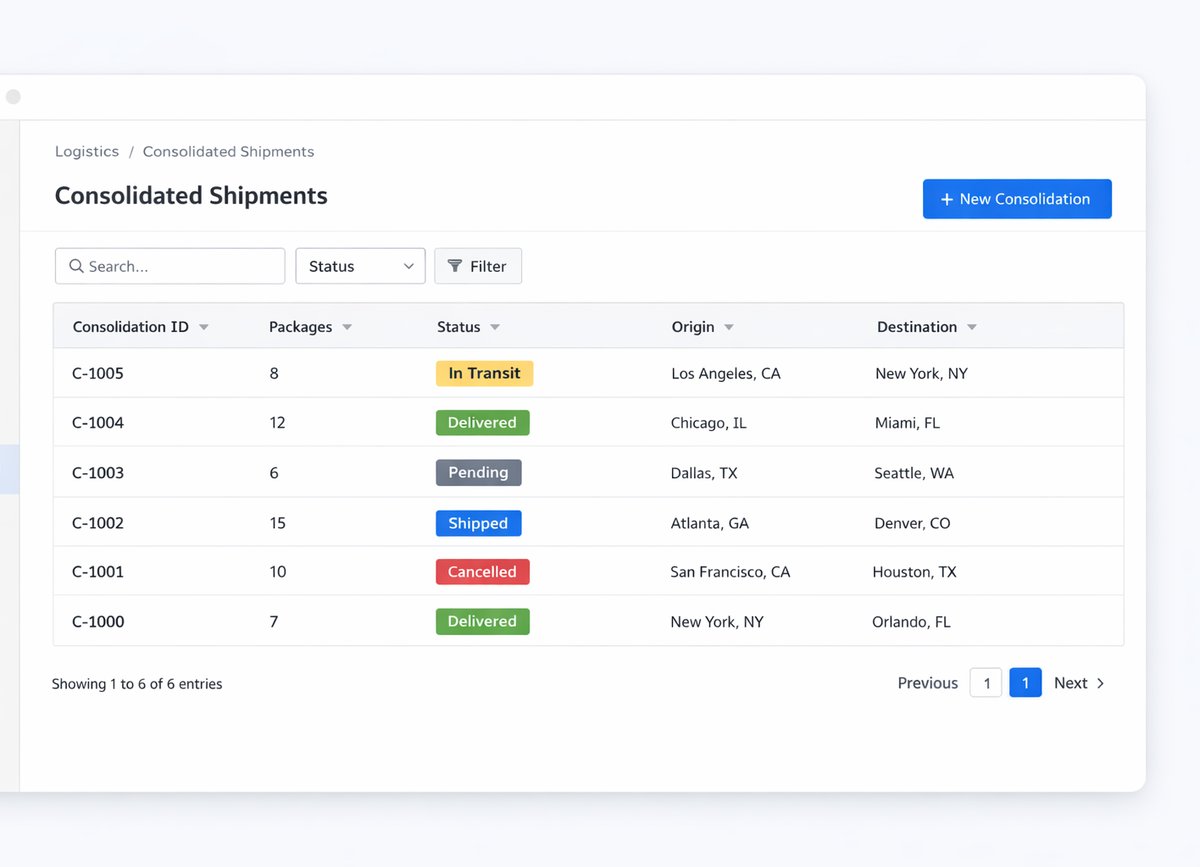
الشحنات المجمعة Consolidated مع تتبع كل طرد.
تأكيد التسليم وبيانات المستلم والتوقيع وإثبات التسليم.
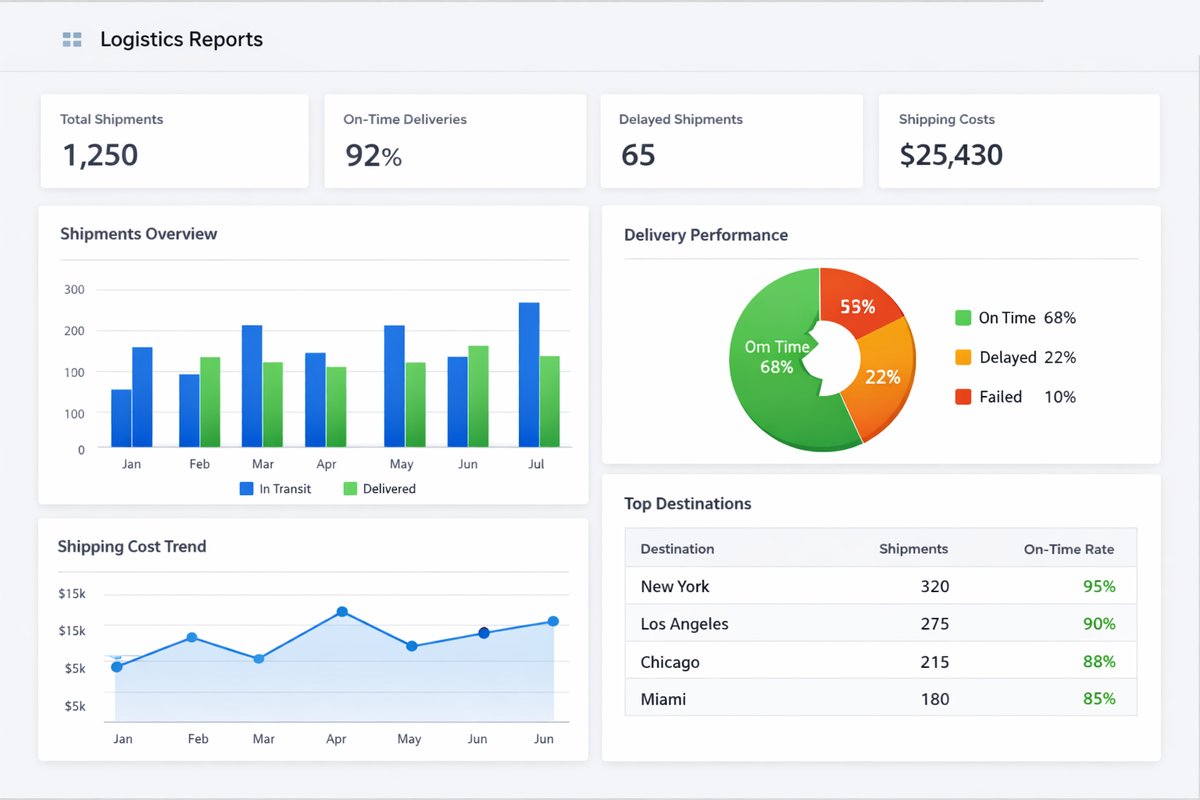
تقارير التأخير والفشل والاستثناءات والتدفق الشهري.
شاشات المنتج
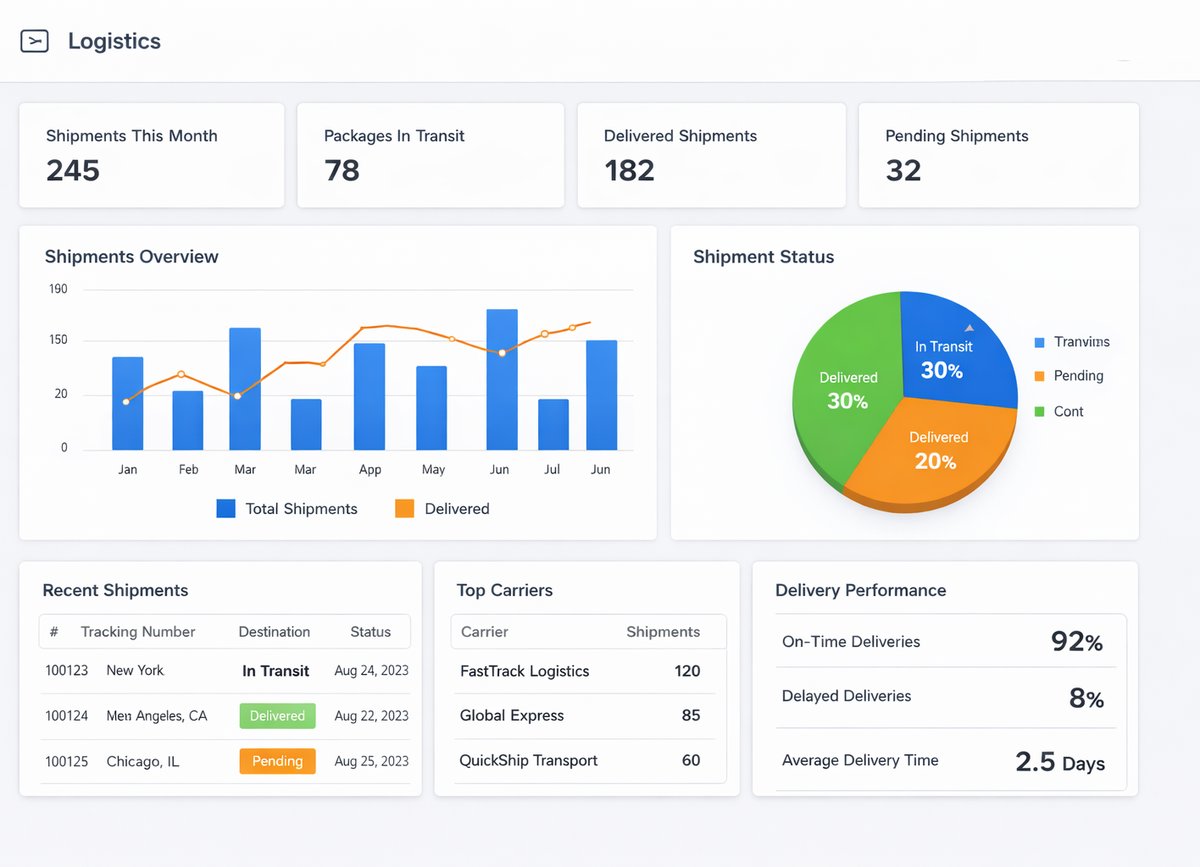
لقطات فعلية من النظام تساعد فريقك على تقييم السجلات والواجهات قبل العرض.
تسلسل التطبيق
ابدأ بحالة شحنة واحدة كاملة ثم وسّع إلى الاستلام، التجميع، الاستثناءات، والتقارير.
اختر شحنة واحدة من إنشاء الطلب حتى التسليم أو الفشل مع كل البيانات والأدلة.
ثبت حقول المستلم والعنوان والهاتف والجهة وبيانات الطرد قبل التوسع.
حدد الحالات المسموحة ومن يملك تحديثها ومتى تصبح الحالة نهائية.
نفّذ حالة تسليم ناجحة وحالة فشل أو تأجيل مع سبب ودليل ومالك للخطوة التالية.
تابع الشحنات المتأخرة والفاشلة والناقصة البيانات ونسبة اكتمال إثبات التسليم.
نقاط التسليم
هذه الروابط تمنع الشحنة من أن تصبح تحديثًا منفصلًا عن التوفر والعميل والفاتورة والدليل.
المخزون ← اللوجستيات
جاهزية الصنف أو الطرد قبل الإرسال تمنع وعود تسليم غير قابلة للتنفيذ.
اللوجستيات ← الأسطول
توافر المركبة والسائق يدعم التخطيط للتسليم عندما تستخدم الشركة أسطولها الداخلي.
اللوجستيات ← CRM
حالة التسليم تساعد فريق المبيعات وخدمة العملاء على متابعة العميل بدقة.
اللوجستيات ← المالية
إثبات التسليم وحالة الشحنة يدعمان جاهزية الفوترة وحل النزاعات.
تقارير اللوجستيات
راجع الطرود والشحنات والاستلام والتجميع وإثبات التسليم والاستثناءات من مصدر واحد.
الطرود حسب الحالة والنوع والفترة.
الشحنات حسب الحالة والمستلم والمسار.
التنبيهات المسبقة الناقصة أو غير المحولة.
طلبات الاستلام Pickup والمرفوضة أو المتأخرة.
الشحنات المجمعة وحالة كل طرد.
إثباتات التسليم والتوقيعات الناقصة.
الشحنات المتأخرة والفاشلة والاستثناءات.
حزمة مراجعة اللوجستيات للإدارة والتشغيل.
لا. تناسب أي شركة تدير شحنات أو طرود أو مستلمين أو تحويلات بين الفروع أو حركة تجهيز وتسليم تحتاج حالة ودليل.
اللوجستيات تدير الشحنة والطرد والمستلم والحالة وإثبات التسليم. الأسطول يدير المركبات والسائقين والصيانة والوقود والجاهزية.
المخزون يتابع الكمية والحركة داخل المستودعات. اللوجستيات تتابع تنفيذ الشحن والتسليم وحالة الشحنة وإثبات التسليم.
جهّز شحنة حقيقية تشمل المستلم، الطرد، الحالة، جهة التسليم، إثبات التسليم، وحالة فشل أو تأخير إن وجدت.
شاركنا شحنة حقيقية تشمل المستلم والطرد والحالة وإثبات التسليم وحالة فشل أو تأخير. سنقترح نطاق البداية والمالكين والتقارير المطلوبة.