وحدة الإشارات الذكية والتعاون الداخلي
السؤال موجود لكن السجل غير واضح
يتم سؤال زميل في محادثة خارجية، ثم لا يعرف أحد أي فاتورة أو مشروع أو تذكرة كان المقصود.
فحص قبل العرض: حضّر مثال متابعة ضاعت لأن السؤال كان خارج سجل العمل.
وحدة الإشارات الذكية والتعاون الداخلي
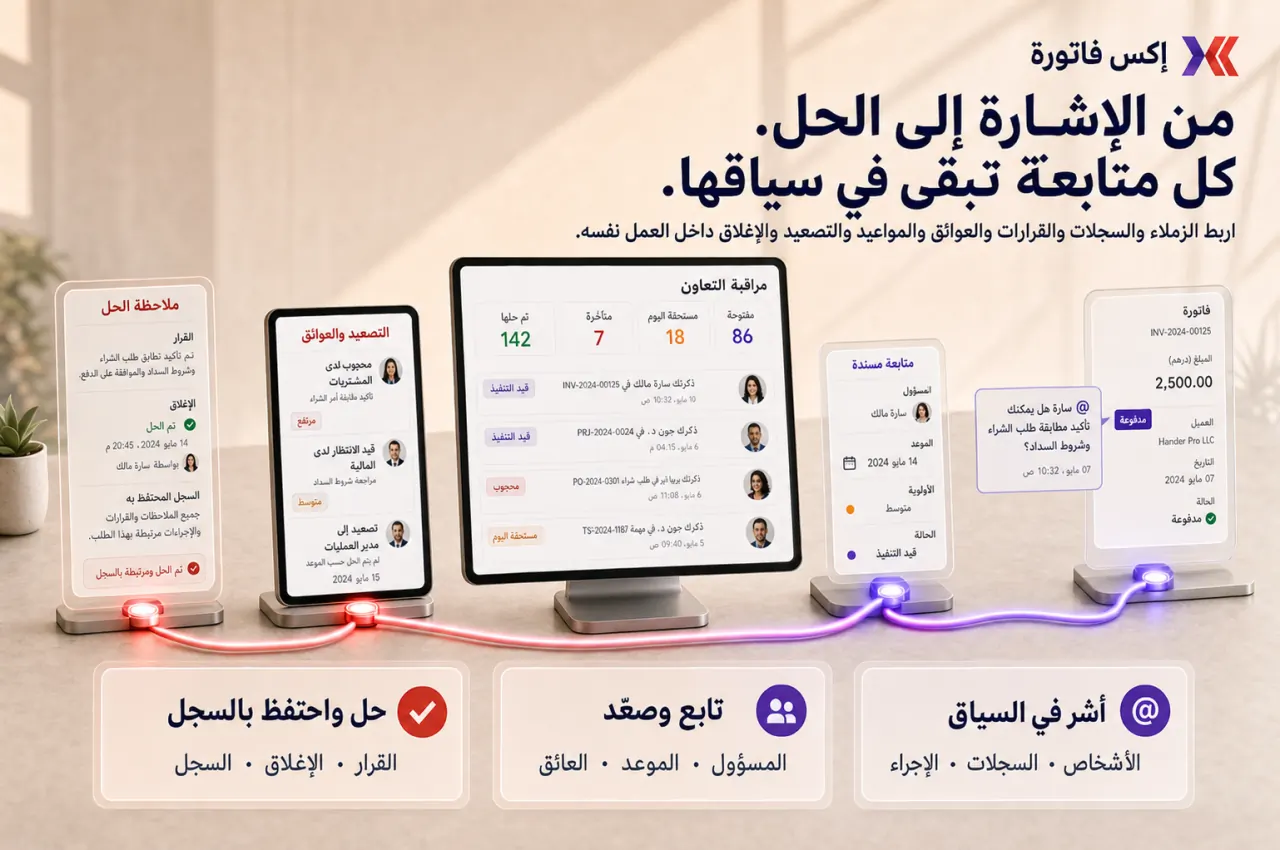
إكس فاتورة يساعد الفرق على ذكر الزملاء وربط السجلات وحفظ الطلبات والردود داخل العميل أو الفاتورة أو المشروع أو التذكرة أو المصروف بدل ضياع السياق في المحادثات.
ابدأ بخمس حالات متابعة ضاعت بين الفرق، ثم اربط كل حالة بالسجل الذي كان يجب أن يحتويها.
متى تحتاج Smart Mentions؟
هذه العلامات تكشف هل المشكلة في غياب السياق أو المالك أو القرار أو التصعيد.
يتم سؤال زميل في محادثة خارجية، ثم لا يعرف أحد أي فاتورة أو مشروع أو تذكرة كان المقصود.
فحص قبل العرض: حضّر مثال متابعة ضاعت لأن السؤال كان خارج سجل العمل.
يتم ذكر أكثر من شخص، لكن لا يظهر من صاحب القرار أو من يجب أن يغلق المتابعة.
فحص قبل العرض: اختر متابعة داخلية لم يكن لها مالك واضح.
يتم الاتفاق في دردشة، ثم لا يظهر القرار عند مراجعة العميل أو الفاتورة أو المشروع لاحقًا.
فحص قبل العرض: حضّر قرارًا مهمًا لم يظهر داخل السجل الذي يخصه.
المدير يحتاج أن يسأل أكثر من شخص ليفهم سبب التأخير أو الاعتراض أو نقص المستندات.
فحص قبل العرض: جهّز حالة blocker احتاجت تصعيدًا وكان السياق مشتتًا.
نطاق التحكم
الهدف أن يكون كل طلب متابعة له سجل ومالك وإجراء وموعد ونتيجة واضحة.
ذكر الزملاء داخل الملاحظات والتعليقات والمنشورات.
ربط سجلات مثل العملاء والفواتير والمشاريع والتذاكر والمصروفات.
حفظ الطلب والرد والقرار داخل نفس سجل العمل.
تحديد المالك والإجراء والموعد المتوقع ودرجة الأهمية.
تصعيد العمل المتعطل مع سياقه وسجلاته المرتبطة.
مراجعة المتابعات المفتوحة والمتأخرة والمتكررة.
وضع قواعد تمنع تحويل الإشارات إلى ضوضاء تنبيهات.
تقارير تعاون تساعد الإدارة على اكتشاف نقاط التعطل بين الفرق.
تسلسل التطبيق
ابدأ بالحالات التي يضيع فيها السياق كثيرًا، ثم وسّع الاستخدام بعد ثبات صيغة الطلب ومراجعة غير المغلق.
ابدأ بمثال من المبيعات والمالية والمشاريع والدعم وHR أو المصروفات.
اختر أول Record Types مثل الفواتير، العملاء، التذاكر، المشاريع، المصروفات، أو المهام.
استخدم صيغة واضحة: المالك، الإجراء، الأهمية، الموعد، والنتيجة المطلوبة.
الإشارة للمتابعة السياقية، أما المهمة أو التذكرة أو الاعتماد فتستخدم عندما يلزم مسار رسمي.
تابع الإشارات المفتوحة والمتأخرة والمتكررة وعدّل قواعد الاستخدام قبل التوسع.
نقاط التسليم
هذه الروابط تمنع السؤال أو القرار من أن يعيش خارج العميل أو الفاتورة أو المشروع أو التذكرة أو المصروف.
المبيعات ← المالية
اذكر المالية داخل سجل العميل أو الفاتورة بدل نقل الحوار خارج السياق.
المشاريع ← التنفيذ
اربط blocker أو ملف أو مرحلة بسجل المشروع حتى لا تضيع مسؤولية الإغلاق.
الدعم ← العمليات
صعّد مشكلة العميل لمالك داخلي مع حفظ سجل التذكرة والسياق.
المصروفات ← المدير
اطلب إيضاح إيصال أو اعتماد أو استثناء داخل سجل المصروف نفسه.
تقارير التعاون الداخلي
راجع الإشارات المفتوحة والمتأخرة والمتكررة حتى تصبح المتابعة قابلة للإدارة.
الإشارات حسب المستخدم أو الفريق.
المتابعات المفتوحة والمغلقة والمتأخرة.
الإشارات حسب الوحدة أو نوع السجل.
زمن الاستجابة حسب الفريق.
نقاط التصعيد المتكررة.
حزمة مراجعة التعاون الداخلي للإدارة.
لا. الدردشة مناسبة للحوار العام، أما الإشارات الذكية فهي متابعة سياقية داخل سجل عمل محدد حتى لا يضيع القرار أو المسؤولية.
لا. الإشارة تساعد على التوضيح والمتابعة، لكن الاعتمادات الرسمية يجب أن تبقى في مسار اعتماد مضبوط.
عندما يحتاج الطلب إلى دورة حياة رسمية أو SLA أو تاريخ استحقاق أو إدارة متكررة، الأفضل إنشاء مهمة أو تذكرة.
جهّز خمس حالات ضاعت فيها المتابعة: بين المبيعات والمالية، مشروع متعطل، تذكرة دعم، اعتماد HR، ومصروف أو فاتورة ناقصة البيانات.
شاركنا خمس حالات ضاعت فيها المتابعة أو القرار خارج السجل. سنقترح أين تبدأ الإشارات، ومن يملك الرد، ومتى تتحول المتابعة إلى مهمة أو اعتماد.