Warranty coverage rules, warranty periods, serial numbers, invoice references, and product or asset context
 Module
Warranty management and after-sales service ERP software
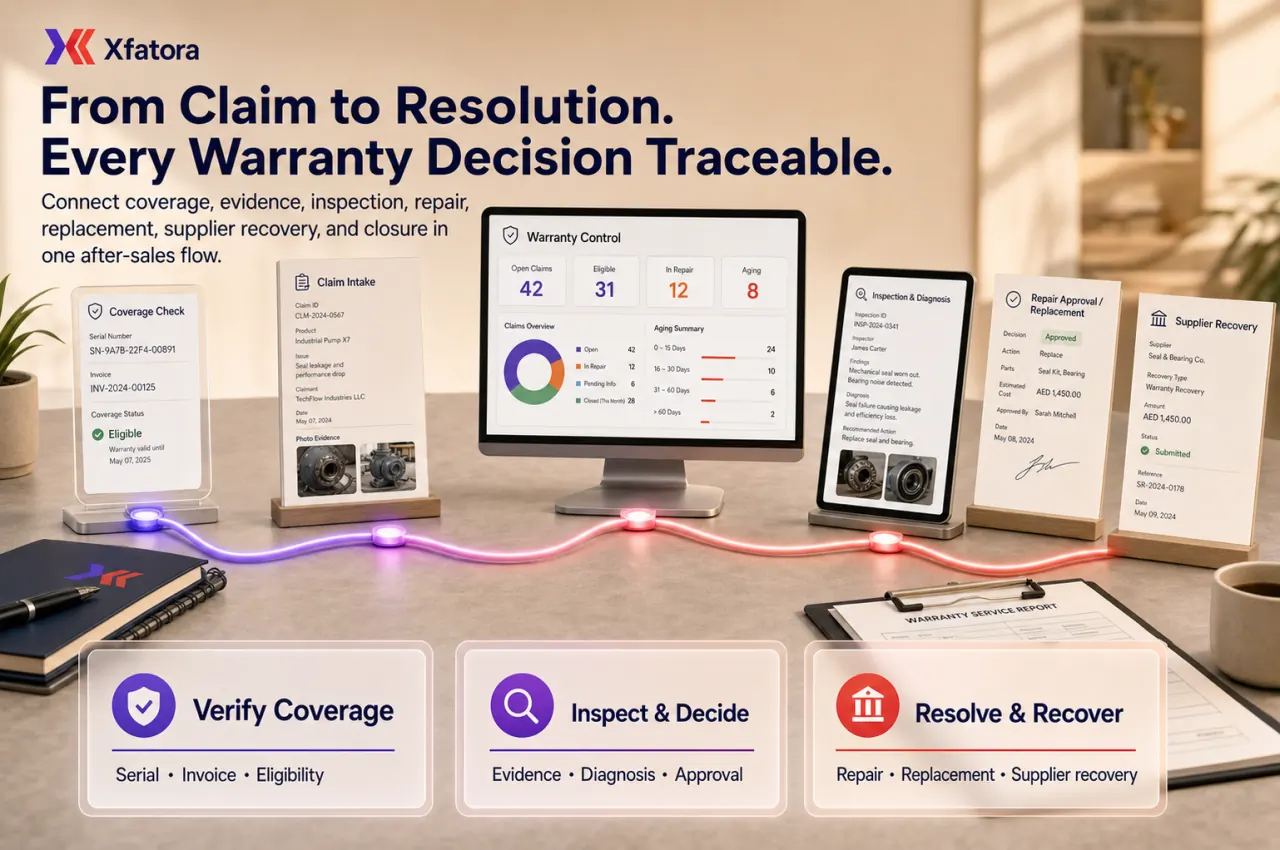
Control coverage, claims, inspection, repair, replacement approval, supplier recovery, service evidence, and warranty reporting.
Xfatora Warranty Management helps after-sales, support, operations, warehouse, procurement, and finance teams manage warranty claims with clear eligibility, ownership, approvals, evidence, and cost visibility.
Approved app available now
Take Field Service to the frontline.
Connect dispatch and technicians across assigned jobs, inspections, diagnosis, work and parts, time, evidence, customer signatures, completion, and service reports.
What this module helps you control
Claim intake with customer, issue reason, evidence, photos, attachments, and responsible owner
Eligibility review for warranty period, misuse indicators, exclusions, contract terms, and missing documents
Inspection, diagnosis, repair recommendation, parts requirement, labor estimate, and service evidence
Repair, replacement, rejection, supplier return, customer resolution, and closure decisions
Approval rules for repair cost, replacement approval, credit note impact, stock issue, and supplier recovery
Customer communication history and optional customer visibility for warranty status
Warehouse handoff for replacement items, spare parts, returns, and damaged stock movement
Finance review for repair cost, replacement value, credit notes, write-offs, and warranty cost reporting
Management reports for open claims, claim aging, repeated failures, supplier patterns, and unresolved customer-risk cases
Business outcomes teams expect
Central warranty information linked to customers and products
Warranty claims with structured steps and accountability
Configurable receipt processes per product group
Process step ownership, estimates, and attachments
Claim status tracking and audit history
Optional customer portal access to warranty info and claims
What teams use most in this module
Practical capabilities that make day-to-day execution faster, cleaner, and easier to govern.
Warranty Information Register
Record warranty coverage and expiration per delivered item or invoice-linked item, so teams know what is covered and until when.
Link warranty records to customer and product
Store warranty start and end dates
Support warranty period updates when needed
Track warranty records in a searchable list
Warranty Claims
Create and manage warranty claims with clear intake, item selection, and status tracking.
Create claims with claim codes and customer linkage
Attach files and supporting evidence
Track claim status through lifecycle (e.g., processing, paused, done)
Activity logs for accountability
Receipt Process Builder
Define how claims should be processed using receipt processes and step-by-step workflows.
Receipt processes by product group
Ordered process steps with icons and descriptions
Assign person in charge per step
Estimated time per step
Time Tracking and Progress
Track time spent on each claim step and manage progress through the workflow.
Start/pause/done workflow actions
Step-level time tracking
History of work progression per claim
Supports operations review and workload insights
Customer Portal Visibility
Optionally expose warranty information and claims to customers via the client portal.
Portal menu entry for warranties
Customers can view warranty information
Customers can view claim details (if enabled)
Reduces support overhead for warranty status updates
Start with this workflow
Follow these structured steps to launch one controlled process first, then expand.
Warranty rollout readiness
1
Bring three real examples: approved repair, rejected claim, and replacement case with stock or finance impact
2
Define warranty types, coverage rules, claim reasons, required evidence, and owner per claim stage
3
Test eligibility review, inspection, repair, replacement, supplier recovery, finance impact, and closure evidence
4
Validate handoffs to Support Desk, CRM, Warehouse, Procurement, Accounting, Assets, and Data Exporter
5
Agree weekly review metrics: open claims, claim aging, repeated failures, repair cost, replacement cost, and unresolved customer-risk cases
Create a warranty receipt process
1
Open Warranty Management to Settings to Warranty Receipt Process
2
Create a receipt process for a product group
3
Add ordered steps (process name, person in charge, estimate time, description)
4
Save and reuse this workflow for future claims
Register warranty information
1
Open Warranty Management to Warranty Information
2
Select customer and product (invoice or delivery-linked when applicable)
3
Set warranty start date and warranty end date / period
4
Save so warranty coverage is traceable later
Submit and process a warranty claim
1
Open Warranty Management to Warranty Claim Information
2
Create a claim and select the customer + invoice/item under warranty
3
Choose the correct receipt process (auto-filtered by product group)
4
Process step-by-step: start to pause to done as work is completed
5
Review claim detail page for history, attachments, and logs
Common problems this module helps solve
Warranty claims are received through calls, chat, email, or support tickets without enough evidence
Teams cannot quickly confirm whether the item is still covered by warranty
Serial number, invoice, delivery reference, inspection notes, and photos are missing or scattered
Repair, replacement, or rejection decisions happen without a clear approval trail
Warehouse issues replacement stock without linking movement to the claim record
Finance receives credit note or replacement requests without service evidence or cost context
Supplier warranty follow-up is lost after customer service closes the customer-facing ticket
Repeated product failures are closed individually and never reach management review
Customers cannot see where their claim stands or who owns the next step
Where teams apply this module
After-sales warranty administration for products, equipment, installations, and service obligations
Repair workflows with inspection, diagnosis, labor, parts, evidence, and completion notes
Replacement approval workflows connected to warehouse stock, delivery status, and finance review
Supplier or manufacturer recovery when the business must reclaim cost or replacement from a vendor
Customer support handoff when a support ticket becomes a formal warranty claim
Service teams tracking claim ownership, claim aging, status, and unresolved customer-risk cases
Quality teams reviewing repeated claim reasons, defect patterns, and product categories with high claim volume
Finance teams reviewing credit notes, write-offs, replacement value, repair cost, and warranty cost impact
Connected records across modules
Support Desk: support tickets can become warranty claims without losing customer communication and SLA context.
CRM and Sales: customer, invoice, product, contract, and account context supports eligibility and relationship review.

Inventory and Warehouse: replacement items, spare parts, returns, damaged stock, and stock movements can be tied to the claim.
Procurement and Purchases: supplier or manufacturer recovery can be tracked as a related workflow.

Accounting: credit notes, replacement cost, repair cost, write-offs, and warranty expense visibility support finance review.

Asset Management: asset serial numbers, maintenance history, and service records support warranty eligibility and evidence.
Knowledge Base: repeated warranty questions and claim requirements can become approved customer or internal articles.

Data Exporter and Reporting: claims, evidence, costs, supplier recovery, and repeated failures can be exported for management review.
Built-in Reports & Analytics
Open, overdue, approved, rejected, repaired, replaced, and closed claims
Claim aging by customer, product, item, serial number, category, owner, and status
Repeated claim reasons and product failure patterns
Repair cost, replacement cost, supplier recovery, and warranty cost impact
Claims missing invoice, serial, photos, inspection notes, or closure evidence
Replacement item issue and spare-part movement review
Supplier or manufacturer recovery follow-up
Customer-risk claims and unresolved after-sales issues
Claim cycle time and step-level processing time
Warranty management review pack for service, operations, finance, and leadership
Compliance & Implementation Resources
Practical guides to help you rollout and validate workflows.
FAQ
Is Warranty Management only for physical products?
No. It can also support service obligations, equipment service, installation claims, field maintenance, spare-part replacement, and customer-installed assets.
What evidence should a warranty claim include?
At minimum: customer, product or asset, serial number where relevant, invoice or delivery reference, issue description, dates, photos or inspection notes, and the final resolution decision.
Should warranty claims connect to warehouse?
Yes when replacement items, spare parts, returns, damaged stock, or supplier recovery need movement history and finance visibility.
Who should approve replacement decisions?
Approval usually depends on warranty rules, claim value, stock impact, and finance policy. Many teams use service, operations, warehouse, and finance approval together.
What should we prepare before a Warranty Management demo?
Prepare three real cases: approved repair, rejected claim, and replacement case with stock or finance impact.
Plans that include this module
Confirm commercial fit before rollout planning.
Business Plan
Enterprise Plan
Ready to evaluate Warranty management and after-sales service ERP software with your team?
We will map this module to your current process, owners, controls, and rollout timeline.
User guide
How to use Warranty management and after-sales service ERP software
Setup checklist, key workflows, reports, and troubleshooting.
Talk to our solution team
Tell us what you need and we will reply with a rollout plan and recommended modules.
Fields marked with * are required.
Related content
Related Modules
AI Sales Assistant
Use AI-assisted calling and qualification workflows to improve first-contact consistency, lead follow-up, call summaries, and CRM handoff discipline.
Often fits plan: Field Service · Scale
Asset Management
Control asset records, custody, locations, maintenance, audits, depreciation, and lifecycle accountability from one controlled workspace.
Often fits plan: Field Service · Scale
Asset Management
Manage company assets, custody, locations, maintenance, audits, depreciation, and lifecycle accountability from one controlled workspace.
Related Use Cases
Accelerate Order to Cash
Connect sales, fulfillment, invoicing, and collections to reduce revenue leakage and improve cash conversion.
order-to-cash
revenue-operations
cash-flow
Control Production Costs
Tie material usage, labor capture, and overhead allocation to each production order for reliable margins.
manufacturing-management
costing
inventory-warehousing
Related Industries
ERP for Manufacturing Operations
Manufacturing ERP for production planning, MRP, inventory, quality, costing, and shop-floor control across growing factories.
manufacturing
mrp
production
ERP for Clinics and Outpatient Networks
Sector playbook covering pain points, workflows, module fit, and buying checklist for erp for clinics and outpatient networks.
industry
operations
erp
Related Guides
Build ZATCA audit trail controls for SMB finance teams
Practical guide for build zatca audit trail controls for smb finance teams with execution steps and buying support links.
zatca
saudi
compliance
ERP Implementation Playbook
A practical, phased guide to planning, launching, and scaling ERP adoption across teams with measurable outcomes.
implementation
operations
change-management