Ticket intake from customers, internal users, email, portal, phone follow-up, or service teams
 Module
Support desk and customer support ERP software
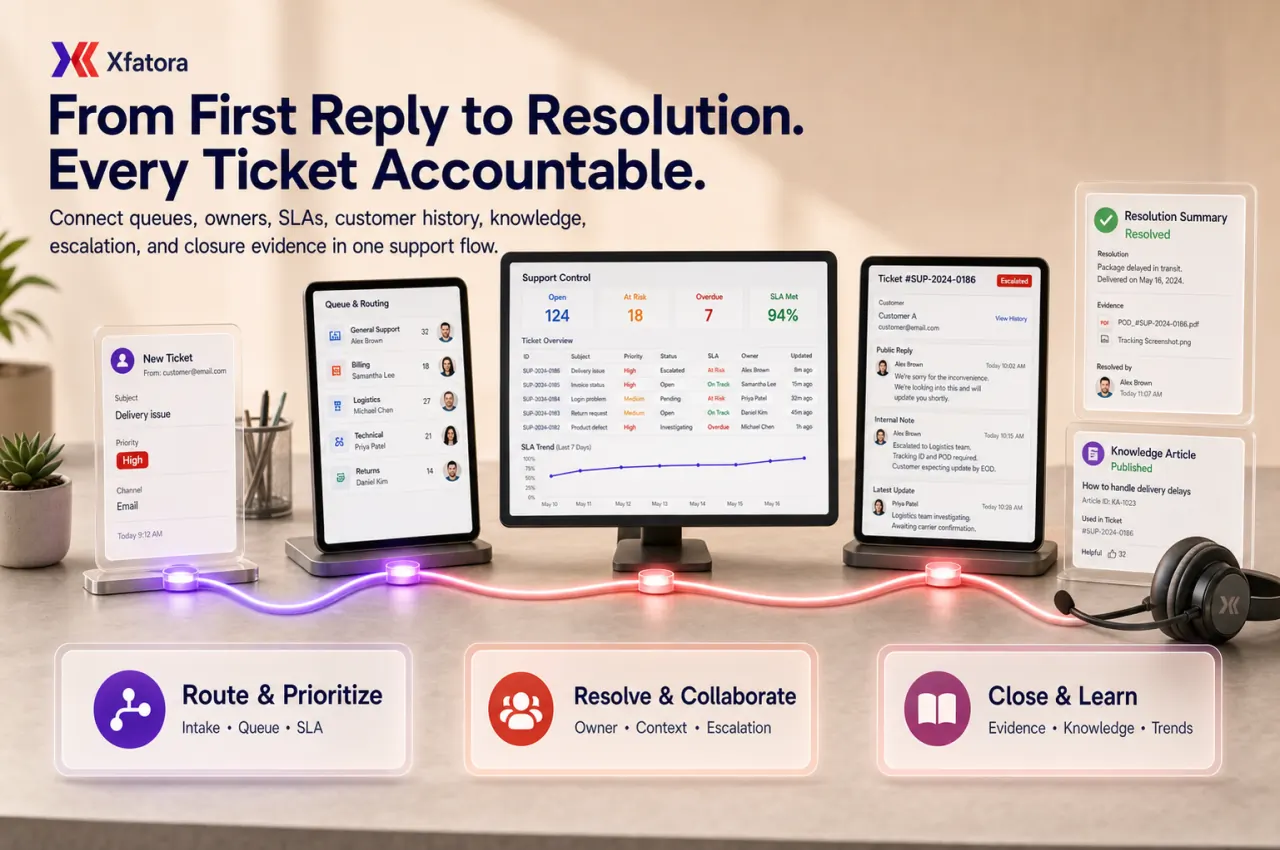
Control tickets, queues, ownership, SLAs, escalation, customer history, knowledge base answers, warranty handoffs, and resolution evidence.
Xfatora Support Desk helps service, support, operations, sales, and management teams handle customer and internal tickets with clear ownership, SLA visibility, escalation paths, customer context, and reviewable closure evidence.
What this module helps you control
Queue, department, category, priority, status, owner, due expectation, and escalation rules
SLA visibility for first response, resolution targets, at-risk tickets, overdue tickets, and breach review
Customer, contact, account, project, invoice, asset, warranty, and delivery context where relevant
Public replies, internal notes, attachments, evidence, closure reason, and resolution summary
Knowledge base handoffs for repeated questions, approved answers, and deflection opportunities
Warranty handoffs when tickets become claim, repair, replacement, or service-obligation cases
Smart Mentions for internal follow-up when another team must resolve a blocker
Support reports for backlog, reopen rate, response time, resolution time, escalation, and repeated issue categories
Exports for support tickets, replies, SLA history, quality review, and management packs
Business outcomes teams expect
Structured ticket management system
Email integration for ticket creation
Customer portal for self-service
Canned responses for efficiency
Priority and status management
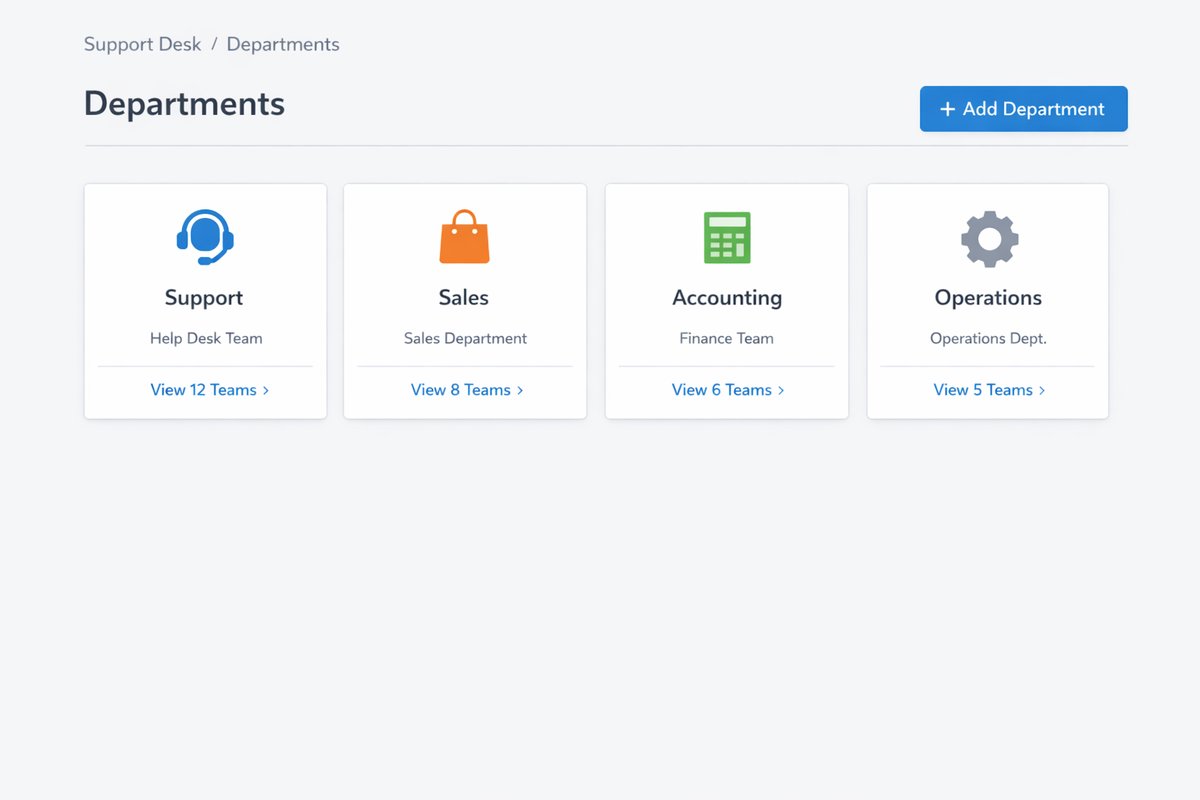
Department-based routing
Complete communication history
Screenshots
Real screens from the platform.
What teams use most in this module
Practical capabilities that make day-to-day execution faster, cleaner, and easier to govern.
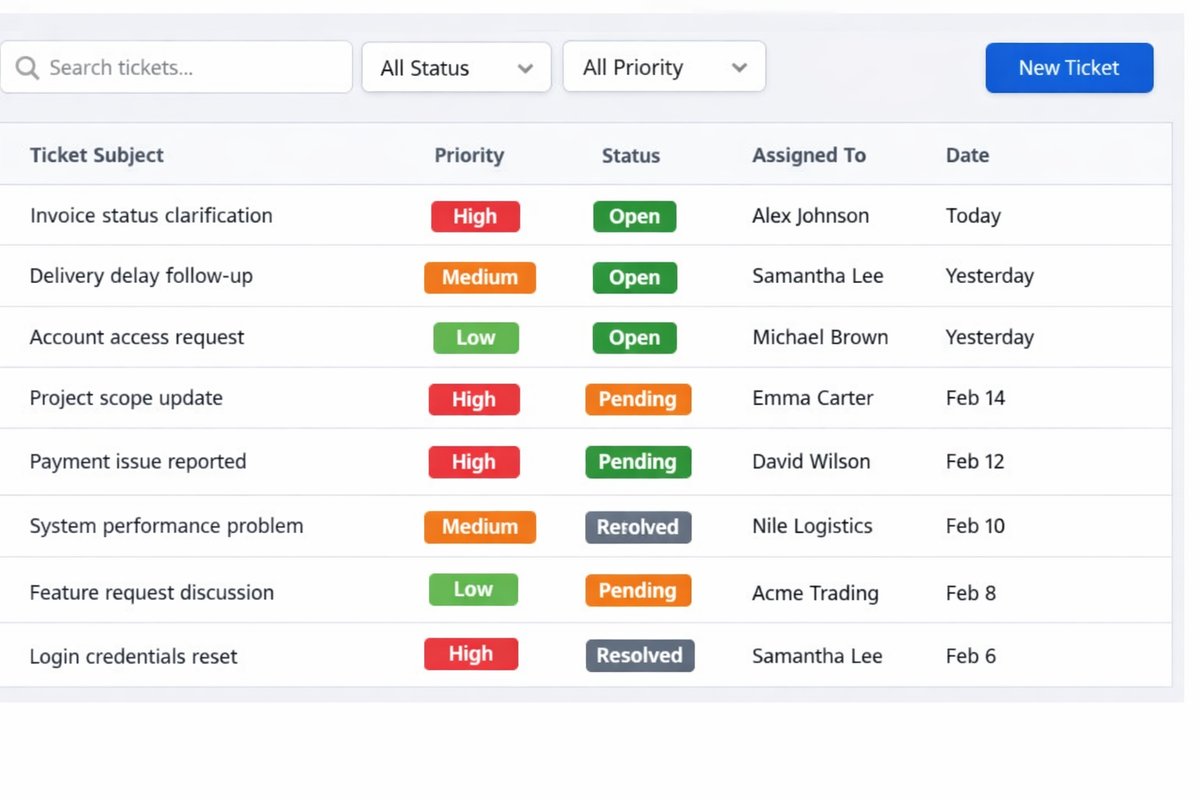
Ticket Management
Comprehensive ticketing system for support cases and issues.
Automatic ticket creation from email
Manual ticket creation
Priority levels (Low, Medium, High, Urgent)
Status workflow (Open, In Progress, Answered, On Hold, Closed)
Assigned agent tracking
Department categorization
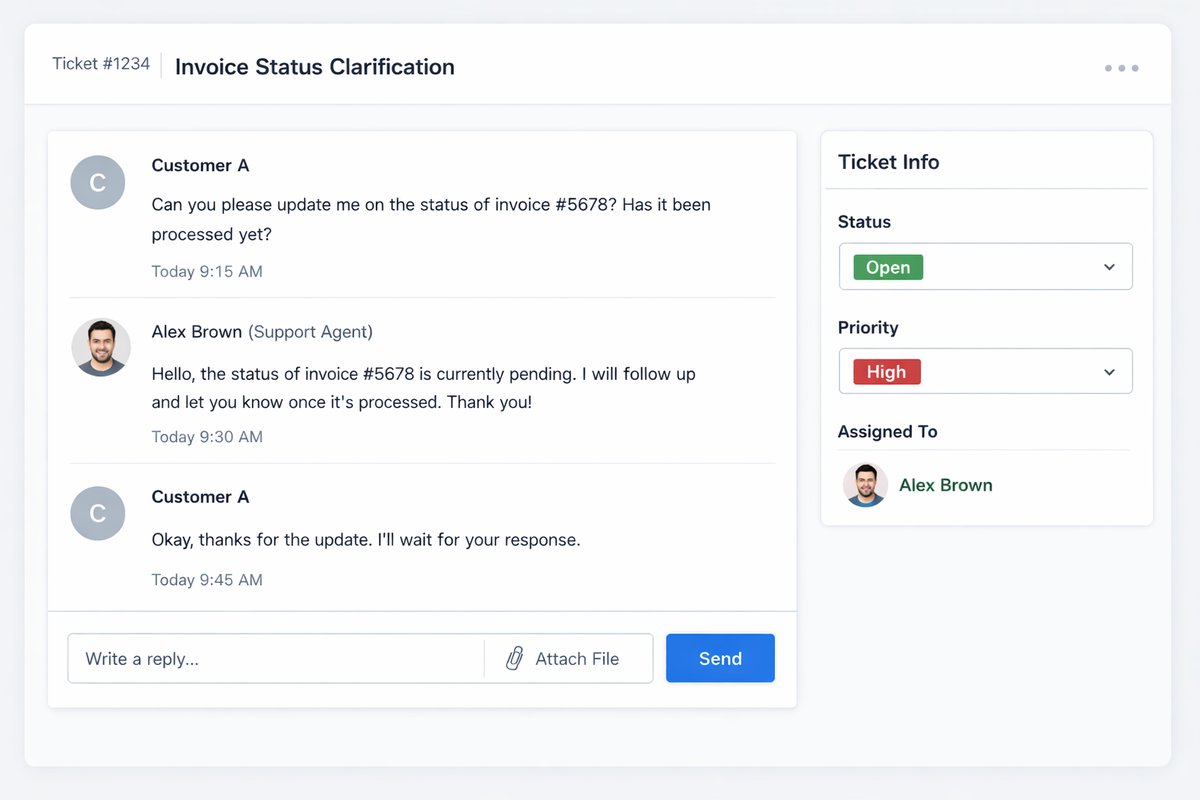
Communication Thread
Complete conversation history between staff and customers.
Email-integrated replies
Customer portal responses
Internal notes
File attachments
Automated notifications
Response templates
Canned Responses
Pre-defined responses for common inquiries to improve efficiency.
Template library
Quick insertion
Customizable templates
Category organization
Time-saving automation
Customer Portal
Self-service portal for customers to manage their tickets.
Ticket submission
Status checking
Response viewing
File attachment
Ticket history access
Organization-level visibility
SLA Management
Service level tracking and escalation.
Response time reminders
Escalation rules
Priority-based SLAs
Manager notifications
Performance tracking
Start with this workflow
Follow these structured steps to launch one controlled process first, then expand.
Support desk rollout readiness
1
Choose five real support cases: urgent issue, repeated issue, billing question, delivery/service issue, and renewal-risk case
2
Define categories, priorities, statuses, queues, owners, SLA expectations, and escalation rules before broad rollout
3
Test public replies, internal notes, attachments, evidence, closure reason, and reopened ticket handling
4
Validate handoffs to CRM, Knowledge Base, Warranty, Smart Mentions, Projects, and Data Exporter
5
Agree the weekly management review: backlog age, at-risk tickets, repeated issues, escalation delay, and closure quality
Ticket Resolution
1
Customer submits ticket via portal or email
2
System creates ticket and notifies team
3
Agent assigns priority and status
4
Agent investigates and responds
5
Customer replies with additional info
6
Agent resolves issue
7
Ticket closed with solution documented
Common problems this module helps solve
Customer requests are scattered across inboxes, phone calls, chat groups, and spreadsheets
Support tickets are answered but not owned, prioritized, or reviewed consistently
Escalations happen in chat without updating the ticket or documenting the blocker
SLA reporting is retrospective, so teams discover risk after the commitment is already missed
Support, sales, operations, billing, warranty, and delivery teams do not share one customer context
Repeated issues are closed one by one without root-cause review or knowledge-base improvement
Managers cannot see backlog age, at-risk tickets, reopened cases, or unresolved handoffs quickly
Customers receive inconsistent answers because approved knowledge content is not used
Warranty or billing issues are closed in support before finance, warehouse, or service teams finish their part
Where teams apply this module
Customer service teams managing questions, complaints, delivery issues, warranty issues, and billing follow-up
Internal IT or operations helpdesk teams handling service requests and internal escalations
After-sales teams tracking repair, replacement, product support, and warranty-related tickets
Account teams needing support history before renewal, upsell, collection, or customer-risk review
Support managers reviewing backlog, SLA risk, repeated issues, and agent workload
Companies moving from email ticketing or shared inboxes to accountable ERP-connected support
Teams connecting support with CRM, Knowledge Base, Warranty, Smart Mentions, Projects, and Data Exporter
Connected records across modules
CRM and Sales: customer, account, contact, pipeline, billing, and renewal context helps support teams understand commercial risk.
Knowledge Base: approved answers can reduce repeated tickets and improve response consistency.
Warranty Management: support tickets can become claim, repair, replacement, or service-obligation workflows without losing customer context.
Smart Mentions: blocked tickets can tag finance, operations, warehouse, delivery, or management owners inside the record.
Projects and Services: support issues that affect delivery can be linked to project tasks, milestones, acceptance, or service obligations.
Logistics and Fleet: delivery status, proof of handover, vehicle availability, or field-service context can support customer responses.

Data Exporter and Reporting: ticket volume, replies, backlog, SLA, repeated issue, and resolution evidence can be exported for management review.
Built-in Reports & Analytics
Open, overdue, at-risk, escalated, reopened, and resolved tickets
Ticket backlog by queue, category, priority, status, owner, and customer
First response time, resolution time, SLA attainment, and breach review
Repeated issue categories and root-cause review
Knowledge-base deflection opportunities and article gaps
Warranty, billing, delivery, and project-related support handoffs
Agent and team workload by ticket volume and aging
Customer-risk and renewal-risk support summary
Support quality pack with replies, notes, attachments, and closure evidence
Exportable support audit and management review pack
Compliance & Implementation Resources
Practical guides to help you rollout and validate workflows.
FAQ
Is Support Desk different from Customer Support?
Customer Support is the broader service workflow. Support Desk focuses on structured ticket queues, ownership, SLA expectations, escalation, and resolution evidence.
Should Support Desk connect to CRM?
Yes. CRM context helps teams understand account value, billing context, renewal risk, sales history, and customer relationship impact before responding.
Do we need formal SLA tracking from day one?
Only if response time is already a business commitment. Otherwise start with ownership, categories, status, escalation, and backlog visibility before adding formal SLA targets.
What should we prepare before a Support Desk demo?
Prepare five real cases: urgent issue, repeated issue, billing question, delivery or service issue, and one renewal-risk case with current owner and response history.
How does Support Desk reduce repeated issues?
Repeated categories, root-cause review, knowledge-base gaps, and closure evidence help managers improve the process instead of only closing individual tickets.
Plans that include this module
Confirm commercial fit before rollout planning.
Growth Plan
Business Plan
Enterprise Plan
Ready to evaluate Support desk and customer support ERP software with your team?
We will map this module to your current process, owners, controls, and rollout timeline.
Talk to our solution team
Tell us what you need and we will reply with a rollout plan and recommended modules.
Fields marked with * are required.
Related content
Related Modules
AI Sales Assistant
Use AI-assisted calling and qualification workflows to improve first-contact consistency, lead follow-up, call summaries, and CRM handoff discipline.
Often fits plan: Field Service · Scale
Asset Management
Control asset records, custody, locations, maintenance, audits, depreciation, and lifecycle accountability from one controlled workspace.
Often fits plan: Field Service · Scale
Asset Management
Manage company assets, custody, locations, maintenance, audits, depreciation, and lifecycle accountability from one controlled workspace.
Related Use Cases
Accelerate Order to Cash
Connect sales, fulfillment, invoicing, and collections to reduce revenue leakage and improve cash conversion.
order-to-cash
revenue-operations
cash-flow
Control Production Costs
Tie material usage, labor capture, and overhead allocation to each production order for reliable margins.
manufacturing-management
costing
inventory-warehousing
Related Industries
ERP for Manufacturing Operations
Manufacturing ERP for production planning, MRP, inventory, quality, costing, and shop-floor control across growing factories.
manufacturing
mrp
production
ERP for Clinics and Outpatient Networks
Sector playbook covering pain points, workflows, module fit, and buying checklist for erp for clinics and outpatient networks.
industry
operations
erp
Related Guides
Build ZATCA audit trail controls for SMB finance teams
Practical guide for build zatca audit trail controls for smb finance teams with execution steps and buying support links.
zatca
saudi
compliance
ERP Implementation Playbook
A practical, phased guide to planning, launching, and scaling ERP adoption across teams with measurable outcomes.
implementation
operations
change-management