Seller company identity, company VAT, address, country code, Company ID, Electronic Address, and scheme fields
 Module
EU e-invoicing, electronic invoice XML, and invoice compliance ERP software
Generate structured electronic invoice files with seller identity, buyer electronic addressing, validation controls, XML evidence, and clean finance handoff.
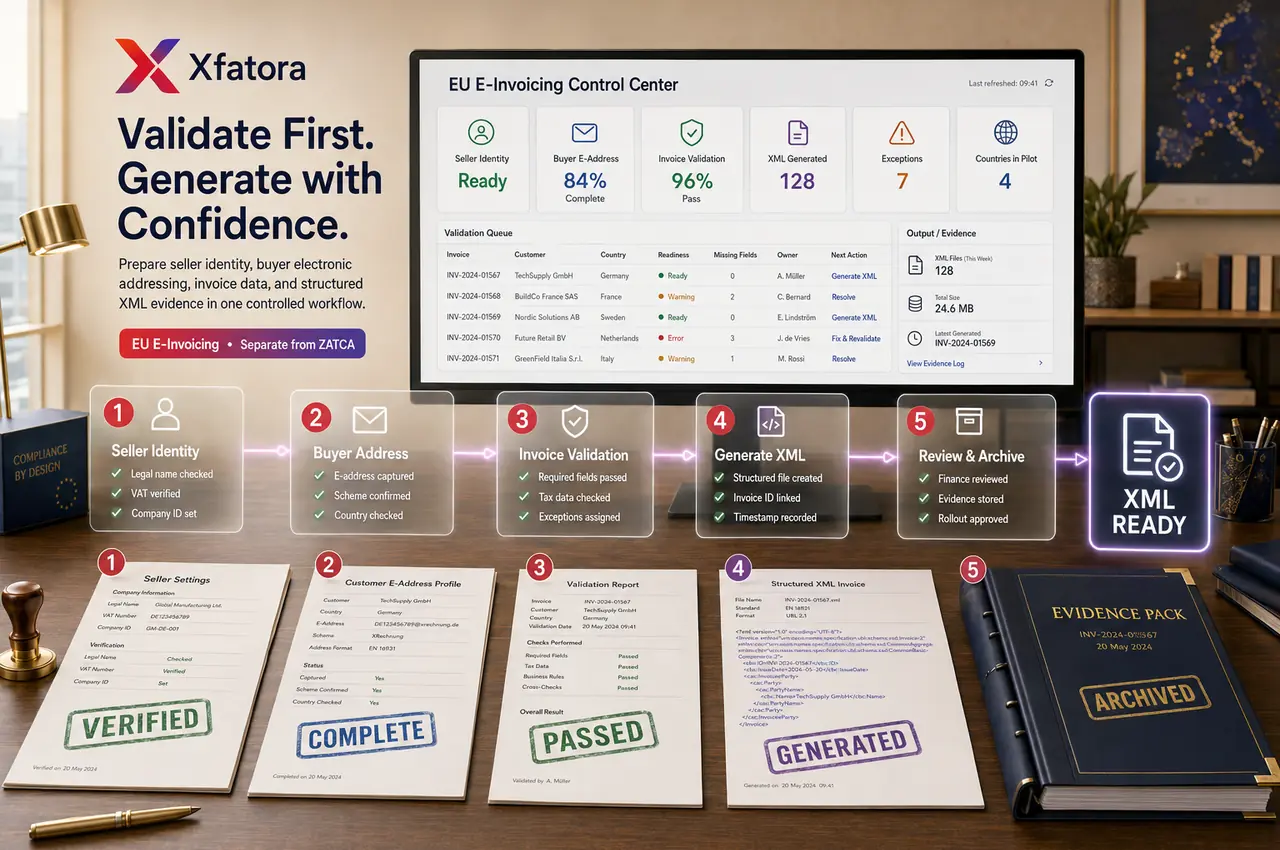
Xfatora E-Invoicing (EU) helps finance, billing, compliance, and master-data teams prepare seller and customer data, validate invoice readiness, generate structured XML outputs, preserve evidence, and keep EU e-invoicing separate from Saudi ZATCA workflows.
What this module helps you control
Customer Electronic Address, Customer Electronic Address Scheme, billing identity, country, and master-data readiness
Required-field validation before XML generation so unusable invoice files are stopped early
Country-aware EU output paths for supported scenarios, with evidence captured before wider rollout
Structured electronic invoice XML generation, downloadable files, archive references, and finance review evidence
Exception ownership for missing seller data, missing customer address data, invalid invoice state, and regeneration
Governance separation between E-Invoicing (EU), Saudi ZATCA Compliance, normal invoicing, accounting, and CRM handoffs
Pilot packs, validation outcomes, invoice identifiers, output timestamps, and rollout signoff by customer or country group
Business outcomes teams expect
Reduce failed e-invoice generation caused by incomplete seller, customer, address, country, or scheme data.
Give finance and billing teams a controlled process before XML files are produced or shared externally.
Improve customer master-data discipline by making buyer electronic addressing a required readiness step.
Avoid mixing EU e-invoicing workflows with Saudi ZATCA controls, QR, and local compliance runbooks.
Create output evidence that can be reviewed by finance, compliance, operations, and implementation teams.
Support phased rollout by testing pilot customers, country paths, validation failures, and regeneration workflows.
Reduce manual formatting and rework when invoices must become structured electronic invoice files.
Connect invoice output readiness with CRM, accounting, data export, and compliance evidence instead of isolated file generation.
What teams use most in this module
Practical capabilities that make day-to-day execution faster, cleaner, and easier to govern.
Seller Identity and Company Settings
Maintain the seller identity fields that drive structured e-invoice output quality.
Company legal name, VAT, address, city, and country code readiness
Seller Company ID and seller Electronic Address
Company ID Scheme and Electronic Address Scheme
Settings ownership and controlled update process
Pre-go-live seller data validation
Buyer Electronic Addressing
Prepare customer-level addressing and scheme values before invoice XML generation.
Customer Electronic Address
Customer Electronic Address Scheme
Customer country and billing identity
Master-data completeness review
Fewer failed outputs from incomplete buyer data
Invoice Validation Before Generation
Stop invalid invoice output attempts early so teams correct records before generating files.
Required-field checks for seller and customer data
Invalid invoice handling
Missing client or missing addressing exception visibility
Fail-fast behavior before unusable XML is created
Clear correction and regeneration path
Structured XML Invoice Output
Generate structured electronic invoice files from existing invoice records with output evidence.
XML file generation
Downloadable or storable output artifacts
Invoice IDs and output timestamps
Line, quantity, rate, and tax-based output construction
Archive-ready evidence for finance and compliance review
Country-Aware EU Output Review
Use supported country handling paths without claiming universal legal coverage for every market.
Default supported EU generation path
Country-specific review where configured
Italy, Romania, and Spain path awareness where applicable
Pilot output review by customer country
Rollout evidence before scaling
Peppol-Style Readiness and Addressing Discipline
Prepare structured addressing and identity discipline for organizations evaluating Peppol-style workflows, without replacing legal or access-network validation.
Buyer and seller electronic addressing review
Scheme field readiness
Master-data governance
No unsupported access-network claims
Clear demo questions for compliance owners
Exception Handling and Regeneration
Resolve missing data and invalid invoice conditions with clear ownership before retrying generation.
Missing seller/company fields
Missing customer electronic address or scheme
Invalid invoice state
Assigned correction owner
Retry and regenerate after validation
Finance, Accounting, and Evidence Handoff
Connect generated e-invoice output with finance review, accounting reconciliation, and evidence retention.
Finance review of invoice and tax correctness
Accounting reconciliation context
Generated XML evidence packs
Data Exporter support for audit-style review
Separate governance from ZATCA Compliance
Start with this workflow
Follow these structured steps to launch one controlled process first, then expand.
E-Invoicing (EU) rollout readiness
1
Prepare one current invoice, one customer with complete data, one customer with missing addressing, one country-specific example, and one failed output scenario
2
Confirm seller legal data, VAT, address, Company ID, Electronic Address, and schemes
3
Confirm customer Electronic Address, scheme, billing identity, and country
4
Define who owns seller settings, customer master data, finance validation, and exception correction
5
Generate pilot XML files and capture acceptance evidence before wider rollout
Configure seller identity
1
Review company legal and VAT data
2
Set address, city, and country code
3
Configure Company ID and Electronic Address
4
Define ID and address schemes
5
Validate seller settings before production generation
Prepare customer master data
1
Open the customer record
2
Complete billing identity and country
3
Populate Customer Electronic Address
4
Populate Customer Electronic Address Scheme
5
Save and validate readiness before invoice generation
Generate an electronic invoice XML file
1
Select a valid invoice
2
Verify seller and customer readiness
3
Trigger e-invoice generation
4
Generate XML output
5
Download or store the file
6
Log evidence for finance and compliance review
Handle failed generation
1
Review validation or missing-data output
2
Assign correction owner
3
Correct seller, customer, or invoice fields
4
Retry generation
5
Archive corrected output and root-cause note
Separate EU e-invoicing from ZATCA
1
Identify whether the scenario is EU e-invoicing or Saudi ZATCA
2
Use E-Invoicing (EU) for structured European output readiness
3
Use ZATCA Compliance for Saudi QR, XML, reporting, or clearance readiness
4
Avoid shared assumptions between the two tracks
5
Document ownership and evidence separately
Who this module is for
Finance leads
Billing operations teams
Compliance or tax operations owners
ERP administrators
Customer master-data owners
Implementation and rollout teams
Companies with European e-invoice output requirements
Teams that must separate EU e-invoicing from Saudi ZATCA
Common problems this module helps solve
Invoices cannot be converted into structured e-invoice XML because required seller or customer fields are missing
Customer electronic addresses and schemes are incomplete or maintained by the wrong team
Billing teams generate files before finance validates invoice correctness
Country-specific rollout is attempted without pilot samples or acceptance evidence
Teams confuse EU e-invoicing with Saudi ZATCA QR, XML, reporting, or clearance workflows
Generated files are not archived with invoice IDs, timestamps, and review evidence
No one owns failed-generation correction and regeneration
E-invoicing is treated as a file button rather than a governed invoice workflow
Where teams apply this module
Finance teams preparing structured EU electronic invoice outputs
Billing operations that need seller and customer readiness before XML generation
Companies with customers requiring electronic address and scheme data
Rollouts that need pilot XML files and evidence before country or customer expansion
Teams separating EU e-invoicing from Saudi ZATCA Compliance
Organizations reviewing Peppol-style readiness questions without claiming unsupported network coverage
Connected records across modules

CRM and Sales: customer records, invoice context, billing identity, and sales-to-invoice handoff must be clean before e-invoice generation.

Accounting: generated invoice output should remain connected to financial review, reconciliation, receivables, and period-close evidence.

ZATCA Compliance: Saudi compliance remains a separate module track and should not be mixed with EU e-invoicing configuration.

Data Exporter: generated XML files, validation results, invoice identifiers, and pilot evidence can support audit-style review packs.
Smart Mentions: missing data or ambiguous validation failures can be routed to the right owner inside the record context.
Core invoicing workflows: e-invoicing depends on accurate invoice line data, tax data, customer data, and approval discipline.
Built-in Reports & Analytics
Generated XML e-invoice files by invoice, customer, country, and period
Invoice identifiers, output timestamps, and stored file references
Validation outcomes and missing-data exceptions
Pilot sample packs for finance, billing, and compliance signoff
Customer readiness list for Electronic Address and scheme completeness
Seller settings review pack for Company ID, Electronic Address, and scheme values
Failed-generation and regeneration history
Rollout verification packs by country or customer group
Compliance & Implementation Resources
Practical guides to help you rollout and validate workflows.
FAQ
Is E-Invoicing (EU) the same as normal invoicing?
No. Normal invoicing controls the commercial invoice workflow. E-Invoicing (EU) focuses on structured electronic invoice data, validation, XML output, and evidence.
Is this the same as Saudi ZATCA Compliance?
No. ZATCA Compliance is the Saudi-specific track. E-Invoicing (EU) should be managed as a separate workflow with separate configuration and evidence.
What data should we prepare first?
Prepare seller company identity, VAT and address details, Company ID, Electronic Address, scheme values, customer electronic address, customer address scheme, billing identity, and country.
Can this generate downloadable XML files?
Yes. The module is designed around structured XML output that can be downloaded, stored, and reviewed.
Can we rely on one successful output test?
No. Test successful invoices, missing-data cases, customer addressing issues, country paths, and regeneration after correction.
What should we prepare before an E-Invoicing (EU) demo?
Prepare one invoice, one complete customer, one incomplete customer, seller identity settings, one country-specific scenario, and one failure case you want to prevent.
Plans that include this module
Confirm commercial fit before rollout planning.
Enterprise Plan
Ready to evaluate EU e-invoicing, electronic invoice XML, and invoice compliance ERP software with your team?
We will map this module to your current process, owners, controls, and rollout timeline.
User guide
How to use EU e-invoicing, electronic invoice XML, and invoice compliance ERP software
Setup checklist, key workflows, reports, and troubleshooting.
Request a Demo
Tell us what you need and we will reply with a rollout plan and recommended modules.
Fields marked with * are required.
Related content
Related Modules
AI Sales Assistant
Use AI-assisted calling and qualification workflows to improve first-contact consistency, lead follow-up, call summaries, and CRM handoff discipline.
Often fits plan: Field Service · Scale
Asset Management
Control asset records, custody, locations, maintenance, audits, depreciation, and lifecycle accountability from one controlled workspace.
Often fits plan: Field Service · Scale
Asset Management
Manage company assets, custody, locations, maintenance, audits, depreciation, and lifecycle accountability from one controlled workspace.
Related Use Cases
Accelerate Order to Cash
Connect sales, fulfillment, invoicing, and collections to reduce revenue leakage and improve cash conversion.
order-to-cash
revenue-operations
cash-flow
Control Production Costs
Tie material usage, labor capture, and overhead allocation to each production order for reliable margins.
manufacturing-management
costing
inventory-warehousing
Related Industries
ERP for Manufacturing Operations
Manufacturing ERP for production planning, MRP, inventory, quality, costing, and shop-floor control across growing factories.
manufacturing
mrp
production
ERP for Clinics and Outpatient Networks
Sector playbook covering pain points, workflows, module fit, and buying checklist for erp for clinics and outpatient networks.
industry
operations
erp
Related Guides
Build ZATCA audit trail controls for SMB finance teams
Practical guide for build zatca audit trail controls for smb finance teams with execution steps and buying support links.
zatca
saudi
compliance
ERP Implementation Playbook
A practical, phased guide to planning, launching, and scaling ERP adoption across teams with measurable outcomes.
implementation
operations
change-management