Protected beneficiary case files with privacy-aware permissions and ownership
 Module
Charity beneficiary care ERP software
Manage beneficiary case files, required documents, aid delivery, follow-ups, attendance, activities, claims, and finance handoffs in one protected care workspace.
Xfatora Charity Beneficiary Care helps charities, NGOs, care centers, and social programs control beneficiary records, evidence, aid delivery, case follow-up, claims, and reporting without scattered spreadsheets.
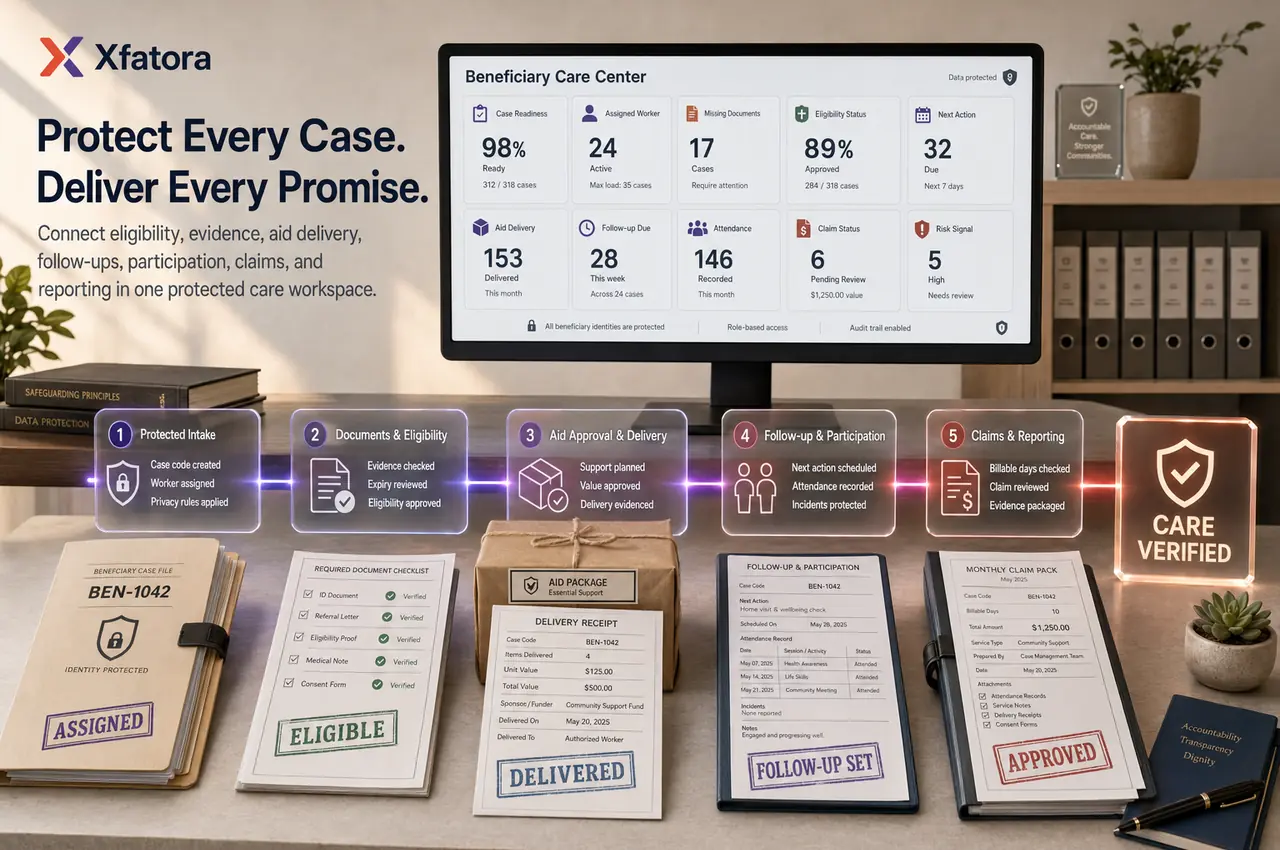
What this module helps you control
Required document checklists, missing evidence, expiry status, and renewal follow-up
Eligibility review, case readiness, risk signals, and next recommended actions
Aid delivery records with quantity, value, sponsor/funder context, and delivery status
Case notes, follow-ups, incidents, sensitive visibility controls, and audit history
Attendance, activities, program participation, residential care usage, and claims
Finance handoff for claims, invoice drafts, funding evidence, and management reporting
Reports for aid value, case backlog, missing documents, expired files, and service activity
Business outcomes teams expect
Give case workers one place to understand a beneficiary's status, missing documents, follow-ups, and aid history.
Reduce operational mistakes by showing case readiness, risk indicators, and next-best actions before teams move cases forward.
Protect sensitive beneficiary information with permission-aware visibility and audit logging.
Record aid deliveries with quantities, values, status, payer or sponsor context, and delivery history.
Improve compliance for residential care programs by connecting admissions, attendance, activities, and monthly claims.
Help managers spot unassigned cases, incomplete files, expiring documents, and pending aid deliveries faster.
Support finance teams with clearer claim preparation, billable day summaries, and invoice draft workflows.
Adapt the same module for charities, NGOs, donors, sponsors, municipalities, and protected beneficiary programs.
What teams use most in this module
Practical capabilities that make day-to-day execution faster, cleaner, and easier to govern.
Protected Beneficiary Case File
Keep each beneficiary as a protected case record rather than a customer record, with privacy-aware display rules and staff permissions.
Beneficiary code, status, assigned case worker, nationality, language, and age context
Sensitive name and date-of-birth masking for users without permission
Case file workspace with overview, documents, notes, aid, attendance, activities, claims, and timeline
Audit logging for sensitive profile access and important changes
Delete protection when dependent records exist
Case Readiness and Next Actions
Show staff what is missing before the case can move forward, so daily work becomes action-led instead of table-led.
Readiness percentage based on assignment, documents, notes, admission, attendance, aid, and payer context
Missing item list for incomplete files
Warnings for expired or risky records
Next action buttons such as upload document, assign worker, add note, or create admission
Status transition guidance for charity and residential-care workflows
Required Documents and Expiry Control
Track required documents by template and highlight missing, uploaded, expiring soon, or expired records.
Document checklist inside the case profile
Upload action beside missing document types
Visibility levels for restricted, sensitive, and public internal documents
Expiry status badges for expired and expiring documents
Download protection and path validation for uploaded files
Case Notes and Follow-up History
Capture social, legal, medical, education, general, and incident notes with visibility controls and case timeline context.
Note type badges for faster review
Incident notes highlighted for attention
Public internal versus restricted note visibility
Latest notes shown directly inside the beneficiary profile
Audit trail for case updates and sensitive access
Aid Delivery Management
Record planned, approved, delivered, or cancelled aid deliveries for financial aid, food baskets, medical support, education support, housing support, kits, supplies, and services.
Beneficiary-linked aid delivery records
Quantity, unit cost, total value, status, sponsor or payer, and project context
Auto-calculated total values from quantity and unit cost
Aid history visible inside the case file
Monthly aid value reporting for managers and finance teams
Residential Care, Admissions, and Attendance
Support reception centers and residential programs with admissions, centers, rooms, beds, daily attendance, and monthly summaries.
Center, room, and bed assignment context
Admission and exit dates
Daily presence and billable day tracking
Current month attendance summary inside the case profile
Residential care setup suitable for MSNA reception communities
Activities and Beneficiary Participation
Track beneficiary participation in social, legal, medical, education, training, integration, and support activities.
Activity type, date, provider, cost, and attendee records
Attendance status per beneficiary
Activity history inside the case profile
Useful for program reporting and social-care evidence
Supports both charity and residential-care programs
Claims, Finance, and Invoice Drafts
Connect operational records to finance through monthly claims, claim lines, billable days, and invoice draft support.
Monthly claim generation from attendance and admission context
Claim lines by beneficiary with present days, billable days, rate, and amount
Claim status tracking from draft to approval
Invoice draft integration for finance review
Claim and invoice visibility inside the beneficiary profile
Role-based Charity Dashboard
Give case workers, managers, and finance teams the queues they need without searching through every record.
Case worker view for my cases, missing documents, and planned aid deliveries
Manager view for unassigned cases, pending review, and high-risk incomplete cases
Finance view for draft claims, claims missing attendance, and aid value this month
Quick links into filtered operational lists
Setup and readiness visibility for growing teams
Start with this workflow
Follow these structured steps to launch one controlled process first, then expand.
Beneficiary care rollout readiness
1
Define beneficiary privacy rules, roles, case owners, and approval responsibilities
2
Prepare beneficiary categories, required document lists, aid types, activities, and funder references
3
Choose the first workflow to stabilize: intake, documents, aid delivery, follow-up, attendance, or claims
4
Test one real case from intake to document review, aid delivery, follow-up, and reporting
5
Review missing documents, overdue follow-ups, aid value, and claim evidence with management and finance
Charity Beneficiary Intake Workflow
1
Create beneficiary case file and assign a case worker
2
Select or apply the charity beneficiary template
3
Upload required eligibility documents
4
Review readiness score and missing items
5
Mark case eligible or active when internal requirements are met
6
Record aid delivery, follow-up notes, and reporting evidence
Aid Delivery Workflow
1
Select beneficiary and aid type
2
Record sponsor or payer context when applicable
3
Enter item description, quantity, unit cost, and total value
4
Set status as planned, approved, delivered, or cancelled
5
Review delivery history from the beneficiary profile
6
Use monthly reports to monitor delivered aid value
Residential Reception Workflow
1
Create protected beneficiary case file
2
Record admission, center, room, bed, and payer context
3
Upload referral, identity, legal, and medical documents
4
Record daily attendance and billable service days
5
Track activities and case notes during the stay
6
Generate monthly claims and prepare invoice drafts
Manager Review Workflow
1
Open dashboard queues for unassigned, pending, and incomplete cases
2
Review risk, readiness, and missing document indicators
3
Assign case workers or request missing information
4
Approve status transitions when cases are ready
5
Monitor aid delivery status and claim readiness
6
Use audit logs and reports for accountability
Who this module is for
Charity operations managers
Case workers and social workers
NGO program managers
Residential care and reception-center teams
Finance teams preparing claims and invoice drafts
Donor, sponsor, and funder reporting teams
Compliance and internal audit reviewers
Common problems this module helps solve
Beneficiary files are scattered across spreadsheets, paper folders, messages, and staff memory
Case workers cannot quickly see missing documents, expired evidence, or the next action
Aid delivery is recorded without enough proof, sponsor context, or delivery status
Sensitive beneficiary information is visible to staff who do not need access
Repeated beneficiary selection wastes time when adding notes, documents, or aid records
Attendance, activities, claims, and finance evidence are disconnected
Management cannot easily review backlog, overdue follow-ups, missing documents, and aid value
Finance teams receive claims or invoice drafts without clear supporting evidence
Where teams apply this module
Charities managing beneficiary eligibility, case review, documents, and aid delivery
NGOs and social programs that need controlled case records and service evidence
Residential care centers tracking attendance, activities, claims, and beneficiary history
Programs funded by sponsors, municipalities, government bodies, or charity funds
Case workers who need one profile for notes, evidence, follow-up, and aid history
Finance teams reviewing claims, invoice drafts, aid value, and supporting documents
Management teams reviewing service performance, backlog, risk, and audit readiness
Connected records across modules

Accounting: claims, invoice drafts, aid value, and funding evidence support finance review.

Document management: required documents, expiry, missing evidence, and renewal follow-up support case completeness.

CRM and contacts: funders, sponsors, partner organizations, or service providers can be referenced without treating the beneficiary as a customer.

Projects and programs: activities, support programs, and service delivery can be grouped for reporting.

Data Exporter: beneficiary operations, aid delivery, claims, and audit evidence can be exported for management review.
Built-in Reports & Analytics
Beneficiary case list by status, owner, risk, and readiness
Missing, expired, and expiring documents
Aid delivery summary by month, beneficiary, aid type, funder, or program
Follow-up backlog and overdue case actions
Attendance and activity participation reports
Claims, invoice draft, and finance evidence review
Sensitive access and audit log review
Program service summary for management and funders
FAQ
Is the beneficiary treated as a customer in Xfatora?
No. The beneficiary is treated as a protected case record. The paying entity can be a government body, municipality, donor, sponsor, or charity funder.
Can the module support both charities and residential care centers?
Yes. The module is designed around templates, including Charity Beneficiaries - KSA and MSNA Reception - Italy workflows.
Can staff see sensitive personal data?
Only staff with the right permission should see sensitive fields. Names, dates of birth, restricted documents, and sensitive notes can be protected.
Can we track required documents?
Yes. Required document checklists show what is uploaded, missing, expiring soon, or expired for each beneficiary case.
Can we record aid delivery values?
Yes. Teams can record aid type, description, quantity, unit cost, total value, sponsor or payer, status, issue date, and notes.
Can it support monthly claims?
Yes. Residential and service programs can use attendance and claim lines to prepare monthly claims and invoice drafts.
Can managers see incomplete cases?
Yes. Dashboard queues can show unassigned cases, pending review cases, missing documents, high-risk incomplete cases, and planned aid not delivered.
Can the module be used in Arabic and English?
Yes. The module and website content support Arabic and English, with Italian support available for MSNA reception use cases.
Is the beneficiary treated as a customer?
No. The beneficiary should be treated as a protected case record. The paying or funding party can be a sponsor, municipality, government body, charity fund, or other organization.
Can we track required beneficiary documents?
Yes. Required document checklists can show uploaded, missing, expiring, and expired evidence so case workers know what each file needs next.
Can aid delivery connect to finance?
Yes. Aid value, delivery evidence, claims, and invoice draft context can support finance review when the program requires funding or reimbursement evidence.
What should we prepare before a charity workflow demo?
Prepare one beneficiary case, required documents, one aid delivery example, one follow-up or incident, one attendance/activity example, and one claim or finance evidence example.
Plans that include this module
Confirm commercial fit before rollout planning.
Enterprise Plan
Ready to evaluate Charity beneficiary care ERP software with your team?
We will map this module to your current process, owners, controls, and rollout timeline.
Request a Demo
Tell us what you need and we will reply with a rollout plan and recommended modules.
Fields marked with * are required.