Lead capture, source tracking, ownership, qualification, and follow-up discipline
 Module
CRM and sales ERP software for lead-to-cash control
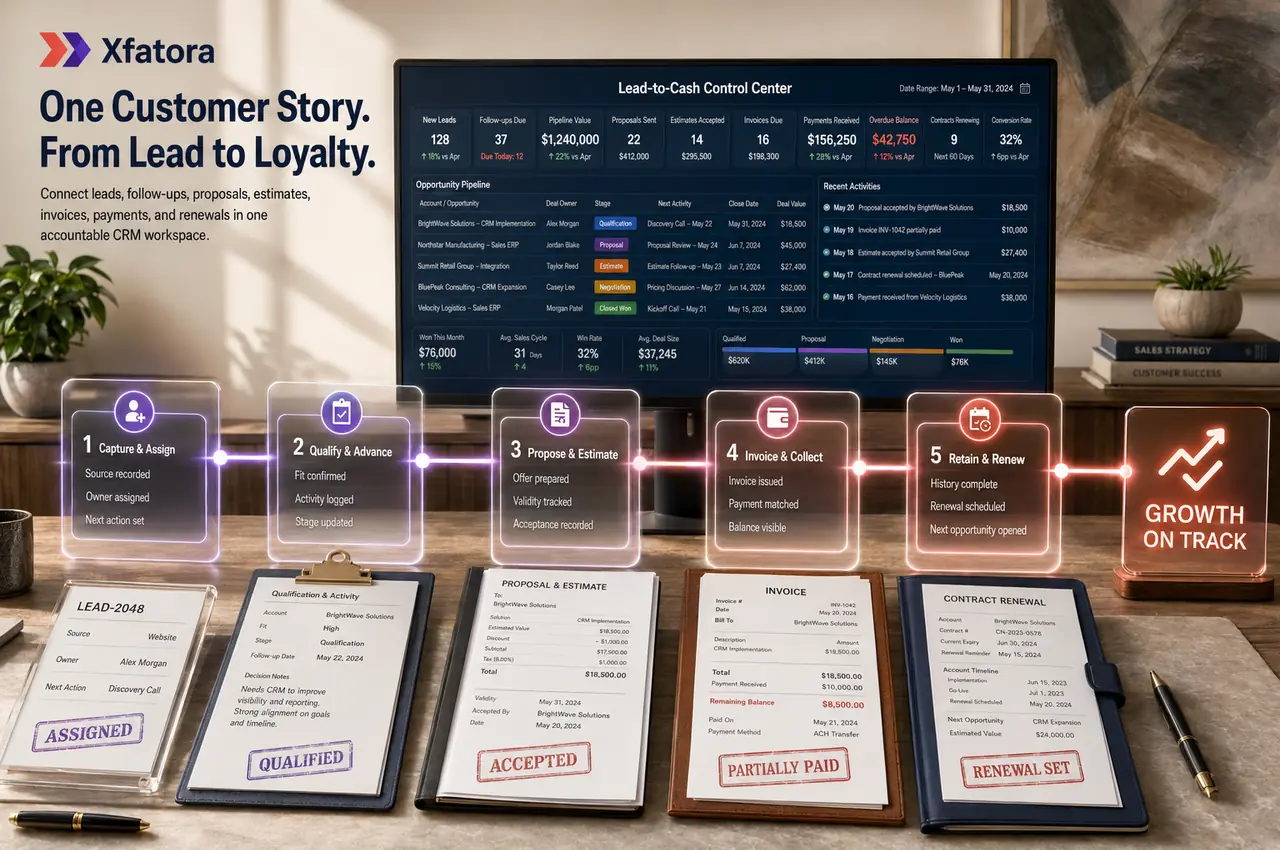
Control leads, customers, proposals, estimates, invoices, payments, contracts, and sales-finance handoffs from one lead-to-cash workspace.
Xfatora CRM and Sales gives teams one ERP workflow for lead ownership, customer history, quotes, estimates, invoices, payments, receivables visibility, and contract follow-up.
Approved app available now
Take Sales & CRM to the frontline.
Move leads, opportunities, follow-ups, and quotations forward from one organized mobile sales workspace.
What this module helps you control
Customer and contact master records with full relationship history
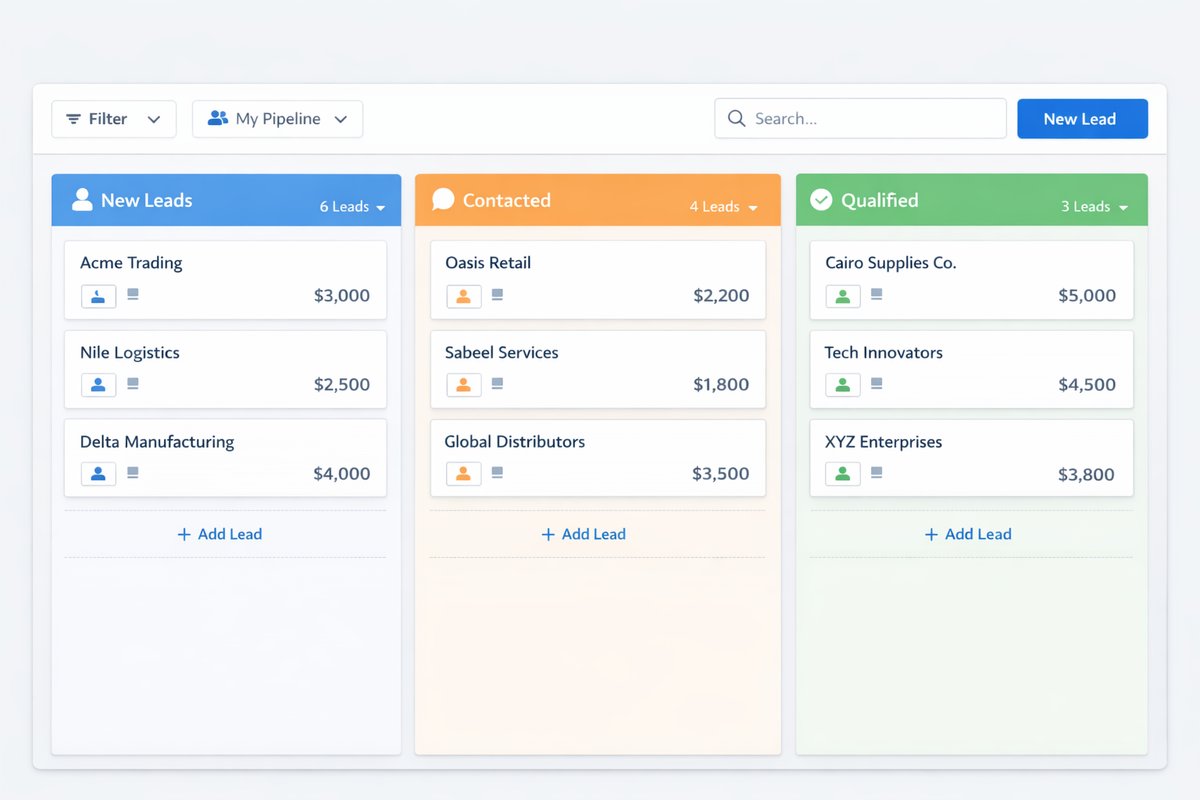
Pipeline stages, stale follow-up visibility, owner accountability, and management review
Proposals, estimates, validity, status, revisions, and customer acceptance flow
Estimate-to-invoice conversion with item, tax, discount, and commercial context
Invoice status, partial payments, overdue balances, and customer statement visibility
Credit notes, adjustments, and customer balance correction evidence
Contract lifecycle, expiry, renewal reminders, files, and account history
Sales-finance handoffs into accounting, receivables, ZATCA, and management reporting
Clean product/service item references for faster quoting and invoicing
Business outcomes teams expect
Keep one source of truth for customer-facing records across leads, customers, and commercial documents.
Clarify lead ownership and follow-up accountability across teams.
Move faster from proposal and estimate approval to invoicing.
Monitor unpaid, overdue, and partially paid invoices without manual reconciliation.
Control contract renewal timing with reminders and history.
Improve coordination between sales and finance using shared statuses and account history.
Strengthen account management with full customer timeline visibility.
Report performance by customer, source, status, and owner.
Reduce data fragmentation caused by spreadsheets and email-only follow-up.
Screenshots
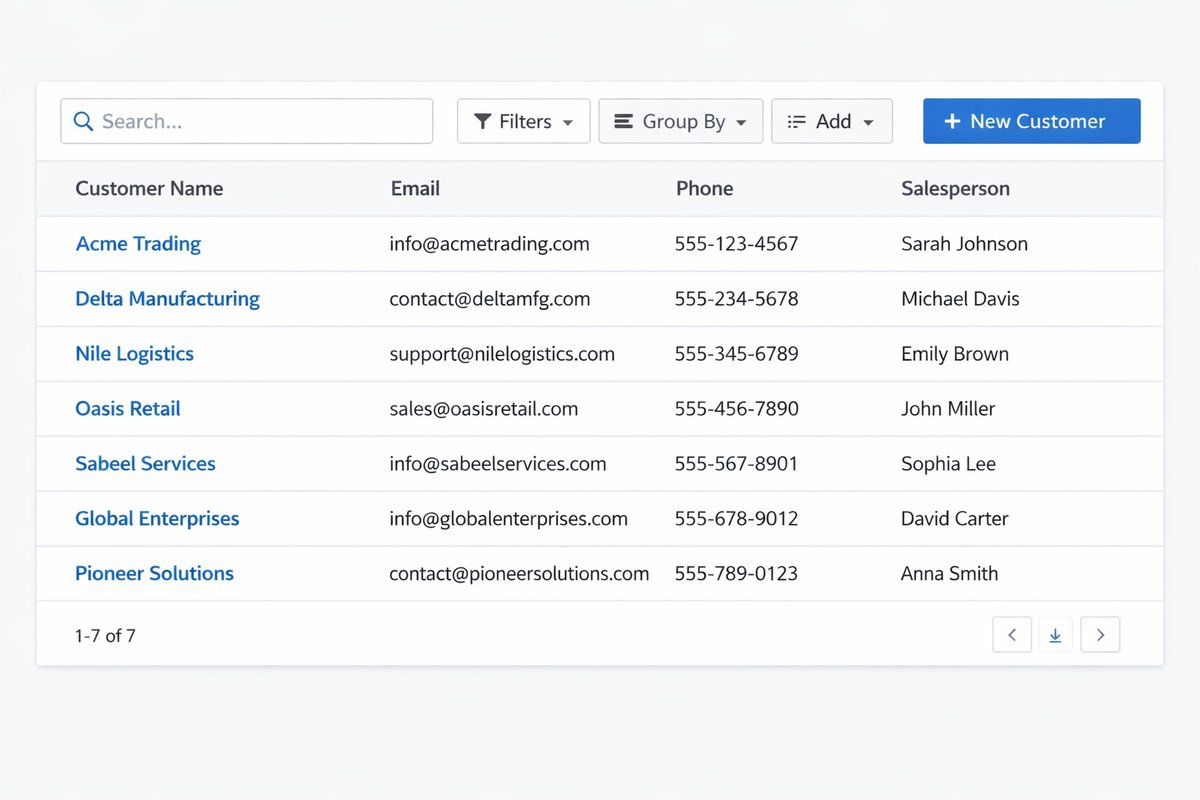
Real screens from the platform.
What teams use most in this module
Practical capabilities that make day-to-day execution faster, cleaner, and easier to govern.
Customers and Contacts
Maintain complete customer master records with linked contacts, notes, documents, and account history so every team works from the same relationship context.
Company and customer records in one profile
Multiple contacts per customer
Notes and timeline history for each account
Document association for commercial records
Segmentation and grouping for reporting
Leads and Qualification
Capture leads, track qualification progress, and enforce ownership from first inquiry through conversion into customer records.
Lead source and status tracking
Owner assignment by territory or team
Follow-up activity logging
Qualification path with stage updates
Lead-to-customer conversion
Pipeline and Opportunity Visibility
Use stage-based pipeline visibility to review opportunities daily, identify stale follow-ups, and give managers clear ownership views.
Stage-based movement for opportunity tracking
Owner clarity for each active deal
Stale follow-up visibility for better discipline
Daily pipeline review workflows
Manager visibility by owner and stage
Proposals
Prepare professional proposals, send them to customers, and track clear lifecycle status for follow-up and handoff.
Professional customer-ready proposals
Draft / sent / accepted / declined tracking
Reminders and follow-up controls
Customer-linked proposal history
Export and sharing support
Estimates
Generate item-based estimates with taxes and discounts, then track validity and move accepted estimates into invoicing.
Item-based estimates for products and services
Tax and discount handling
Validity and status management
Conversion into invoices
Email and export flow
Invoices and Payments
Issue invoices, track status, and record full or partial payments with clear customer-level visibility shared between sales and finance.
Invoice creation with customer linkage
Unpaid / paid / overdue / partial payment visibility
Payment recording with status updates
Customer statement visibility
Better sales-finance coordination
Credit Notes and Adjustments
Handle commercial adjustments with credit notes linked to invoices so balances stay accurate and auditable.
Credit notes linked to invoice records
Customer balance accuracy
Future invoice application
Audit visibility for finance and management
Contracts and Renewals
Track contract lifecycle from creation through renewal with dates, attachments, and reminders tied to each customer account.
Contract start and end dates
Attachment management
Renewal reminders
Expiry tracking
Renewal and closure handling with history
Items, Products, and Services
Maintain reusable items and service lines to speed estimate and invoice preparation with consistent pricing references.
Reusable items and services list
Faster estimate and invoice creation
Pricing consistency across documents
Cleaner quoting handoffs
Reporting and Sales Visibility
Use operational reporting to monitor lead performance, sales progress, invoice status, payment collections, and contract timing.
Sales by customer
Pipeline by source and stage
Invoice status visibility
Payments tracking
Conversion outcomes by owner and status
Start with this workflow
Follow these structured steps to launch one controlled process first, then expand.
CRM rollout readiness
1
Define lead sources, required fields, owners, and follow-up rules
2
Clean customer and contact records before migrating account history
3
Choose the first workflow to stabilize: lead follow-up, estimates, invoices, payments, or renewals
4
Test one real customer from lead capture to invoice and payment review
5
Review pipeline, overdue invoices, and contract renewals with sales and finance
Lead capture and qualification
1
Create or receive lead
2
Validate core details
3
Assign owner
4
Update lead source and status
5
Record follow-up activity
6
Qualify or disqualify
Lead to customer conversion
1
Confirm fit and readiness
2
Convert lead to customer
3
Create primary customer and contact records
4
Continue commercial process under customer account
Proposal and estimate follow-up
1
Prepare proposal or estimate
2
Send to customer
3
Log follow-up
4
Revise when required
5
Track acceptance or decline
6
Hand off to invoicing
Estimate to invoice to payment
1
Finalize approved commercial document
2
Issue invoice
3
Monitor payment status
4
Record partial or full payments
5
Review overdue balances
Contract lifecycle and renewal
1
Create contract
2
Set start and end dates
3
Attach files
4
Monitor expiry reminders
5
Renew or close with clean history
Who this module is for
Sales representatives managing leads, follow-ups, proposals, and estimates
Sales managers reviewing pipeline stage, owner performance, and stale deals
Account managers maintaining customer history, contacts, contracts, and renewals
Finance and collections teams reviewing invoice and payment status
Customer service or delivery teams needing one account history
Business owners tracking lead-to-cash visibility and revenue risk
Saudi and GCC teams that need customer and invoice data ready for e-invoicing
Common problems this module helps solve
Leads are captured in chat, email, spreadsheets, or staff memory without clear ownership
Sales teams miss follow-ups because pipeline stages and reminders are not enforced
Customer data, contacts, documents, and commercial history are scattered
Proposals and estimates are revised manually without clear status or expiry control
Accepted estimates do not move cleanly into invoices and payment follow-up
Finance cannot see enough sales context behind unpaid or partially paid invoices
Contracts renew late because expiry dates and account owners are not reviewed
Sales, support, delivery, and finance teams each keep a different customer record
ZATCA or e-invoicing readiness is weakened by incomplete invoice/customer data
Management lacks reliable conversion, pipeline, collection, and renewal visibility
Where teams apply this module
B2B sales teams moving from spreadsheet pipelines into controlled CRM
Service companies that quote, estimate, invoice, and collect through one workflow
Companies that need clear ownership from lead capture to customer conversion
Teams that need customer history shared between sales, finance, and delivery
Finance teams that need receivable and payment context connected to sales work
Organizations tracking contracts, renewals, recurring relationships, and account history
Companies preparing cleaner invoice data for ZATCA and e-invoicing workflows
Connected records across modules

Accounting: invoices, payments, credit notes, receivables, and customer balances support finance review.
ZATCA and e-invoicing: customer, invoice, tax, QR, XML, and evidence readiness depend on clean sales records.

Projects: accepted deals can become delivery work with customer context and billing expectations.

Inventory: stock availability can influence estimates, sales commitments, and delivery promises.
Procurement: customer commitments can create sourcing needs when items or services are not available.
Support Desk: customer issues and account history can be reviewed alongside commercial records.
Data Exporter: pipeline, invoice, payment, and customer history can support audits and management analysis.
Built-in Reports & Analytics
Lead source and campaign performance
Pipeline by stage, owner, value, and stale follow-up
Lead conversion outcomes and lost reasons
Proposals and estimates by status and expiry
Sales by customer, item, service, and period
Invoice status summary and unpaid invoice review
Payments received, partial payments, and overdue balances
Customer statement and account activity review
Credit notes and commercial adjustment review
Contract expiry, renewal, and account owner review
Compliance & Implementation Resources
Practical guides to help you rollout and validate workflows.
FAQ
Can we track multiple contacts per customer?
Yes. Customer profiles support multiple contact records tied to the same account history.
Can accepted estimates become invoices?
Yes. Accepted estimates can move directly into invoicing workflows.
Can finance teams review invoice and payment progress?
Yes. Invoice and payment statuses are visible for cross-functional review.
Can we track partial payments?
Yes. Partial payment recording is supported with remaining balance visibility.
Can contracts be linked to customers?
Yes. Contracts remain linked to customer records with dates, files, and reminders.
How do we avoid missed follow-ups?
Define ownership rules, enforce status updates, and use reminder-based review cadence.
Can managers review pipeline performance by owner and source?
Yes. Pipeline views and reports support owner/source performance analysis.
Can we keep customer history in one place?
Yes. Leads, contacts, proposals, estimates, invoices, payments, and contracts are tied to account records.
What happens when duplicate customers or leads exist?
Teams should follow a duplicate policy for detection, merge ownership, and audit notes.
How is CRM and Sales different from the Sales & Invoicing module page?
CRM and Sales focuses on lead-to-account relationship management plus commercial continuity, while Sales & Invoicing is centered on billing execution workflows.
How does CRM and Sales connect to Accounting?
Invoices, payments, credit notes, receivables, customer statements, and overdue balances should be shared with finance so collections and reporting are based on the same customer record.
How does CRM and Sales support ZATCA readiness?
Clean customer records, invoice data, tax setup, and sales-to-invoice discipline help reduce manual fixes before QR, XML, and e-invoicing evidence are reviewed.
What should we prepare before a CRM and Sales demo?
Prepare one lead, one customer, one proposal or estimate, one invoice, one payment or overdue balance, and one contract or renewal example.
Should CRM be implemented before Accounting?
It depends on the first business pain. If lead follow-up and invoice handoff are weak, start with CRM and Sales. If reporting confidence and close delay are worse, start with Accounting but connect CRM early.
Plans that include this module
Confirm commercial fit before rollout planning.
Growth Plan
Business Plan
Enterprise Plan
Ready to evaluate CRM and sales ERP software for lead-to-cash control with your team?
We will map this module to your current process, owners, controls, and rollout timeline.
User guide
How to use CRM and sales ERP software for lead-to-cash control
Setup checklist, key workflows, reports, and troubleshooting.
Talk to our solution team
Tell us what you need and we will reply with a rollout plan and recommended modules.
Fields marked with * are required.
Related content
Related Modules
AI Sales Assistant
Use AI-assisted calling and qualification workflows to improve first-contact consistency, lead follow-up, call summaries, and CRM handoff discipline.
Often fits plan: Field Service · Scale
Asset Management
Control asset records, custody, locations, maintenance, audits, depreciation, and lifecycle accountability from one controlled workspace.
Often fits plan: Field Service · Scale
Asset Management
Manage company assets, custody, locations, maintenance, audits, depreciation, and lifecycle accountability from one controlled workspace.
Related Use Cases
Accelerate Order to Cash
Connect sales, fulfillment, invoicing, and collections to reduce revenue leakage and improve cash conversion.
order-to-cash
revenue-operations
cash-flow
Control Production Costs
Tie material usage, labor capture, and overhead allocation to each production order for reliable margins.
manufacturing-management
costing
inventory-warehousing
Related Industries
ERP for Manufacturing Operations
Manufacturing ERP for production planning, MRP, inventory, quality, costing, and shop-floor control across growing factories.
manufacturing
mrp
production
ERP for Clinics and Outpatient Networks
Sector playbook covering pain points, workflows, module fit, and buying checklist for erp for clinics and outpatient networks.
industry
operations
erp
Related Guides
Build ZATCA audit trail controls for SMB finance teams
Practical guide for build zatca audit trail controls for smb finance teams with execution steps and buying support links.
zatca
saudi
compliance
ERP Implementation Playbook
A practical, phased guide to planning, launching, and scaling ERP adoption across teams with measurable outcomes.
implementation
operations
change-management