Export type selection by business dataset, owner, purpose, and review audience
 Module
Data exporter and CSV export management ERP software
Govern CSV exports, audit packs, reconciliation datasets, migration extracts, BI inputs, finance close packs, and sensitive data sharing from one controlled workflow.
Xfatora Data Exporter helps administrators, finance, operations, auditors, and BI teams extract structured CSV datasets across ERP modules with clear ownership, date windows, storage rules, and review discipline.
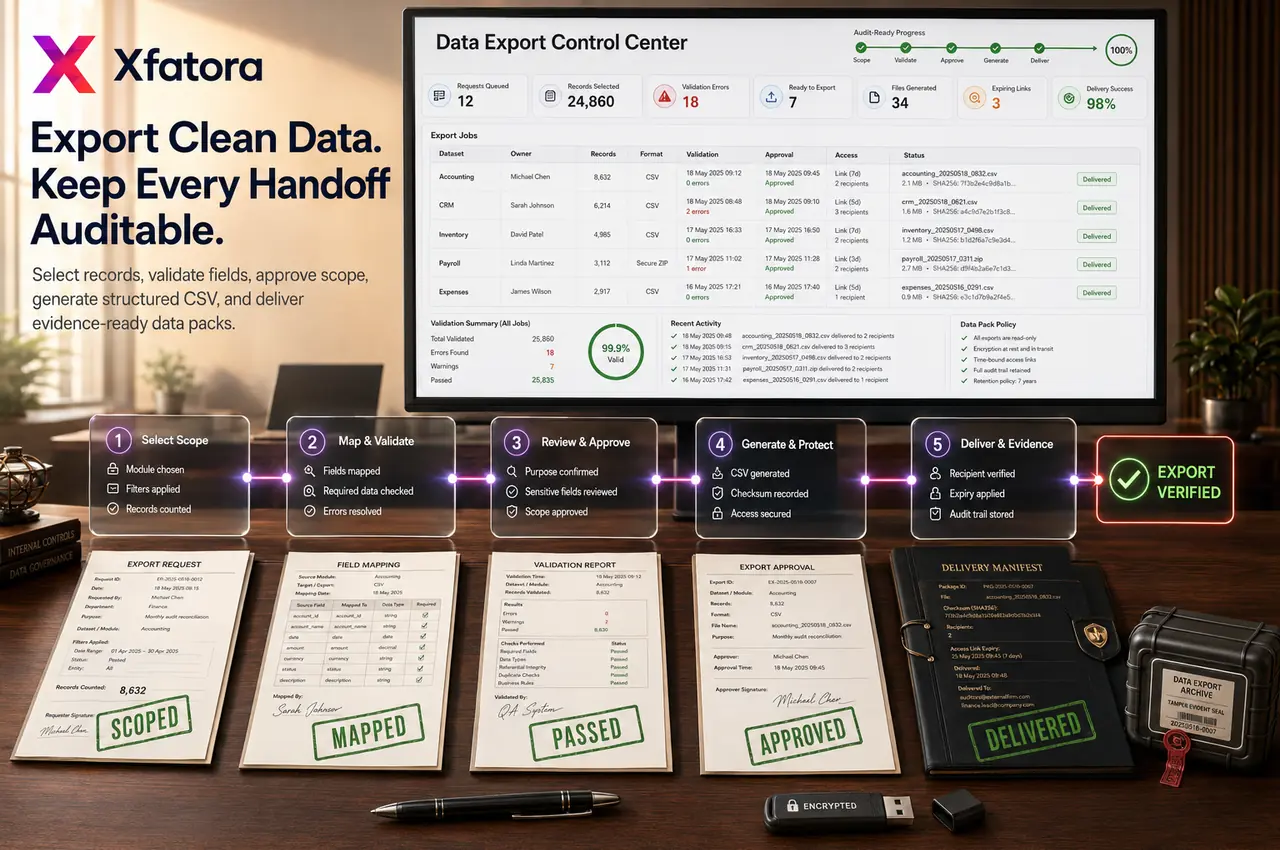
What this module helps you control
Standard periods, all-time extracts, last 3/6/12 months, and custom From Date / To Date windows
Admin-led export governance for sensitive financial, customer, supplier, HR, payroll, and operational data
Controlled CSV output for finance close, reconciliation, audit evidence, migration, BI, and management packs
Cross-module export consistency across CRM, accounting, procurement, inventory, HR, payroll, projects, support, manufacturing, fleet, and goals
File naming, storage location, retention period, sharing rules, and reviewer access discipline
Reconciliation between exported CSV files, in-system reports, and source records
Recurring monthly, quarterly, audit, migration, and exception-review export packs
Export request intake, approval, handoff, and post-export validation ownership
Data leakage and shadow-spreadsheet risk control
Business outcomes teams expect
Keep CSV exports consistent across modules so teams stop rebuilding extract logic in every department.
Reduce manual copy/paste and spreadsheet stitching when preparing operational or finance reviews.
Produce cleaner, structured inputs for Excel and BI workflows with less reformatting.
Collect audit evidence faster using repeatable datasets and controlled date windows.
Build month-end and quarter-end finance and reconciliation packs with clear dataset scope.
Share data in a more controlled way through admin-owned extraction and handling rules.
Standardize reporting windows using All Time, Last 3/6/12 Months, and From Date/To Date filters.
Support migration and data cleanup projects with consistent historical extracts.
Reduce dependence on ad hoc engineering or manual one-off data pulls.
Improve governance around who can export, where files are stored, and how sensitive records are distributed.
What teams use most in this module
Practical capabilities that make day-to-day execution faster, cleaner, and easier to govern.
Export Type Selection
Administrators choose the exact dataset required for each request using a consistent export interface across business areas.
Choose Export Type based on business purpose
Select from operational and finance-ready datasets
Use one consistent export flow across modules
Reduce selection errors with standardized naming
Support recurring monthly and quarterly extraction routines
Period and Date Filtering
Every export can be scoped with standard periods or custom dates so teams align review windows and audit boundaries.
All Time for complete historical extracts
Last 3 / 6 / 12 Months for recurring review cycles
From Date / To Date for custom audit and migration windows
Consistent time-scope control across export types
Easier cross-team comparison using standard period definitions
Cross-Module Data Coverage
Data Exporter supports repeatable extraction across many operating domains without duplicating how each module runs day to day.
CRM / Sales: customers, leads, invoices, and related records
Finance: payments, expenses, and finance-linked exports
HR / Payroll: employees, contracts, and Payroll Payslips
Procurement: vendors, orders, requests, quotations, Vendor Bills, Vendor Payments
Warehouse / Inventory, Manufacturing, Projects, Support, Knowledge Base, Goals / OKRs, and Fleet datasets
Finance and Reconciliation Export Packs
Finance teams can design recurring packs for close and reconciliation by exporting aligned monthly datasets.
Sales invoices for the selected period
Payments and expenses for reconciliation support
Vendor Bills and Vendor Payments when procurement-finance linkage is required
Controlled monthly folder and naming conventions
Repeatable evidence for reviewer sign-off
Audit and Compliance Exports
Prepare audit evidence packs with precise windows and dataset controls for internal reviewers and external auditors.
Precise extraction by fixed period or custom date window
Warehouse Stock Movements and stock-level evidence
HR, finance, vendor, and ticket-history support where required
Controlled sharing process with reviewers and auditors
Repeatable documentation habits across audit cycles
BI, Spreadsheet, and Analysis Readiness
CSV outputs provide a simple, structured format that teams can ingest into spreadsheets or BI tools for KPI review and management analysis.
CSV format keeps extraction simple and portable
Compatible with Excel and BI ingestion workflows
Supports KPI review across departments
Enables cross-team reporting without rebuilding extracts each cycle
Standardized structure improves repeatable analysis
Migration and Data Cleanup Support
Use Data Exporter to prepare baseline data extracts, perform quality checks externally, and validate corrections during migration projects.
Master-data review before migration activities
Historical extraction for cleanup and mapping work
Staged export cycles for phased rollouts
Validation exports after corrections are applied
Practical support for implementation and remediation teams
Admin Governance and Access Control
The module is admin-oriented because exported datasets can include sensitive operational and financial information.
Admin-led ownership of export execution
Controlled handling of sensitive datasets
Storage and retention rules for CSV archives
Request-and-share governance between teams
Safer internal and external distribution practices
Repeatable Functional Export Packs
Teams can define repeatable pack templates so recurring reporting and review processes run faster and with fewer errors.
Monthly finance close pack
Inventory audit pack for review windows
Support quality pack (tickets and replies)
HR review pack for employees, contracts, or payslips
Procurement spend pack for vendor and order analysis
Extensible Export Coverage
As additional Xfatora modules are enabled, export types can expand while preserving the same core behavior and output handling.
Add new export types without changing core process expectations
Keep output handling consistent across old and new datasets
Scale cross-module coverage as operating scope grows
Preserve governance practices while expanding dataset availability
Start with this workflow
Follow these structured steps to launch one controlled process first, then expand.
Data exporter rollout readiness
1
Choose the first three recurring export packs to govern instead of enabling every extract at once
2
Define the owner, requester, reviewer, purpose, period window, retention rule, and storage location for each pack
3
Test one finance pack, one operational pack, and one sensitive-data pack before broader rollout
4
Reconcile sample CSV files against in-system reports and source records
5
Agree how changes to fields, filters, naming, and downstream BI use will be approved
Export a dataset by period
1
Open Data Exporter
2
Choose Export Type
3
Choose a standard period or custom From Date / To Date range
4
Run Export
5
Download the CSV file
6
Store or share the file according to policy
Monthly finance export pack
1
Export sales invoices for the month
2
Export payments for the same month
3
Export expenses for the same month
4
Export Vendor Bills or Vendor Payments if required
5
Store all files in a controlled monthly pack
6
Use the pack for reconciliation and finance review
Inventory audit export pack
1
Export Warehouse Stock Movements for the audit window
2
Export Warehouse Stock Levels
3
Export Warehouse Locations if needed
4
Reconcile ending position with movement history
5
Flag anomalies for investigation
6
Archive the pack as audit evidence
HR or payroll review pack
1
Export HR Employees, HR Contracts, or Payroll Payslips as needed
2
Select the correct review period
3
Validate dataset completeness before sharing
4
Provide outputs only to authorized reviewers
5
Store files under retention and privacy rules
Migration or cleanup support export
1
Select the relevant master or transactional dataset
2
Export All Time or staged periods
3
Review duplicates and data gaps externally
4
Prepare cleanup actions
5
Repeat export after corrections for validation
Support or operations quality review
1
Export support tickets and replies
2
Analyze recurring issue categories and response patterns
3
Identify process or documentation gaps
4
Define operational improvements
5
Track the next review cycle with the same export pack structure
Who this module is for
Platform administrators who own export governance and execution
Finance reviewers who need controlled month-end and reconciliation packs
Audit and compliance teams requesting evidence windows
Operations leads reviewing cross-functional performance
BI and reporting teams consuming structured CSV inputs
Migration and implementation teams handling cleanup and validation
Department leads requesting governed extracts for periodic review
Common problems this module helps solve
Teams rebuild the same monthly exports manually with different field orders and filters
Finance, operations, and BI teams disagree because exported spreadsheets are not reconciled to source reports
Audit evidence is collected late from multiple owners instead of prepared as repeatable packs
Export access is too broad for sensitive customer, supplier, payroll, or financial records
CSV files are shared without clear retention, naming, folder, or reviewer rules
Migration and cleanup projects begin without trusted baseline extracts
Dashboards and exports are confused, so users treat offline spreadsheets as the source of truth
Departments request one-off data pulls from admins or developers without governance
Historical exports are too large because period windows and custom ranges are not used
Where teams apply this module
Finance close packs for invoices, payments, expenses, vendor bills, and reconciliation reviews
Audit evidence packs for internal review, external auditors, compliance checks, and exception investigations
Inventory and warehouse validation using stock levels, stock movements, locations, and stocktake windows
HR and payroll review packs for employees, contracts, payslips, attendance, and payroll evidence
Procurement analysis for vendors, purchase requests, purchase orders, quotations, bills, and vendor payments
CRM and sales analysis for customers, leads, invoices, proposals, payments, and account history
Migration and data cleanup projects needing baseline exports, duplicate detection, transformation, and validation
BI and spreadsheet analysis where controlled CSV inputs feed management dashboards
Support, projects, manufacturing, fleet, and OKR governance packs for periodic reviews
Connected records across modules

Core Accounting: finance exports support reconciliation, period close, audit packs, and management review while accounting remains the posting source of truth.

CRM and Sales: customer, lead, invoice, payment, proposal, and account history exports support revenue review and commercial analysis.
Procurement: vendor, purchase request, purchase order, quotation, bill, and vendor payment exports support spend and supplier review.

Inventory and Warehouse: stock levels, locations, and movement exports support stocktake, audit, and valuation review.
HR Payroll and People Records: employee, contract, payslip, payroll, and HR evidence exports support sensitive workforce review packs.

Manufacturing, Projects, Support, Fleet, and OKR: operational records can be exported as governed CSV slices for management and quality review.
Reporting and BI: CSV exports can feed spreadsheet and BI analysis, but they should not replace controlled dashboards or source records.
Built-in Reports & Analytics
Finance close export pack by period
Audit evidence pack by dataset and date window
Reconciliation pack comparing exports with source reports
Migration baseline and post-cleanup validation exports
Inventory stocktake and movement export pack
Procurement spend and vendor activity export pack
HR, people, payroll, and sensitive workforce export pack
CRM, sales, invoice, and collection review exports
Support, project, manufacturing, fleet, and OKR management packs
BI-ready CSV inputs for governed dashboard refreshes
Compliance & Implementation Resources
Practical guides to help you rollout and validate workflows.
FAQ
Who should have access to Data Exporter?
Access should stay primarily with administrators because exports can contain sensitive operational and financial data. Other teams should typically request controlled extracts through an admin owner.
Can we export by fixed periods and custom date ranges?
Yes. Use All Time, Last 3 / 6 / 12 Months, or custom From Date and To Date depending on whether the use case is recurring reporting or a specific audit/migration window.
Which modules can be exported?
Exports cover many business areas including CRM, finance, HR, procurement, warehouse/inventory, manufacturing, projects, support, knowledge base, goals/OKRs, and fleet based on enabled datasets.
Is Data Exporter intended for audits and compliance reviews?
Yes. It is commonly used to build repeatable audit evidence packs with controlled date windows and clear dataset scope.
Can finance use it for monthly close packs?
Yes. Finance teams can export aligned monthly datasets such as invoices, payments, expenses, and vendor-related records to support reconciliation and period-end review.
Can we use Data Exporter for migration or cleanup projects?
Yes. Teams frequently use historical and staged exports for baseline analysis, duplicate detection, transformation planning, and post-fix validation.
How should exported CSV files be stored and shared safely?
Use controlled storage, defined retention windows, clear naming conventions, and restricted sharing. Avoid uncontrolled distribution of sensitive raw files.
How is Data Exporter different from dashboards or in-app reports?
Data Exporter produces structured CSV outputs. Dashboards and in-app reports focus on on-screen metrics and visual monitoring. Teams often use both for different purposes.
How should this page differ from Reporting Dashboards content?
This page should focus on controlled extraction, governance, and reusable export packs. Reporting Dashboards content should focus on KPI visualization and in-app decision monitoring.
Should we keep both exports and csv-export-manager public pages?
No. Keep one public identity: Data Exporter. Treat CSV Export Manager as legacy/internal naming for the admin path and compatibility references only.
Should exports replace dashboards?
No. Dashboards and in-app reports support operational monitoring. Data Exporter provides controlled CSV outputs for audit, reconciliation, migration, BI, and external review.
Who should approve exported data?
The data owner should approve the export purpose and audience. Finance usually owns financial extracts, HR owns workforce extracts, and operations owns stock, delivery, support, and project extracts.
What should we prepare before a Data Exporter demo?
Prepare one recurring monthly export, one audit request, one sensitive dataset, one BI spreadsheet, and one mismatch between an exported file and an in-system report.
How do we reduce data leakage from CSV exports?
Limit export permissions, define approved recipients, store files in controlled folders, use retention rules, and avoid sharing raw exports through unmanaged channels.
Plans that include this module
Confirm commercial fit before rollout planning.
Enterprise Plan
Ready to evaluate Data exporter and CSV export management ERP software with your team?
We will map this module to your current process, owners, controls, and rollout timeline.
User guide
How to use Data exporter and CSV export management ERP software
Setup checklist, key workflows, reports, and troubleshooting.
Request a Demo
Tell us what you need and we will reply with a rollout plan and recommended modules.
Fields marked with * are required.
Related content
Related Modules
AI Sales Assistant
Use AI-assisted calling and qualification workflows to improve first-contact consistency, lead follow-up, call summaries, and CRM handoff discipline.
Often fits plan: Field Service · Scale
Asset Management
Control asset records, custody, locations, maintenance, audits, depreciation, and lifecycle accountability from one controlled workspace.
Often fits plan: Field Service · Scale
Asset Management
Manage company assets, custody, locations, maintenance, audits, depreciation, and lifecycle accountability from one controlled workspace.
Related Use Cases
Accelerate Order to Cash
Connect sales, fulfillment, invoicing, and collections to reduce revenue leakage and improve cash conversion.
order-to-cash
revenue-operations
cash-flow
Control Production Costs
Tie material usage, labor capture, and overhead allocation to each production order for reliable margins.
manufacturing-management
costing
inventory-warehousing
Related Industries
ERP for Manufacturing Operations
Manufacturing ERP for production planning, MRP, inventory, quality, costing, and shop-floor control across growing factories.
manufacturing
mrp
production
ERP for Clinics and Outpatient Networks
Sector playbook covering pain points, workflows, module fit, and buying checklist for erp for clinics and outpatient networks.
industry
operations
erp
Related Guides
Build ZATCA audit trail controls for SMB finance teams
Practical guide for build zatca audit trail controls for smb finance teams with execution steps and buying support links.
zatca
saudi
compliance
ERP Implementation Playbook
A practical, phased guide to planning, launching, and scaling ERP adoption across teams with measurable outcomes.
implementation
operations
change-management