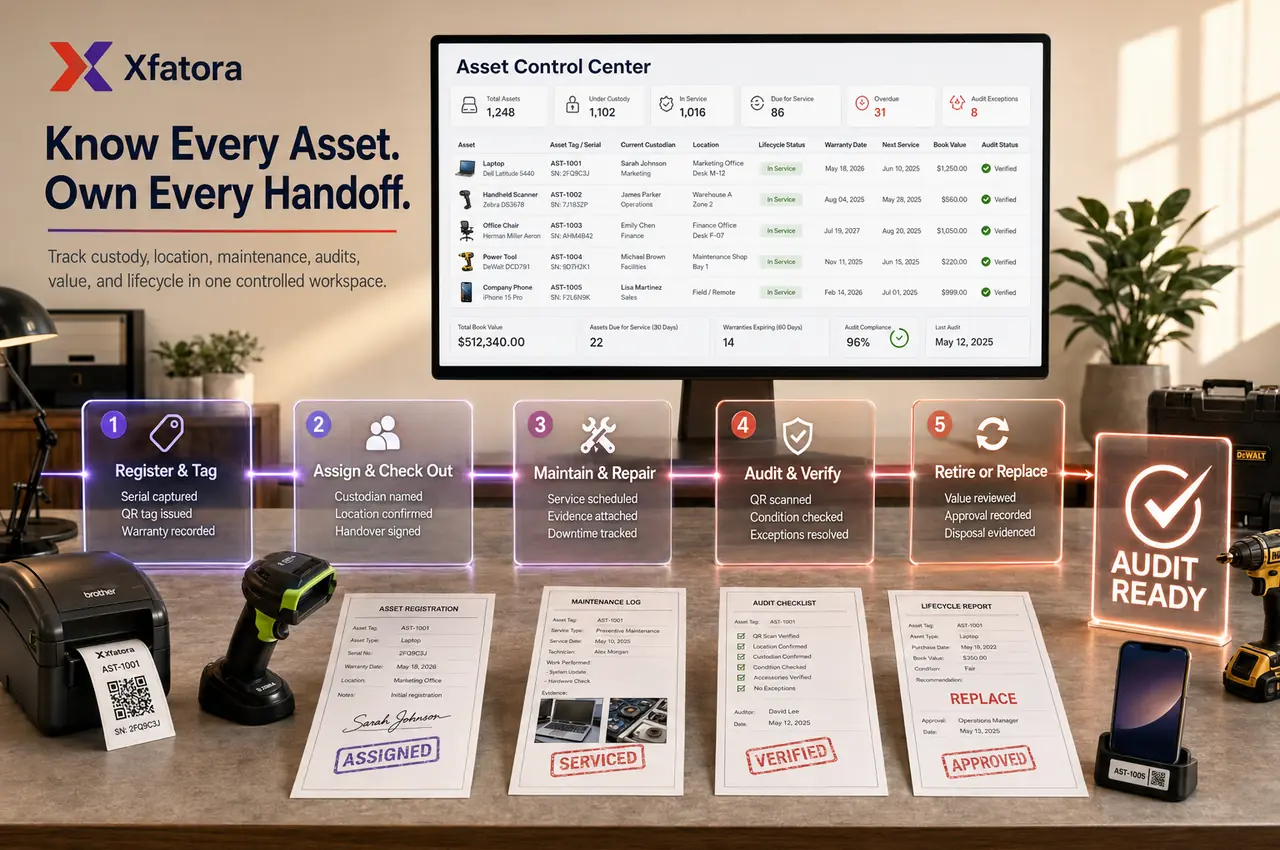
Asset register with asset name, asset tag, serial number, category, model, manufacturer, purchase date, warranty date, and supporting files
 Module
Asset management and fixed asset register ERP software
Control asset registers, custody, locations, maintenance evidence, audits, depreciation, warranty dates, disposal, and replacement planning.
Xfatora Asset Management helps operations, IT, facilities, procurement, finance, and audit teams govern company assets from purchase and custody through maintenance, depreciation, audit, disposal, and replacement planning.
Approved app available now
Take Assets to the frontline.
Manage the asset register, custody, locations, documents, and asset status from a field-ready app connected to XFatora.
What this module helps you control
Location, branch, department, project, site, and responsible owner visibility
Custody check-out, check-in, transfer, return, handover notes, and current holder accountability
Maintenance, repair, calibration, inspection, downtime, service cost, and maintenance evidence
Audit rounds, bulk audit, serial verification, QR verification, missing asset review, and exception closure
Depreciation, current value, useful life, disposal, write-off, replacement planning, and finance review
Accessories, consumables, components, licenses, predefined kits, and related controlled items
Procurement-to-asset handoff after purchase, supplier context, invoices, and capitalization review
Warranty Management handoff for warranty dates, serial numbers, maintenance history, and service evidence
Data export and management reporting for custody, audit, value, maintenance, and lifecycle decisions
Business outcomes teams expect
Keep one controlled source of truth for company Assets and related custody records.
Improve accountability by showing clearly who currently holds each asset.
Strengthen location and assignment visibility across branches, floors, and facilities.
Reduce loss from undocumented transfers and untracked handovers.
Enforce cleaner check-out/check-in discipline with expected return control.
Maintain reliable maintenance and service history for operations and IT teams.
Improve audit readiness with serial, QR, and Bulk Audit verification workflows.
Support cleaner finance review with purchase cost, depreciations, and current value visibility.
Manage Licenses and related controlled items in one broader asset-control workspace.
Track lifecycle decisions from acquisition and deployment through retirement and replacement.
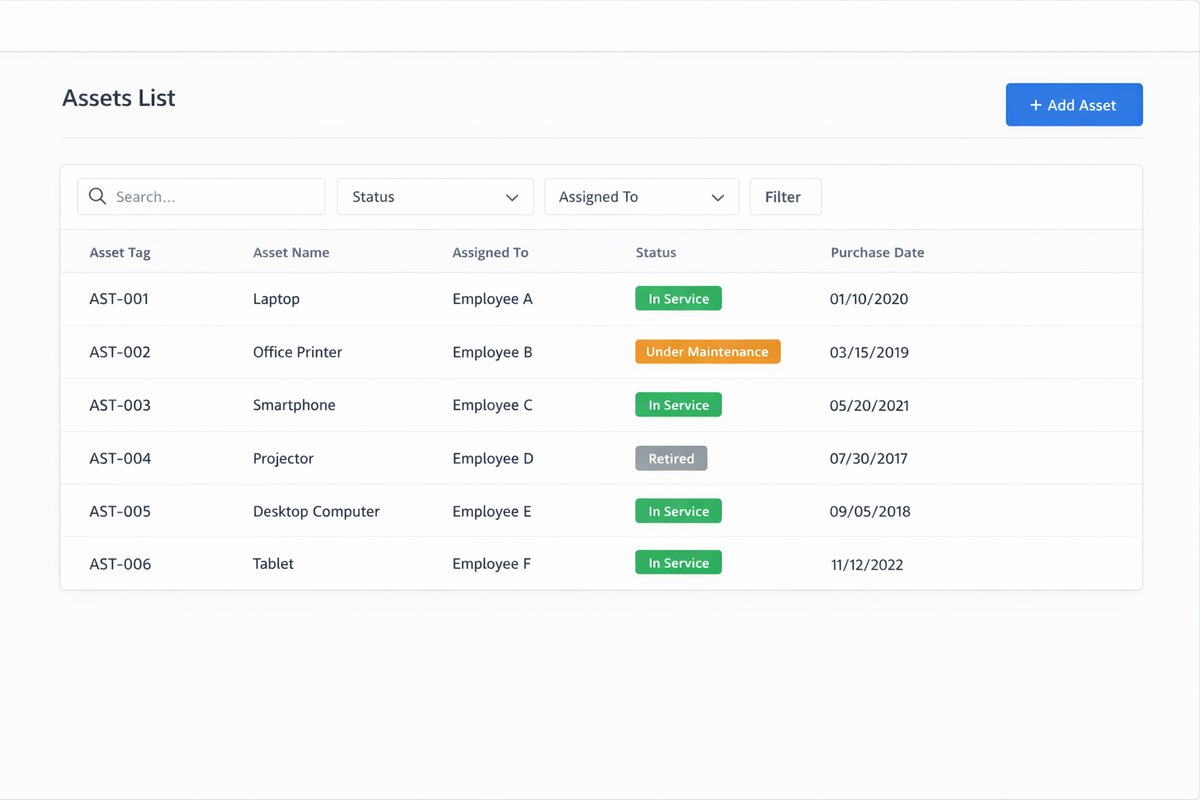
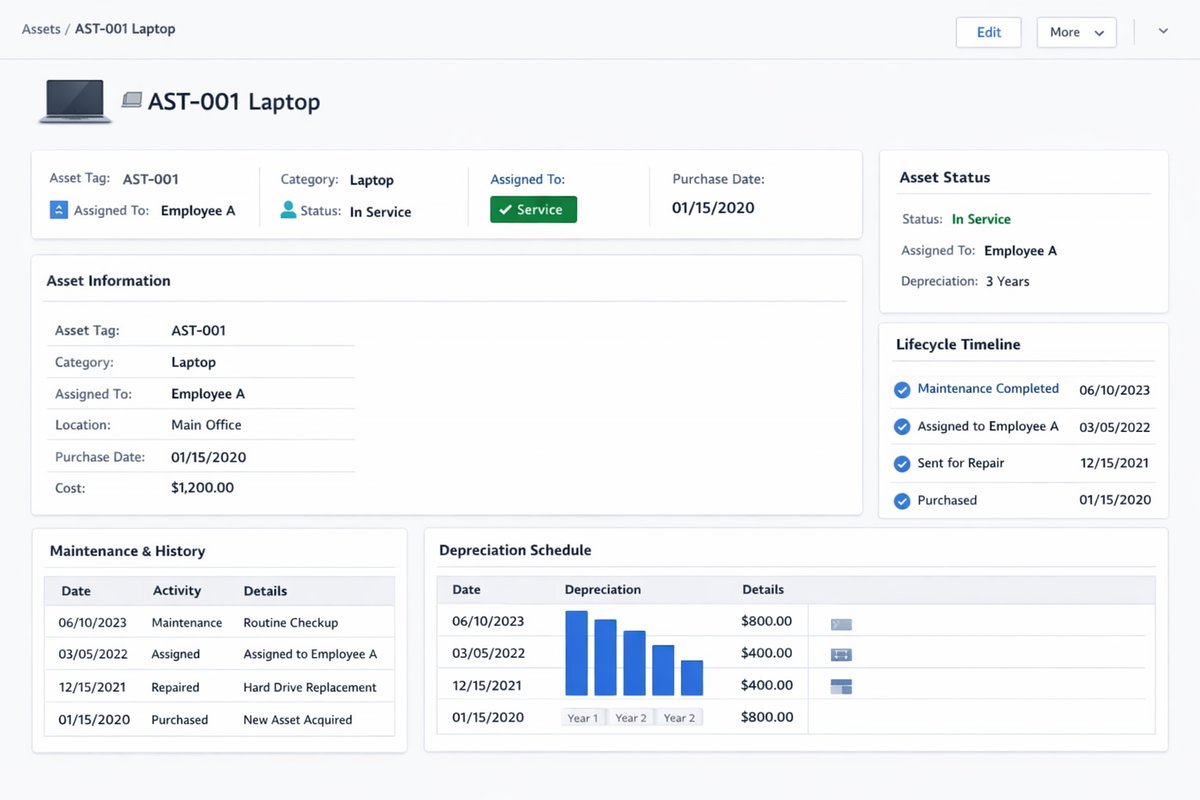
Screenshots
Real screens from the platform.
What teams use most in this module
Practical capabilities that make day-to-day execution faster, cleaner, and easier to govern.
Asset Register and Asset Records
Create a searchable master record for every asset so operations, IT, facilities, and finance teams review the same information before assignment, maintenance, or retirement decisions.
Asset register with standardized fields
Asset name and Serial Number tracking
Purchase date and purchase cost visibility
Warranty and warranty expires dates
Descriptions, notes, and attached files
Searchable master record for lifecycle review
Categories, Models, Manufacturers, and Status Labels
Standardize classification so reporting, approvals, and lifecycle decisions stay consistent across departments and sites.
Categories and Models setup
Asset Manufacturers master records
Status Labels for lifecycle control
Cleaner classification for reports
Deployable, pending, maintenance, or archived style states
Locations and Ownership Context
Track where assets are placed and who is operationally responsible, including branch/site context needed for audits and transfers.
Locations and default location assignment
Parent location structure where used
Responsible manager or ownership context
Site-level visibility for distributed teams
Asset placement tracking over time
Assignment, Check-out, and Check-in
Control custody with traceable issue/return history so teams can confirm who has each item and when it should be returned.
Check-out to user, team, or department
Check-in/Check-out timeline history
Expected check-in date governance
Handover and return notes/evidence capture
Current holder visibility for accountability
Requests and Approval Flows
Support controlled issuance for requestable assets/models with separation between requester, approver, and custodian.
Requestable assets or models
Request management and approval requests
Controlled issuance before handover
Role separation for sensitive equipment
Governed handover trail for compliance review
Maintenance, Repair, and Service History
Keep complete maintenance logs so teams can plan downtime, validate service quality, and preserve repair evidence.
Maintenance records by asset
Repair, upgrade, calibration, or support activity types
Start date, completion date, and service cost
Service documents and maintenance history
Better uptime decisions through full visibility
Audit, Bulk Audit, and QR Verification
Run periodic asset verification programs with structured audit tracking and faster field checks using QR and serial references.
Audit management with auditor assignment
Bulk Audit execution for larger inventories
Audit dates, progress, and exception status
Scan QRcode for on-site verification
Print QR code for labeling and audit rounds
Depreciation and Value Visibility
Provide a controlled view of depreciations and value movement to support finance review and end-of-life planning.
Depreciations linked to purchase cost
Current value and monthly depreciation visibility
Value review during close and budgeting cycles
Replacement or retirement planning support
Shared context for operations and finance
Files, Evidence, and Asset History
Attach supporting evidence to each record so audits and approvals can verify handovers, repairs, and retirement actions.
Upload image and attach file support
Handover and return evidence retention
Maintenance reports and service attachments
Asset history timeline for traceability
Audit-supporting record retention
Licenses Management
Track software and entitlement records as part of broader controlled-asset governance for digital resources.
Licenses and product keys
Seats and allocation visibility
Licensed to user/email/name references
Expiration or termination tracking
Software asset control in the same workspace
Accessories, Consumables, Components, and Predefined Kits
Manage related controlled items that support core assets so teams can track quantity, usage, and readiness together.
Accessories with assignment context
Consumables quantity and remaining balances
Components usage and replacement control
Predefined Kits for faster standardized deployment
Broader controlled-asset ecosystem visibility
Reports and Dashboards
Use operational and finance reporting views to monitor inventory health, custody status, service activity, and value trends.
Dashboard with total assets and recent activity
Assets by status and asset categories
Inventory report and unaccepted assets visibility
Maintenance and audit performance review
Decision support for operations and finance leaders
Start with this workflow
Follow these structured steps to launch one controlled process first, then expand.
Asset management rollout readiness
1
Prepare a sample of twenty assets across categories, locations, departments, and custody owners
2
Include one purchase-to-asset case, one custody transfer, one maintenance event, one disposal scenario, and one audit exception
3
Define required fields: asset tag, serial number, category, location, owner, purchase date, cost, status, warranty date, and useful life
4
Agree ownership between procurement, operations, IT/facilities, HR, finance, and audit
5
Test reports for custody exposure, maintenance history, audit exceptions, depreciation review, and replacement planning
Register a new asset
1
Create asset record
2
Assign category, model, manufacturer, and location
3
Set Serial Number or asset tag
4
Add purchase and warranty details
5
Attach files and supporting evidence
6
Save and verify reporting visibility
Check-out an asset to a user or team
1
Open asset record
2
Choose check-out target
3
Set date and expected check-in date
4
Capture notes and evidence
5
Confirm status change
6
Verify custody history
Return or check-in an asset
1
Open assigned asset
2
Record return/check-in
3
Validate condition and notes
4
Update location and Status Labels
5
Attach handover or inspection evidence
6
Confirm item is available or moved to maintenance/storage
Transfer an asset between people or locations
1
Identify current holder/location
2
Choose new holder/location
3
Record effective date and reason
4
Confirm transfer
5
Update status and accountability
6
Verify history is preserved
Maintenance and repair workflow
1
Flag asset for maintenance
2
Create maintenance record
3
Set maintenance type, dates, and cost
4
Attach service report
5
Complete repair/upgrade/calibration
6
Return asset to active or assigned state
Audit and verification workflow
1
Create audit request
2
Assign approver/auditor
3
Verify assets by Serial Number, QR, or location
4
Adjust findings or status where needed
5
Close audit
6
Review exceptions and missing assets
Depreciation and retirement review
1
Review value and depreciation status
2
Identify fully depreciated or end-of-life assets
3
Decide retain, replace, or retire
4
Record retirement reason and date
5
Preserve searchable history
6
Include items in close or annual review
Who this module is for
IT asset custodians
Operations and facilities teams
Equipment administrators
Finance reviewers
Approvers and compliance reviewers
Department managers
Leadership teams that need custody and audit visibility
Common problems this module helps solve
Assets are tracked in spreadsheets that finance, operations, IT, and facilities do not fully trust
Teams know an item was purchased but cannot confirm where it is or who currently holds it
Handover between employees, branches, departments, or projects happens without evidence
Maintenance history, repair cost, service reports, and warranty dates are scattered outside the asset record
Audits take too long because serial numbers, QR labels, locations, and status labels are inconsistent
Finance cannot easily connect purchase cost, depreciation, disposal, write-off, and replacement decisions
Procurement buys equipment, but the post-acquisition asset lifecycle is not governed
Low-value items are over-tracked while high-risk assets are missing custody or maintenance controls
Replacement planning happens late because current value, downtime, repair history, and audit exceptions are not reviewed together
Where teams apply this module
Fixed asset register for equipment, laptops, devices, furniture, tools, vehicles, licenses, accessories, components, and controlled items
Employee and department custody tracking for check-out, check-in, return, transfer, and handover evidence
Branch and site asset visibility for multi-location companies
Maintenance and repair history for assets where downtime, warranty, or service evidence matters
Finance review for capitalization, depreciation, current value, disposal, write-off, and replacement planning
Audit and physical verification using serial numbers, QR codes, bulk audit, and exception tracking
Procurement-to-asset handoff when purchases become controlled assets after acquisition
Warranty and service evidence support when serial numbers, warranty dates, and maintenance history affect claims
Connected records across modules
Procurement: purchase requests, purchase orders, supplier context, and acquisition evidence can become governed asset records.

Accounting: capitalization, depreciation, disposal, current value, write-off, and reporting context support finance review.
HR Records: employee custody, onboarding, offboarding, and asset handover can be coordinated with people records.
Projects and Services: assets assigned to jobs, sites, or delivery teams can keep custody and return history.
Fleet Management: vehicles can connect operating history and assignments with broader asset lifecycle and depreciation review.

Warranty Management: serial numbers, warranty dates, maintenance history, and service evidence support warranty eligibility and claims.
Inventory and Warehouse: stock movement and controlled items can be separated from long-lived assets and custody records.

Data Exporter: asset registers, custody, maintenance, audit exceptions, and value review packs can be exported for management.
Built-in Reports & Analytics
Asset register completeness by category, location, owner, serial number, and status
Assets by status: active, assigned, pending, under maintenance, retired, disposed, replaced, or lost
Assets by location, branch, department, project, site, or current holder
Currently checked-out assets and overdue return exposure
Transfers, check-in/check-out history, handover evidence, and unaccepted assets
Maintenance, repair, inspection, downtime, service cost, and warranty-related service evidence
Audit progress, missing assets, unresolved exceptions, QR verification, and serial verification results
Depreciation, current value, useful life, end-of-life, disposal, write-off, and replacement planning
Licenses, accessories, consumables, components, and predefined kit usage
Asset management review pack for operations, finance, procurement, HR, IT, and leadership
Compliance & Implementation Resources
Practical guides to help you rollout and validate workflows.
Asset Management Implementation Checklist
Prepare categories, custody rules, maintenance tracking, audit processes, finance review, and rollout priorities.
Read guideERP Implementation Playbook
Roll out asset governance controls with clear ownership, approval, and audit checkpoints.
Read guideReporting Dashboards Guide
Define operational and finance review cadence for asset status, maintenance, and value decisions.
Read guideFAQ
Can we track who an asset is assigned to?
Yes. Asset records keep assignment and custody history so teams can see who currently holds each item and when handovers occurred.
Can we manage locations and Status Labels?
Yes. You can manage Locations and Status Labels to control placement visibility and lifecycle state governance.
Can we record maintenance and service history?
Yes. Maintenance records support dates, types, service cost, notes, and evidence attachments for each asset.
Can we audit assets with serial or QR verification?
Yes. Audit workflows support Serial Number validation, Scan QRcode checks, and Bulk Audit execution.
Can we track depreciations and value information?
Yes. Purchase cost, depreciations, monthly movement, and current value visibility support finance review and replacement planning.
Can we manage software licenses in the same module?
Yes. Licenses can be governed in the same controlled workspace with seats, product keys, and expiration tracking.
Can we control Accessories, Consumables, and Components?
Yes. The module supports related controlled items including Accessories, Consumables, Components, and Predefined Kits where used.
Can we request and approve asset assignment?
Yes. Request and approval workflows support controlled issuance with role separation between requester, approver, and custodian.
How should this page differ from Inventory?
Asset Management focuses on asset custody, lifecycle history, maintenance, audit, and depreciations, while Inventory focuses on stock balances and item movement control.
How should this page differ from Procurement or Core Accounting?
Procurement governs buying and supplier commitments, Core Accounting governs financial posting and statements, and Asset Management governs post-acquisition custody and lifecycle control.
Is Asset Management different from Inventory?
Yes. Inventory controls stock balances and item movement. Asset Management controls long-lived or governed items with custody, lifecycle, maintenance, audit, depreciation, warranty, and disposal context.
Should every item be tracked as an asset?
No. Track an item as an asset when custody, value, warranty, audit, depreciation, maintenance, compliance, or operational risk justifies lifecycle control.
Who owns asset data after go-live?
Finance usually owns accounting rules, while operations, IT, or facilities own location, usage, maintenance, and custody updates. Procurement owns acquisition context.
Can asset management help with warranty claims?
Yes. Serial numbers, warranty dates, maintenance history, service evidence, and asset condition can support warranty eligibility and claim review.
What should we prepare before an Asset Management demo?
Prepare twenty sample assets across categories, plus one purchase, one transfer, one maintenance event, one disposal scenario, and one audit exception.
Plans that include this module
Confirm commercial fit before rollout planning.
Business Plan
Enterprise Plan
Ready to evaluate Asset management and fixed asset register ERP software with your team?
We will map this module to your current process, owners, controls, and rollout timeline.
User guide
How to use Asset management and fixed asset register ERP software
Setup checklist, key workflows, reports, and troubleshooting.
Talk to our solution team
Tell us what you need and we will reply with a rollout plan and recommended modules.
Fields marked with * are required.
Related content
Related Modules
AI Sales Assistant
Use AI-assisted calling and qualification workflows to improve first-contact consistency, lead follow-up, call summaries, and CRM handoff discipline.
Often fits plan: Field Service · Scale
Asset Management
Control asset records, custody, locations, maintenance, audits, depreciation, and lifecycle accountability from one controlled workspace.
Attendance and Leave
Manage attendance exceptions, leave requests, approvals, employee availability, payroll cutoffs, and HR reporting from one workflow.
Related Use Cases
Accelerate Order to Cash
Connect sales, fulfillment, invoicing, and collections to reduce revenue leakage and improve cash conversion.
order-to-cash
revenue-operations
cash-flow
Control Production Costs
Tie material usage, labor capture, and overhead allocation to each production order for reliable margins.
manufacturing-management
costing
inventory-warehousing
Related Industries
ERP for Manufacturing Operations
Manufacturing ERP for production planning, MRP, inventory, quality, costing, and shop-floor control across growing factories.
manufacturing
mrp
production
ERP for Clinics and Outpatient Networks
Sector playbook covering pain points, workflows, module fit, and buying checklist for erp for clinics and outpatient networks.
industry
operations
erp
Related Guides
Build ZATCA audit trail controls for SMB finance teams
Practical guide for build zatca audit trail controls for smb finance teams with execution steps and buying support links.
zatca
saudi
compliance
ERP Implementation Playbook
A practical, phased guide to planning, launching, and scaling ERP adoption across teams with measurable outcomes.
implementation
operations
change-management