@ mentions for users, owners, managers, and internal teams inside live business records
 Module
Smart mentions and record-level collaboration ERP software
Mention teammates, reference records, and keep follow-up, decisions, blockers, ownership, and escalation inside the business record where work happens.
Xfatora Smart Mentions helps sales, finance, projects, support, HR, operations, and managers keep internal collaboration attached to CRM records, invoices, expenses, tasks, tickets, approvals, and operational workflows.
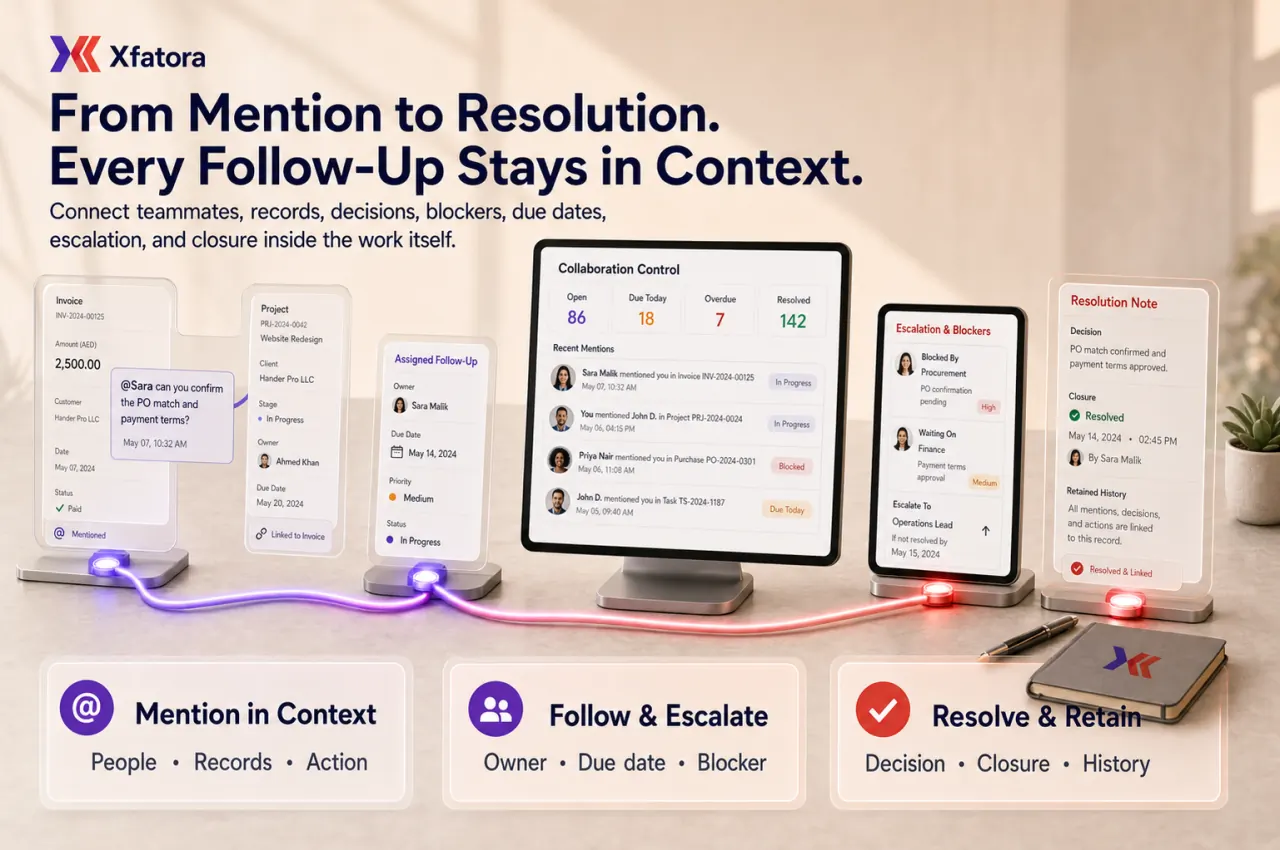
What this module helps you control
# references for projects, invoices, customers, estimates, contracts, expenses, leads, proposals, tickets, tasks, and related records
Notes, comments, posts, requests, replies, decisions, blockers, and closure updates attached to the source record
Record-level collaboration history for sales, finance, projects, support, HR, procurement, inventory, expenses, and operations
Ownership, urgency, due date, expected outcome, and escalation context inside the same thread
Open, resolved, overdue, repeated, and escalated follow-up visibility for managers
Mention governance rules that prevent notification noise and keep requests actionable
Operational review outputs for coaching, response discipline, adoption, and blocked handoff analysis
Business outcomes teams expect
Reduce context loss by keeping requests and replies attached to the exact record that needs action.
Improve follow-up ownership by tagging one accountable owner instead of broadcasting vague requests in chat.
Move faster across sales, finance, projects, support, HR, and operations without copying context between tools.
Make blockers and decisions easier to review because the discussion stays beside the customer, invoice, project, ticket, expense, or task.
Strengthen handoffs with a visible history of who was asked, what was requested, and what changed.
Reduce notification noise by defining when to mention, who to mention, and when to convert a mention into a task or approval.
Give managers a practical way to review unresolved mentions, delayed responses, repeated blockers, and collaboration bottlenecks.
Support adoption across existing modules as a lightweight collaboration layer rather than a separate chat system.
What teams use most in this module
Practical capabilities that make day-to-day execution faster, cleaner, and easier to govern.
@ Mentions for People and Teams
Tag the right owner directly where the work is happening, so responsibility is visible in the record context.
Mention users while writing notes, comments, or posts
Assign direct ownership for a question, review, blocker, or follow-up
Clarify urgency, expected outcome, and due date in the same thread
Reduce broad messages to groups when one accountable owner is needed
Preserve who was tagged and why
# References for Business Records
Reference related records inline so discussions stay tied to the right business objects and dependencies.
Reference projects, invoices, customers, estimates, contracts, expenses, leads, proposals, tickets, and tasks
Keep dependencies visible in the collaboration text
Jump from discussion to the affected record faster
Reduce ambiguity around which document or workflow needs action
Preserve cross-record context for reviewers
Notes, Comments, and Posts
Keep request-and-response history in the working record instead of moving decisions into side channels.
Mention activity inside notes, comments, and posts
Contextual decision history
Clearer follow-up during handoffs
Record-level comments connected to actual work
Continuity when ownership changes
Record-Level Collaboration
Anchor collaboration to the source record so every reviewer can understand the background before acting.
Collaboration attached to CRM, finance, project, HR, support, and operations records
Better continuity across lifecycle stages
Less searching across chat and spreadsheets
Clearer accountability between departments
Shared context for multi-team execution
Escalation and Blocker Follow-up
Route blocked work to the right owner with the decision, dependency, deadline, and record context visible.
Escalate blockers without copying long background messages
Reference the affected record or dependency
Keep escalation and resolution in the same thread
Support urgent and time-sensitive follow-up
Review unresolved blockers by owner or team
Governance and Usage Rules
Define usage standards so mentions improve accountability without becoming noisy notifications.
When to mention and when not to mention
When a mention should become a task, ticket, or approval
Message standards for owner, action, urgency, due date, and outcome
Avoid mentioning everyone when one owner is accountable
Manager coaching for adoption quality
Reports and Review Outputs
Review mention behavior and response quality to improve collaboration discipline over time.
Mention volume by user, team, module, and record type
Open vs resolved follow-up threads
Overdue and repeated blockers
Response-time trends by team or workflow
Collaboration review packs for managers
Start with this workflow
Follow these structured steps to launch one controlled process first, then expand.
Smart Mentions rollout readiness
1
Prepare five lost follow-up examples: sales-finance, project blocker, support escalation, HR approval, and expense or invoice clarification
2
Select the first record types where mentions are allowed
3
Define mention message format: owner, action, urgency, due date, expected outcome
4
Agree when mentions should convert to a task, approval, or ticket
5
Review unresolved mentions after the first two weeks and adjust usage rules
Mention a teammate on a record
1
Open the record that needs action
2
Add a note, comment, or post
3
Mention the accountable teammate
4
Write the requested action and due date
5
Keep replies and closure updates in the same record
Reference a related business record
1
Open the current comment or note area
2
Reference the related invoice, project, customer, expense, ticket, task, estimate, contract, lead, or proposal
3
Explain the dependency
4
Mention the responsible owner
5
Track the outcome without leaving the context
Escalate blocked work
1
Identify the blocker inside the source record
2
Mention the decision owner
3
Reference the affected record or dependency
4
Add required decision, deadline, and next action
5
Review the mention thread until the blocker is resolved
Weekly collaboration review
1
Review open and overdue mention threads
2
Identify repeated blockers by module, team, or owner
3
Coach teams on message clarity and ownership
4
Convert recurring mention patterns into process improvements
5
Update governance rules when mention usage becomes noisy
Who this module is for
Sales teams
Finance teams
Project managers
Support teams
HR and payroll teams
Operations managers
Department heads
Teams that lose context in chat or email
Common problems this module helps solve
A question is asked in chat but the related invoice, project, ticket, or expense is not obvious
Everyone is copied but no single person owns the next action
Managers cannot see unresolved internal follow-up until the customer or finance team complains
Handoffs between departments lose decisions, files, or context
Approvals and clarifications happen outside the record and become hard to audit
Teams repeatedly search for the same related customer, project, invoice, ticket, or expense
Support, finance, sales, projects, and operations all discuss the same issue in different places
Mentions become noisy because there is no rule for owner, action, urgency, and closure
Where teams apply this module
Sales teams asking finance or operations for action on customer, quote, invoice, or payment records
Finance teams asking for invoice, expense, procurement, payment, or month-end clarification inside the affected record
Project teams escalating delivery blockers, missing evidence, scope questions, and handoff decisions
Support teams tagging internal owners on cases without splitting context into chat
HR and managers coordinating approvals, employee records, attendance, payroll inputs, or offboarding follow-up
Operations teams following up on inventory, logistics, fleet, warranty, equipment, and procurement exceptions
Connected records across modules

CRM and Sales: mention finance, operations, or managers on customer, lead, quote, invoice, payment, and contract context.
Accounting: keep invoice, payment, expense, purchase, month-end, and reporting clarification beside the finance record.

Projects and Services: mention owners on blockers, milestones, files, delivery evidence, scope changes, and billing readiness.

Support Desk: escalate internal help while the support case remains the source of truth.

HR Records and Payroll: route employee, approval, payroll, reimbursement, attendance, and offboarding follow-up to accountable owners.
Expenses: clarify missing receipts, approvals, reimbursement status, policy exceptions, and finance readiness inside the expense record.

Procurement and Inventory: resolve purchase clarifications, receiving issues, stock exceptions, and approval questions with record context.

Data Exporter: review mention and follow-up patterns as part of operational review packs.
Built-in Reports & Analytics
Mention volume by user, team, module, record type, and period
Open, resolved, overdue, and repeated mention threads
Response-time trends by department and workflow
Escalation hot spots by record type and process
Unresolved blockers by owner, team, or module
Record-level collaboration review pack for managers and operations leaders
Compliance & Implementation Resources
Practical guides to help you rollout and validate workflows.
FAQ
Are Smart Mentions the same as chat?
No. Chat is broad conversation. Smart Mentions are contextual requests attached to a business record so ownership, context, and follow-up history remain visible.
Can we mention teammates directly inside records?
Yes. Teams can mention users inside notes, comments, and posts to tag owners where work is happening.
Can we reference related business records?
Yes. Teams can reference related records such as projects, invoices, customers, estimates, contracts, expenses, tickets, tasks, leads, and proposals where enabled.
Should mentions replace approvals?
No. Mentions support collaboration and clarification. Formal approvals should remain controlled workflow steps.
When should a mention become a task or ticket?
Create a task or ticket when the request needs formal lifecycle tracking, assignment, due dates, SLA control, or recurring management review.
What should managers review first?
Review unresolved mentions, overdue follow-up, repeated blockers, response delays, and teams with high mention volume.
Plans that include this module
Confirm commercial fit before rollout planning.
Business Plan
Enterprise Plan
Ready to evaluate Smart mentions and record-level collaboration ERP software with your team?
We will map this module to your current process, owners, controls, and rollout timeline.
User guide
How to use Smart mentions and record-level collaboration ERP software
Setup checklist, key workflows, reports, and troubleshooting.
Talk to our solution team
Tell us what you need and we will reply with a rollout plan and recommended modules.
Fields marked with * are required.
Related content
Related Modules
AI Sales Assistant
Use AI-assisted calling and qualification workflows to improve first-contact consistency, lead follow-up, call summaries, and CRM handoff discipline.
Often fits plan: Field Service · Scale
Asset Management
Control asset records, custody, locations, maintenance, audits, depreciation, and lifecycle accountability from one controlled workspace.
Often fits plan: Field Service · Scale
Asset Management
Manage company assets, custody, locations, maintenance, audits, depreciation, and lifecycle accountability from one controlled workspace.
Related Use Cases
Accelerate Order to Cash
Connect sales, fulfillment, invoicing, and collections to reduce revenue leakage and improve cash conversion.
order-to-cash
revenue-operations
cash-flow
Control Production Costs
Tie material usage, labor capture, and overhead allocation to each production order for reliable margins.
manufacturing-management
costing
inventory-warehousing
Related Industries
ERP for Manufacturing Operations
Manufacturing ERP for production planning, MRP, inventory, quality, costing, and shop-floor control across growing factories.
manufacturing
mrp
production
ERP for Clinics and Outpatient Networks
Sector playbook covering pain points, workflows, module fit, and buying checklist for erp for clinics and outpatient networks.
industry
operations
erp
Related Guides
Build ZATCA audit trail controls for SMB finance teams
Practical guide for build zatca audit trail controls for smb finance teams with execution steps and buying support links.
zatca
saudi
compliance
ERP Implementation Playbook
A practical, phased guide to planning, launching, and scaling ERP adoption across teams with measurable outcomes.
implementation
operations
change-management