Survey creation, reusable templates, question structure, scoring, required fields, and open-text feedback
 Module
Survey management and customer feedback ERP software
Run repeatable feedback programs for customers, employees, support, projects, training, onboarding, and service quality.
Xfatora Surveys helps customer success, support, HR, operations, project, and management teams collect structured feedback, publish surveys, review results, track responses, and convert feedback into accountable improvements.
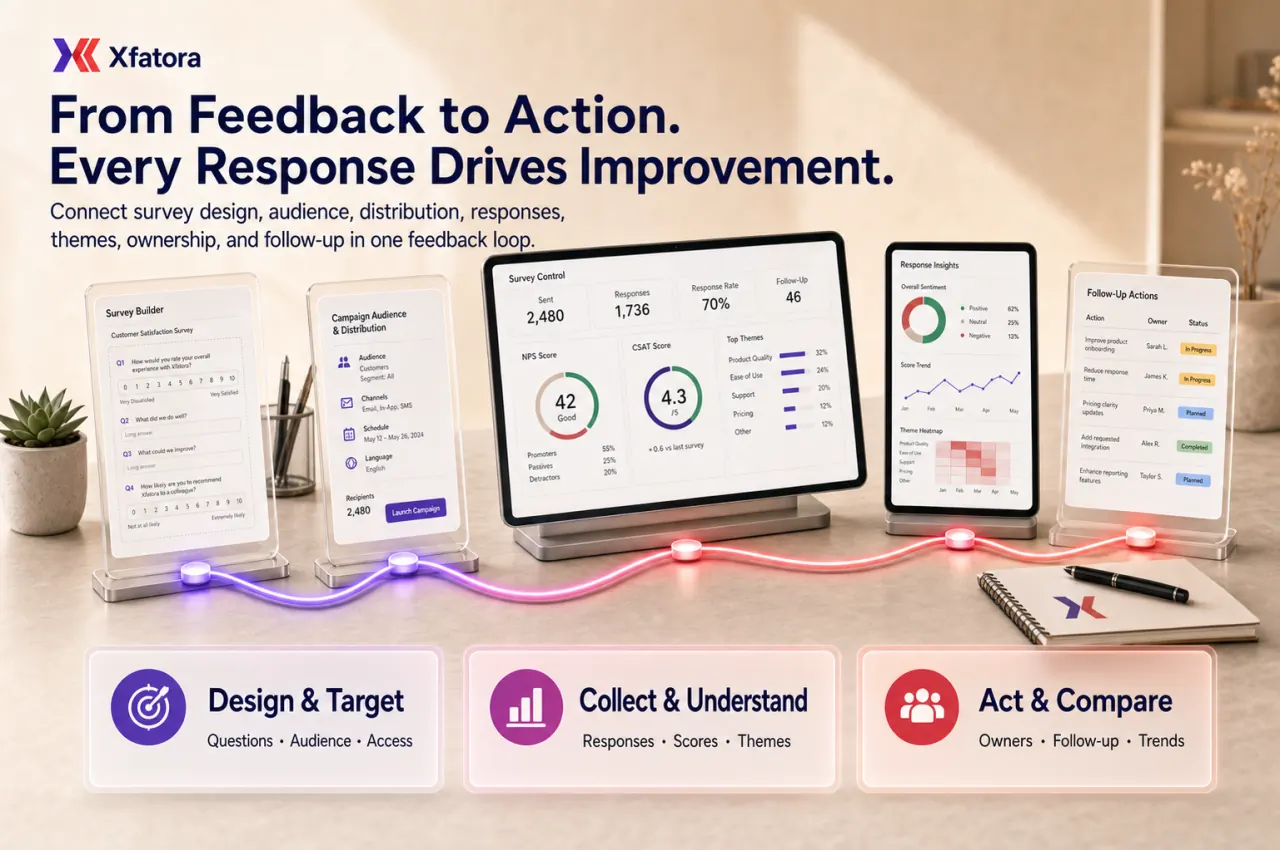
What this module helps you control
Customer surveys, employee pulse checks, onboarding feedback, training feedback, project retrospectives, and service feedback
NPS, CSAT, customer satisfaction, voice-of-customer, and post-sale feedback programs where your process uses them
Published, disabled, restricted, internal-only, logged-in-only, and link-based survey access patterns
Survey links, campaign distribution, mail lists, audience segments, and recurring survey cycles
Response tracking, participant counts, response rate, survey results, text-answer review, themes, and trend comparison
Follow-up ownership for negative feedback, customer-risk responses, service gaps, and process improvement actions
Connections with CRM, Customer Support, Knowledge Base, Projects, HR Records, Smart Mentions, and Data Exporter
Business outcomes teams expect
Turn feedback into decisions instead of collecting responses that nobody owns.
Build a repeatable customer satisfaction process for service, support, delivery, onboarding, and post-sale review.
Run both customer-facing and internal pulse programs without mixing survey tools and spreadsheets.
Compare recurring survey cycles so managers can see whether improvement actions actually moved the signal.
Capture both measurable answers and open-text comments so teams do not miss the reason behind a score.
Improve response discipline with clear audience, trigger, timing, ownership, and follow-up rules.
Connect negative feedback to CRM, support, project, or knowledge-base improvement work.
Prepare leadership-ready summaries with response totals, satisfaction patterns, recurring themes, and action status.
What teams use most in this module
Practical capabilities that make day-to-day execution faster, cleaner, and easier to govern.
Survey Builder and Templates
Create reusable survey structures so feedback programs can run repeatedly without rebuilding from scratch.
Survey subject, short description, and purpose
Question groups and reusable survey structure
Required questions for key signals
Checkbox, radio, input field, and text-area style responses where available
Template discipline for recurring campaigns
Customer Feedback and Satisfaction Programs
Use structured surveys for customer satisfaction, post-sale feedback, service follow-up, and voice-of-customer review.
Customer satisfaction and service-quality feedback
NPS or CSAT style programs where your process requires them
Post-ticket and post-delivery surveys
Customer-risk feedback visibility
Recurring review of negative reasons and improvement themes
Internal Pulse and Employee Feedback
Run internal surveys for teams, training, onboarding, retrospectives, and operational quality checks.
Employee pulse checks
Training and onboarding feedback
Internal process feedback
Project retrospective surveys
Audience and privacy rules by purpose
Publishing, Access, and Distribution
Control survey publishing, access rules, and distribution patterns for internal and external audiences.
Published, paused, or disabled survey state
Logged-in participant option where needed
Link-based sharing
Mail list and audience segment support where enabled
Redirect or completion flow patterns where configured
Response Review and Results
Review response totals, participant counts, structured answers, and open-text feedback in one review flow.
Survey response list
Total participants and response counts
Question-level result review
Open-text answer interpretation
Theme grouping and action discussion
Trend Tracking and Feedback Loops
Repeat surveys on a cadence and compare signals across cycles instead of treating feedback as a one-off campaign.
Monthly or quarterly survey cycles
Response-rate and satisfaction trend review
Recurring issue tracking
Before-and-after improvement comparison
Action review after each cycle
Follow-up Ownership and Action Control
Make feedback useful by assigning owners to negative responses, recurring issues, and improvement actions.
Follow-up rules for urgent or negative feedback
Owner assignment after review
Customer-risk or service-risk escalation
Improvement action tracking
Leadership review of unresolved feedback
Reports, Exports, and Management Packs
Prepare feedback summaries for managers and export datasets for deeper analysis when needed.
Response rate and participation reports
Satisfaction and trend summaries
Negative reason and theme reports
Survey cycle comparison
Export-ready feedback packs
Start with this workflow
Follow these structured steps to launch one controlled process first, then expand.
Survey rollout readiness
1
Prepare one customer satisfaction survey, one service feedback case, one employee pulse example, one negative response, and one leadership report requirement
2
Define survey purpose, audience, trigger, timing, and owner
3
Write questions tied to decisions, not curiosity
4
Choose access rules and distribution method
5
Define who reviews results and who owns follow-up
Run a customer satisfaction survey
1
Create or reuse survey template
2
Select customer audience or trigger
3
Publish and share survey link
4
Monitor response rate and results
5
Assign follow-up for negative or high-risk responses
Run a support quality survey
1
Prepare post-ticket or post-service survey
2
Distribute after resolution or service moment
3
Review CSAT, comments, and recurring issues
4
Link insights to support process or knowledge-base updates
5
Review trend in the next cycle
Run an internal pulse survey
1
Define internal audience and anonymity or identity rules
2
Publish a short survey with clear purpose
3
Review response rate and key themes
4
Assign people or operations follow-up
5
Repeat on cadence to compare movement
Close the feedback loop
1
Review survey results and open-text comments
2
Group repeated themes and root causes
3
Assign owners and due dates
4
Communicate what changed after feedback
5
Compare next survey cycle against previous results
Who this module is for
Customer success teams
Support managers
CRM and account managers
HR and people operations
Project and service delivery leads
Operations leaders
Quality and training teams
Executives reviewing customer experience
Common problems this module helps solve
Customer feedback is collected in messages, calls, spreadsheets, or separate form tools with no single review rhythm
Survey results are read once but no owner is assigned to fix recurring issues
Negative comments are ignored because reports focus only on averages
Support and service teams cannot connect satisfaction results to the case or customer context
Employee pulse surveys collect comments but do not produce visible action
One-off surveys cannot be compared against previous cycles
Response rate is low because the audience, timing, and purpose are unclear
Leadership cannot see which feedback actions are still unresolved
Where teams apply this module
Customer satisfaction, CSAT, NPS, voice-of-customer, and post-sale feedback programs
Support follow-up after ticket resolution or service delivery
Employee pulse checks, training feedback, onboarding review, and internal operations surveys
Project retrospectives and post-delivery feedback for service teams
Product feedback, customer-risk signals, and recurring complaint analysis
Leadership reporting on response rate, satisfaction movement, and unresolved feedback actions
Connected records across modules

CRM and Sales: customer context, segments, account owners, renewal risk, and post-sale feedback can inform follow-up.
Customer Support: post-ticket surveys, service feedback, recurring issue review, and support quality improvement can connect to case outcomes.

Knowledge Base: feedback themes can reveal missing articles, unclear answers, and content improvement needs.

Projects and Services: post-delivery surveys and retrospectives can support customer acceptance, improvement, and billing readiness review.

HR Records: internal pulse, training feedback, onboarding review, and employee audience context can support people operations.

Smart Mentions: negative responses or urgent follow-up can be routed to internal owners in context.

Data Exporter: survey responses, comments, and trend packs can be exported for deeper analysis and leadership reporting.
Built-in Reports & Analytics
Survey response list by cycle, audience, and survey type
Response rate, participant count, and completion visibility
Customer satisfaction, CSAT, NPS-style, or rating summaries where used
Open-text feedback themes and negative reason review
Recurring issues by service, support, project, training, or customer segment
Follow-up action status after each survey cycle
Feedback trend comparison by month, quarter, audience, or campaign
Management review pack for customer experience and improvement ownership
Compliance & Implementation Resources
Practical guides to help you rollout and validate workflows.
FAQ
Can we use Surveys for both customers and employees?
Yes. The same survey workflow can support customer feedback, service feedback, onboarding feedback, training feedback, internal pulse checks, and project retrospectives.
Can Surveys support NPS or CSAT programs?
Yes, where your process uses NPS-style or CSAT-style questions, survey structures can support those feedback programs and recurring review.
Should surveys be anonymous?
It depends on the purpose. Employee pulse surveys may need anonymity, while customer service follow-up often needs identifiable responses so teams can act.
How do surveys improve operations?
They convert repeated feedback into visible patterns, owners, and improvement actions instead of leaving comments as isolated observations.
What should we prepare before a Surveys demo?
Prepare one current feedback form, one negative response, one customer or employee audience example, one response report, and one improvement action you want to track.
Plans that include this module
Confirm commercial fit before rollout planning.
Business Plan
Enterprise Plan
Ready to evaluate Survey management and customer feedback ERP software with your team?
We will map this module to your current process, owners, controls, and rollout timeline.
User guide
How to use Survey management and customer feedback ERP software
Setup checklist, key workflows, reports, and troubleshooting.
Talk to our solution team
Tell us what you need and we will reply with a rollout plan and recommended modules.
Fields marked with * are required.
Related content
Related Modules
AI Sales Assistant
Use AI-assisted calling and qualification workflows to improve first-contact consistency, lead follow-up, call summaries, and CRM handoff discipline.
Often fits plan: Field Service · Scale
Asset Management
Control asset records, custody, locations, maintenance, audits, depreciation, and lifecycle accountability from one controlled workspace.
Often fits plan: Field Service · Scale
Asset Management
Manage company assets, custody, locations, maintenance, audits, depreciation, and lifecycle accountability from one controlled workspace.
Related Use Cases
Accelerate Order to Cash
Connect sales, fulfillment, invoicing, and collections to reduce revenue leakage and improve cash conversion.
order-to-cash
revenue-operations
cash-flow
Control Production Costs
Tie material usage, labor capture, and overhead allocation to each production order for reliable margins.
manufacturing-management
costing
inventory-warehousing
Related Industries
ERP for Manufacturing Operations
Manufacturing ERP for production planning, MRP, inventory, quality, costing, and shop-floor control across growing factories.
manufacturing
mrp
production
ERP for Clinics and Outpatient Networks
Sector playbook covering pain points, workflows, module fit, and buying checklist for erp for clinics and outpatient networks.
industry
operations
erp
Related Guides
Build ZATCA audit trail controls for SMB finance teams
Practical guide for build zatca audit trail controls for smb finance teams with execution steps and buying support links.
zatca
saudi
compliance
ERP Implementation Playbook
A practical, phased guide to planning, launching, and scaling ERP adoption across teams with measurable outcomes.
implementation
operations
change-management