Employee payroll setup, salary structure, payroll eligibility, and readiness checks
 Module
Payroll and HR salary management ERP software
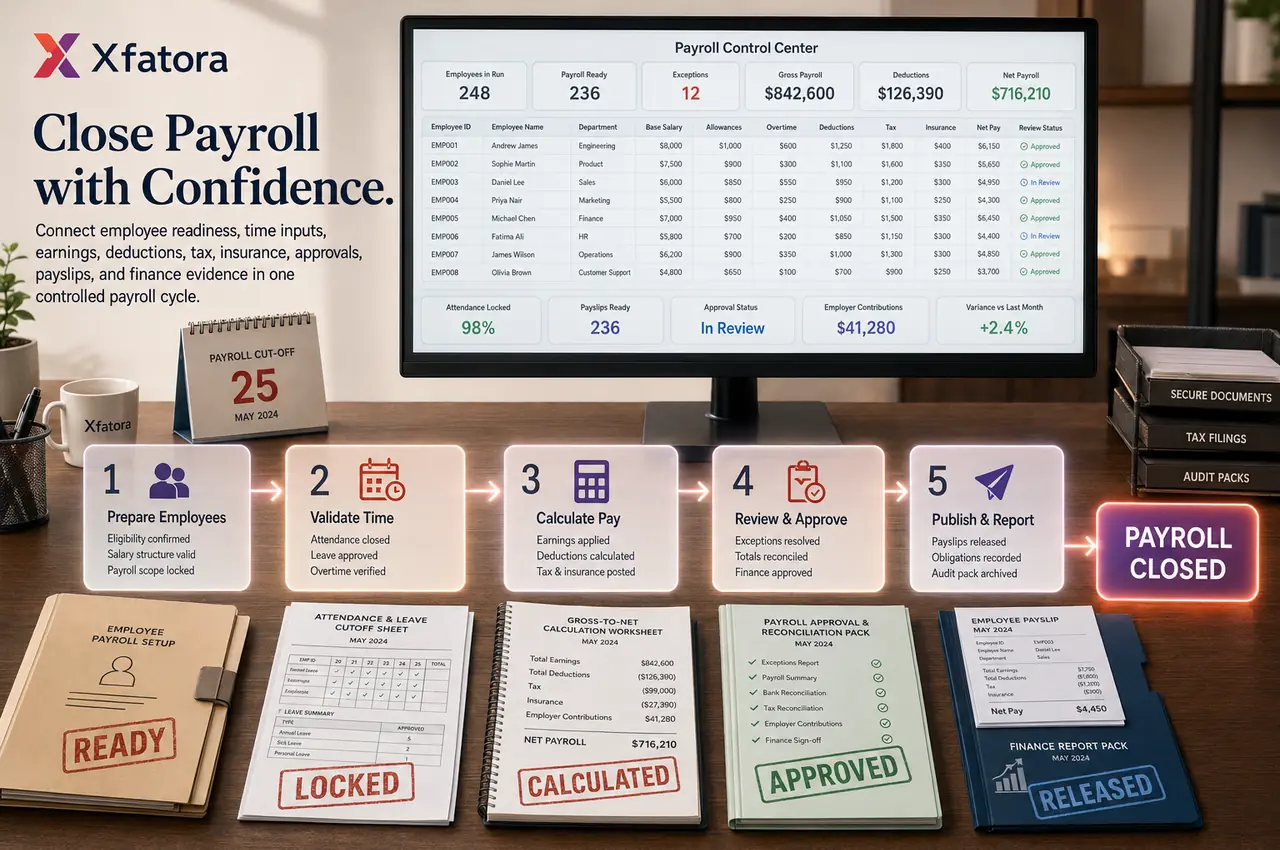
Run controlled payroll cycles with salary structures, earnings, deductions, tax, insurance, attendance validation, approvals, payslips, and finance-ready reports.
Xfatora HR Payroll helps HR, payroll, and finance teams control employee payroll readiness, gross-to-net calculation, attendance inputs, tax and insurance settings, payslip release, approvals, and audit evidence.
Approved app available now
Take HR & People to the frontline.
Bring attendance, leave, schedules, employee records, permission-aware payroll access, workload, and goals closer to every role.
What this module helps you control
Earnings, allowances, bonus, commission, one-time adjustments, and variable pay
Salary deductions, deduction basis, deduction rates, and payslip visibility
Income tax rates, tax brackets, rebates, taxable salary logic, and payroll impact review
Insurance list, staff insurance, company contributions, and employer obligation review
Attendance, paid leave, unpaid leave, overtime, and timesheet leave validation before payroll
Payroll period, cutoff date, monthly run control, review, approval, and close discipline
Payslip templates, payroll columns, pay slip numbers, PDF output, and employee-ready payslips
Payroll reports, income summary, department payroll, insurance cost summary, and audit packs
Handoffs to People Records, Time & Attendance, Core Accounting, commissions, and Data Exporter
Business outcomes teams expect
Improve gross-to-net payroll control across every monthly run.
Reduce manual spreadsheet calculations and repeated payroll rework.
Keep salary, allowance, and deduction components consistent across staff.
Handle deductions, tax settings, and insurance obligations with stronger consistency.
Connect attendance and leave validation to payroll timing with clearer discipline.
Enable structured payroll review before payslip release.
Generate payslips faster with clearer component visibility.
Give finance better visibility into payroll totals and payroll cost.
Strengthen monthly payroll traceability from setup to approval.
Improve audit readiness for payroll changes, corrections, and exceptions.
What teams use most in this module
Practical capabilities that make day-to-day execution faster, cleaner, and easier to govern.
Payroll Setup and Salary Structure
Configure salary setup and payroll components so each employee is payroll-ready before the pay cycle starts.
Salary setup by employee profile
Payroll components with controlled structure
Earnings categories and allowance types
Monthly payroll frequency and period discipline
Staff-level payroll readiness checks
Earnings, Allowances, and Variable Pay
Control fixed and variable income elements in one place, including Salary, allowances, Bonus KPI, and Commission amount.
Salary and recurring allowance handling
Bonus KPI and Commission amount inputs
One-time payroll adjustments per period
Staff-specific payroll elements
Review visibility before final run
Salary Deductions
Configure Salary Deductions List rules with transparent deduction basis and clear payslip visibility.
Salary deductions by type and policy
Deduction basis and deduction rates
Earning inclusion or exclusion logic
Pre-payroll deduction review
Transparent deduction breakdown on payslips
Income Tax Configuration
Manage Income Tax Rates, Income Tax Brackets, and Income Tax Rebates with payroll-review impact visibility.
Income tax rates and bracket setup
Income tax rebates and assignment rules
Tax code or rate assignment by employee
Taxable salary logic controls
Review impact before payroll close
Insurance and Company Contributions
Track Insurance list, staff insurance, Total insurance, and employer obligations for finance-sensitive review.
Insurance list configuration and maintenance
Staff insurance assignment
Total insurance visibility by payroll run
Company Contributions List support
Employer obligation review for finance
Attendance and Leave Integration
Use validated attendance and leave data to avoid closing payroll before actual working time and leave inputs are finalized.
Actual working time dependency
Paid leave and unpaid leave impact
Standard working time of the month baseline
Timesheet Leaves and anomaly checks
Cutoff validation before payroll run
Payroll Run Processing
Execute each payroll run with pay-period control, calculation sequence discipline, and review-before-close governance.
New payroll run for payroll in month
Pay period and cutoff control
Gross-to-net calculation sequence
Outlier and exception review
Payroll opening and closing discipline
Payslips and Payslip Templates
Generate and review Payslips with Pay slip number, Payment run date, and template-driven output structure.
Payslips and pay slip number tracking
Payment run date visibility
Payslip templates and PDF payslip templates
Payroll column display and layout control
Download-ready payslip output
Payroll Columns and Configuration Logic
Define Payroll columns using controlled calculation logic so templates remain consistent and buyer-friendly.
Payroll columns with taking method options
Function name and formula assignment
Constant, system, or formula-driven values
Display with staff and template views
Reusable structure for monthly runs
Payroll Reports and Review Outputs
Produce finance-ready payroll outputs for review, comparison, and audit evidence.
Payroll report and department payroll visibility
Income summary report and trend comparison
Insurance cost summary report
Average income and total payroll cost context
Audit-ready payroll evidence packs
Start with this workflow
Follow these structured steps to launch one controlled process first, then expand.
Payroll rollout readiness
1
Define payroll owners, cutoff calendar, salary components, deduction rules, tax settings, insurance rules, and approval roles
2
Prepare one payroll cycle with employees, salaries, allowances, deductions, attendance exceptions, leave, overtime, and one adjustment
3
Validate employee payroll readiness before generating the payroll run
4
Run payroll, review outliers, approve totals, publish payslips, and prepare finance evidence
5
Agree how late corrections, reruns, reopened attendance, and payroll disputes are handled
Configure employee payroll readiness
1
Confirm employee exists and is payroll-eligible
2
Define salary and allowance structure
3
Assign tax and insurance settings
4
Validate deduction rules
5
Confirm payslip template or Payroll columns
6
Verify employee inclusion in payroll run scope
Finalize attendance and leave before payroll
1
Review actual working time for the period
2
Review paid leave and unpaid leave entries
3
Check Timesheet Leaves and attendance exceptions
4
Correct anomalies with owner accountability
5
Lock the payroll input period at cutoff
6
Confirm payroll is ready to calculate
Run monthly payroll
1
Choose payroll month and period
2
Generate new payroll run
3
Calculate gross earnings and allowances
4
Apply deductions, Income taxes, insurance, and adjustments
5
Review outliers and exceptions
6
Finalize payroll run with approval control
Review and publish payslips
1
Review individual payslips
2
Validate Pay slip number and employee details
3
Confirm Gross pay, Total deductions, and Net pay
4
Publish or download payslips
5
Archive payroll evidence for review
Handle bonus, commission, or one-time adjustments
1
Identify impacted employees
2
Enter bonus, commission, or one-time adjustment values
3
Confirm taxable or non-taxable treatment where relevant
4
Re-run or refresh payslip values
5
Review effect on total payroll cost
Monthly payroll review and audit pack
1
Review payroll summary and period totals
2
Review deduction and tax outputs
3
Review insurance cost summary
4
Compare against prior period
5
Export and store payroll review pack
6
Complete finance sign-off
Common problems this module helps solve
Payroll starts before employee records, salary components, attendance, and leave inputs are ready
Late attendance corrections create reruns and payroll disputes
Earnings, allowances, deductions, tax, and insurance are calculated in spreadsheets
Payroll cutoff ownership is unclear between HR, managers, payroll, and finance
Payslip values are hard to explain because components are not structured
Variable pay, bonuses, commissions, or one-time adjustments arrive late
Finance receives payroll totals without enough review evidence
Insurance and employer contributions are reviewed separately from the pay run
Payroll audit packs are rebuilt from emails, files, and manual exports after the fact
Where teams apply this module
Monthly payroll teams that need controlled gross-to-net payroll runs
HR operations teams validating employee payroll readiness before each cycle
Payroll managers reviewing earnings, deductions, tax, insurance, and adjustments
Finance teams reviewing department payroll totals, obligations, and audit evidence
Companies where attendance, leave, overtime, and payroll cutoff timing cause rework
Organizations that need structured payslips and payroll history by employee and period
Management teams reviewing payroll cost, average income, and period-to-period movement
Connected records across modules
People Records: employee profiles, contracts, salary references, departments, managers, and eligibility feed payroll setup.
Time & Attendance: finalized attendance, paid leave, unpaid leave, overtime, and period close status support payroll validation.

Core Accounting: payroll totals, obligations, insurance, and period cost impact support finance review.
Workload Planner: leave and availability context can help managers understand staffing impact before payroll cutoff.

Commissions and sales workflows: approved commission amount can be reviewed as variable payroll input where relevant.

Data Exporter: payroll, payslip, deduction, insurance, and review evidence can be exported for audit and management packs.
Built-in Reports & Analytics
Payroll run summary by period
Department payroll and employee payroll visibility
Gross pay, total deductions, net pay, and adjustment review
Income summary report and period-to-period movement
Insurance cost summary and employer contribution review
Attendance and leave validation status before payroll
Payslip release and payroll evidence pack
Payroll exception, rerun, and correction review
Finance-ready payroll totals and audit export pack
Average income and total payroll cost context
FAQ
How does HR Payroll connect to Time & Attendance?
Payroll should use finalized attendance, approved leave, unpaid absence, approved overtime, and closed-period status after HR operations completes exception review.
Can we manage salary components and deductions?
Yes. Salary, allowances, deductions, tax settings, insurance, bonus, commission, and one-time adjustments can be structured for review before payslip release.
Can finance review payroll before final approval?
Yes. Finance can review payroll totals, department payroll, insurance cost, deductions, income summary, and audit evidence before final sign-off.
What should we prepare before a payroll demo?
Prepare one real payroll cycle with employees, salary structures, allowances, deductions, attendance exceptions, leave, overtime, insurance, tax settings, payslips, and one late correction example.
Plans that include this module
Confirm commercial fit before rollout planning.
Business Plan
Enterprise Plan
Ready to evaluate Payroll and HR salary management ERP software with your team?
We will map this module to your current process, owners, controls, and rollout timeline.
User guide
How to use Payroll and HR salary management ERP software
Setup checklist, key workflows, reports, and troubleshooting.
Talk to our solution team
Tell us what you need and we will reply with a rollout plan and recommended modules.
Fields marked with * are required.
Related content
Related Modules
AI Sales Assistant
Use AI-assisted calling and qualification workflows to improve first-contact consistency, lead follow-up, call summaries, and CRM handoff discipline.
Often fits plan: Field Service · Scale
Asset Management
Control asset records, custody, locations, maintenance, audits, depreciation, and lifecycle accountability from one controlled workspace.
Often fits plan: Field Service · Scale
Asset Management
Manage company assets, custody, locations, maintenance, audits, depreciation, and lifecycle accountability from one controlled workspace.
Related Use Cases
Accelerate Order to Cash
Connect sales, fulfillment, invoicing, and collections to reduce revenue leakage and improve cash conversion.
order-to-cash
revenue-operations
cash-flow
Control Production Costs
Tie material usage, labor capture, and overhead allocation to each production order for reliable margins.
manufacturing-management
costing
inventory-warehousing
Related Industries
ERP for Manufacturing Operations
Manufacturing ERP for production planning, MRP, inventory, quality, costing, and shop-floor control across growing factories.
manufacturing
mrp
production
ERP for Clinics and Outpatient Networks
Sector playbook covering pain points, workflows, module fit, and buying checklist for erp for clinics and outpatient networks.
industry
operations
erp
Related Guides
Build ZATCA audit trail controls for SMB finance teams
Practical guide for build zatca audit trail controls for smb finance teams with execution steps and buying support links.
zatca
saudi
compliance
ERP Implementation Playbook
A practical, phased guide to planning, launching, and scaling ERP adoption across teams with measurable outcomes.
implementation
operations
change-management