Item, commodity, unit, opening stock, and warehouse master-data readiness
 Module
Inventory and warehouse ERP software
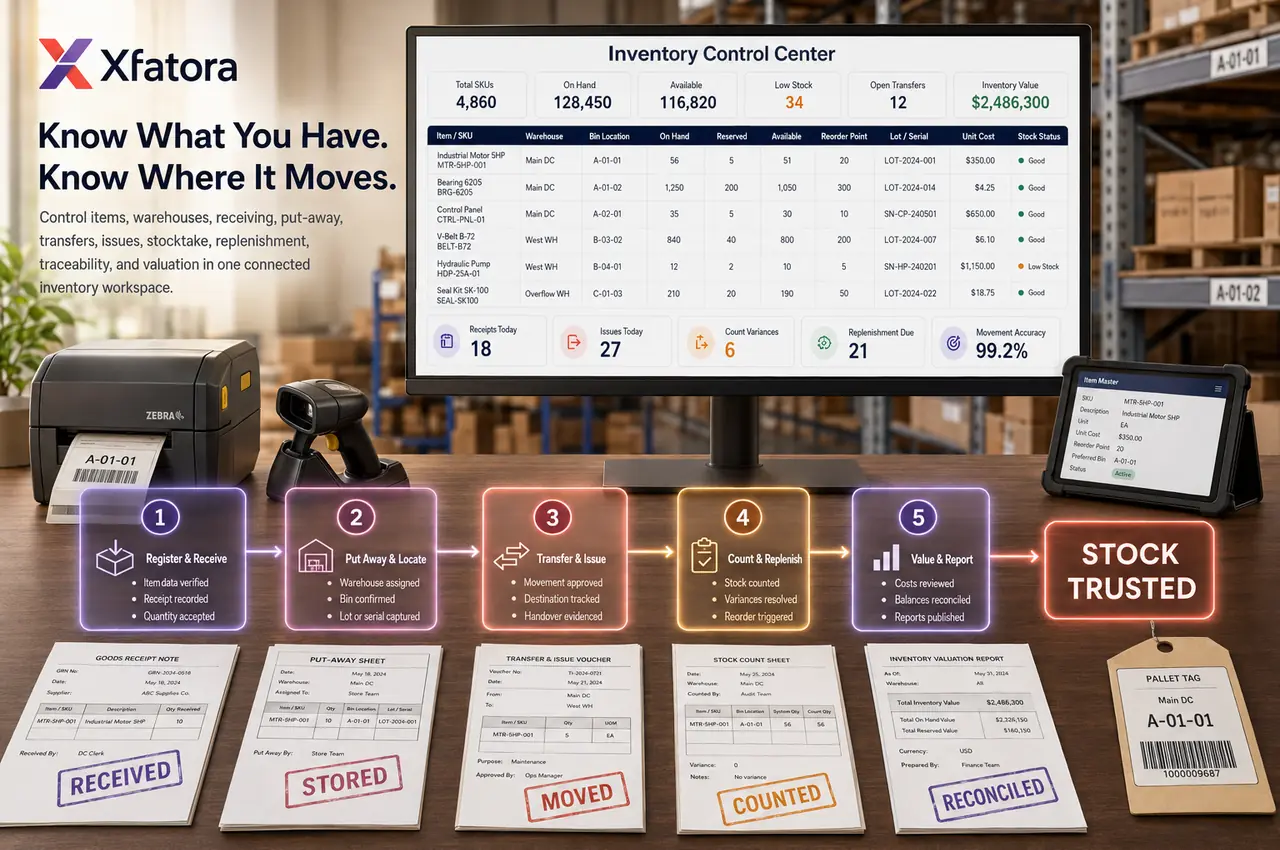
Control items, warehouses, receiving, issuing, transfers, stocktake, replenishment, traceability, and inventory valuation from one connected stock workspace.
Xfatora Inventory gives operations, warehouse, procurement, manufacturing, sales, and finance teams one ERP workflow for stock accuracy, movement traceability, replenishment, and valuation review.

Approved app available now
Take Inventory & Warehouse to the frontline.
Keep items, balances, receipts, issues, transfers, and stock counts close to the warehouse floor and connected to ERP.
KSA Compliance
Saudi invoicing controls for this module
Map this module to your ZATCA rollout so finance, sales, and compliance teams share one controlled process.
What this module helps you control
Warehouse-level stock visibility across branches, stores, and operating sites
Goods receipt and inventory receiving voucher controls with references and evidence
Issue goods and inventory delivery voucher controls for customer, internal, project, or production usage
Internal delivery notes and inter-warehouse transfer discipline
Stocktake, cycle count, loss, adjustment, reason capture, and approval review
Minimum and maximum stock thresholds for replenishment planning
Serial number and lot number traceability where enabled
Inventory valuation, stock history, movement reports, and finance review evidence
Connected handoffs with procurement, sales, manufacturing, accounting, and logistics
Business outcomes teams expect
Improve stock visibility across warehouses and operating sites so teams plan with cleaner availability data.
Reduce receiving and issuing errors with structured inventory receiving voucher and inventory delivery voucher records.
Strengthen availability checks before customer commitments or internal consumption requests.
Keep cleaner movement history and accountability across receiving, issue, transfer, and adjustment events.
Plan replenishment with better confidence using minimum stock and maximum stock thresholds.
Control shrinkage and correction quality with reason-based loss & adjustment records and approvals.
Improve coordination between inventory, procurement, and sales through shared item and movement context.
Increase reliability of physical count reconciliation through repeatable stocktake discipline.
Give finance and management clearer inventory valuation visibility and movement evidence.
Support stronger traceability for serialized or lot-controlled items where those controls are enabled.
Screenshots
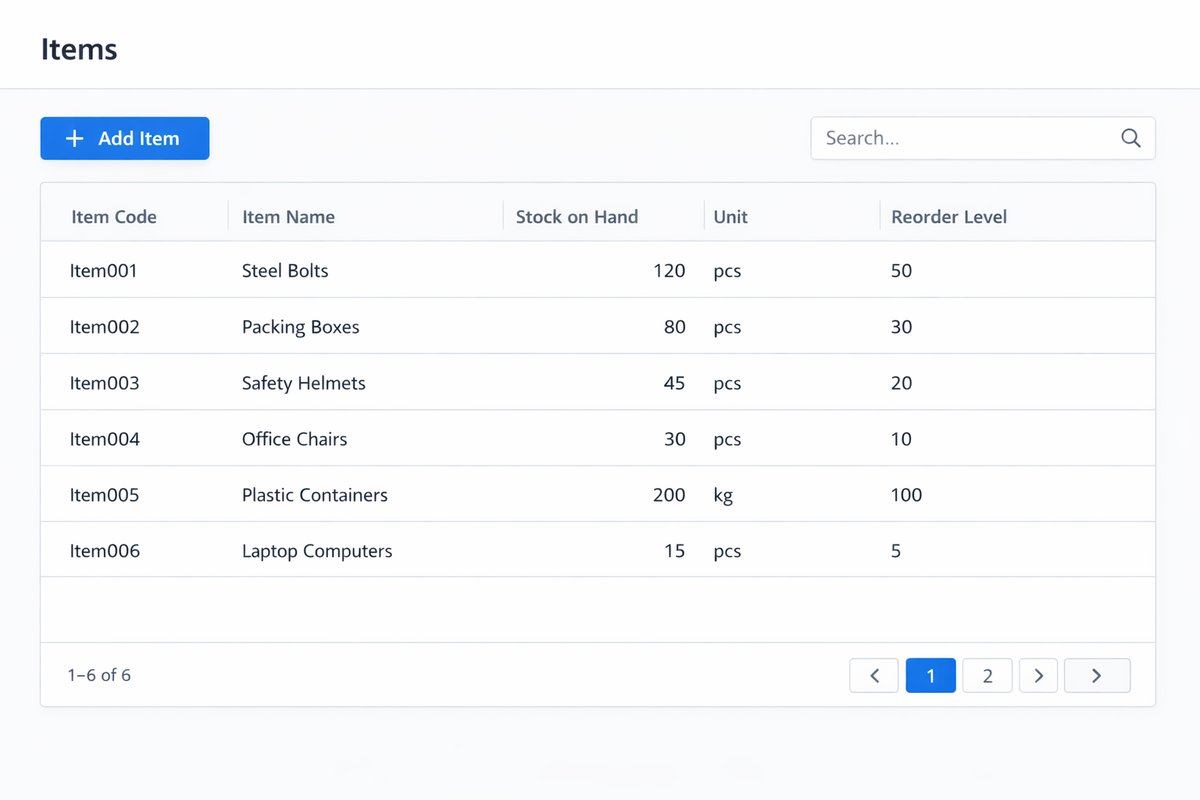
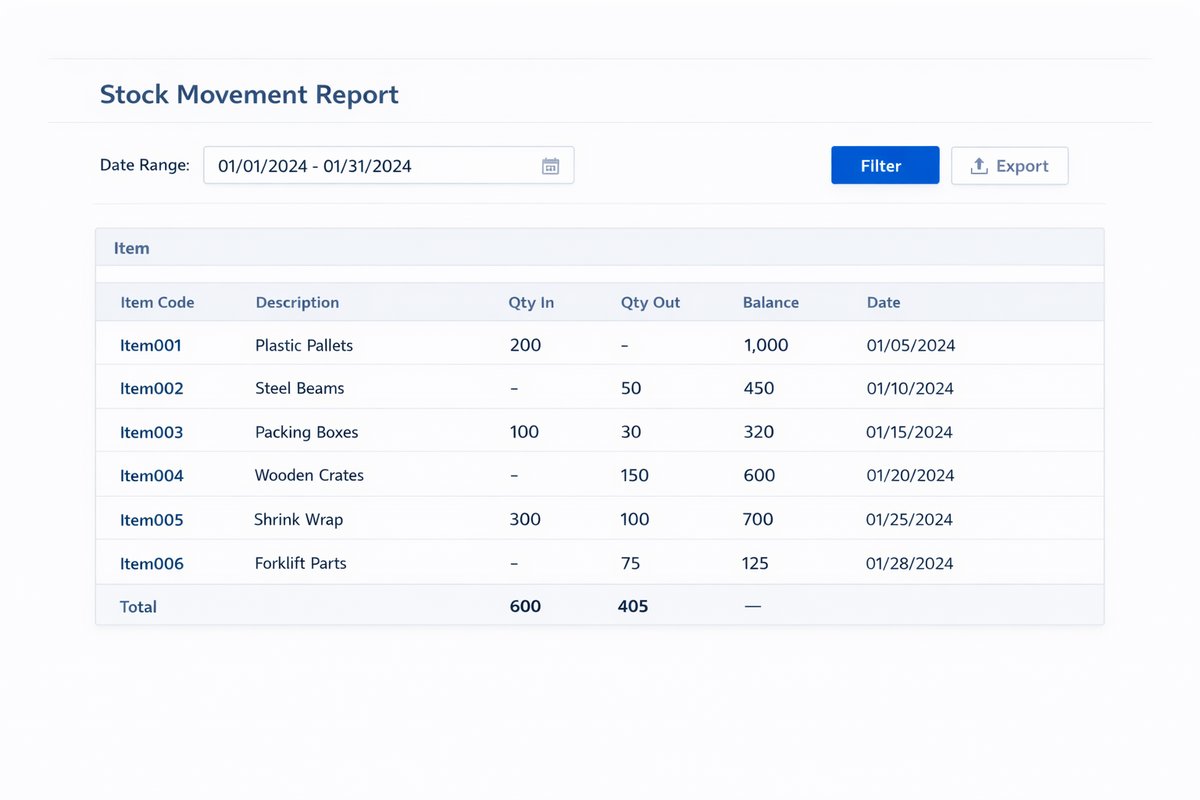
Real screens from the platform.
What teams use most in this module
Practical capabilities that make day-to-day execution faster, cleaner, and easier to govern.
Items and Commodity Master
Maintain standardized item and commodity records so every transaction uses consistent naming, coding, unit, and opening stock discipline.
Item and Commodity records with controlled names and codes
Commodity group structure for reporting and filtering
Unit definition to keep quantity handling consistent
Opening Stock setup for go-live accuracy
Item properties and master data standards
Duplicate prevention through naming and coding discipline
Warehouses and Storage Structure
Control warehouse records, ownership, and visibility across multiple sites so operations know where stock sits and who is accountable.
New Warehouse records with warehouse codes and addresses
Responsible ownership by warehouse
Warehouse-level stock visibility for planning
Multi-site stock control for branch and central locations
Storage location detail can be applied where deployment supports it
Inventory Receiving
Receive goods into stock with warehouse-specific controls and traceable receipt references using goods receipt and Inventory receiving voucher records.
Goods receipt posting into selected warehouse
Inventory receiving voucher for controlled receipt recording
Received quantity capture with references and evidence
Purchase flow linkage where relevant to receiving
Approved receiving traceability for audit review
Inventory Delivery / Issue Goods
Issue Goods from inventory with availability checks, clear source warehouse control, and documented destination or usage reasons.
Inventory delivery voucher posting for outbound movements
Source warehouse control before issue
Customer, internal, or project issue context tracking
Reason for export capture for accountability
Available quantity review before posting
Delivery and issue history for follow-up
Transfers and Internal Delivery
Move stock between warehouses through Internal delivery note workflows that protect source and destination accuracy and movement accountability.
Internal delivery note controls for transfers
Source and destination warehouse validation
Cross-site restocking execution
Inter-warehouse stock movement traceability
Movement accountability by reference and owner
Stocktake, Loss, and Adjustments
Run stocktake routines and controlled adjustments to reconcile available quantity with counted quantity and preserve evidence for review.
Stocktake process for physical count reconciliation
Loss & adjustment entries for discrepancies
Available quantity versus counted quantity comparison
Reason capture for shrinkage, damage, and correction
Approval and review discipline for sensitive adjustments
Minimum / Maximum Inventory and Replenishment
Define minimum stock and maximum stock rules to identify unsafe inventory and prepare replenishment actions before service levels drop.
Minimum stock and maximum stock thresholds by item
Low-stock and unsafe inventory visibility
Reorder readiness support for procurement handoff
Replenishment responsibility alignment across teams
Operational planning based on real stock position
Inventory Valuation and Reporting
Review inventory value and movement evidence with reports that support daily control, management visibility, and finance review.
Inventory Valuation Report for stock value visibility
Stock summary report for on-hand review
Opening, receipt, issue, and closing balance analysis
Inventory history by transaction and period
Operational KPI and management review support
Serial, Lot, and Item Traceability
Track serial number and lot number details where enabled so teams can audit item movement, isolate issues, and support controlled handling.
Serial number tracking for serialized goods
Lot number tracking for grouped traceability
Traceability by item across receiving and issue
Damaged or lost item follow-up by serial/lot references
Lookup and audit support for compliance checks
Shipment / Packing / Delivery Readiness
Support final handoff readiness with packing list and shipment visibility linked to inventory issue and transfer context.
Packing list references for dispatch preparation
Shipment status visibility for operational handoff
Delivery readiness checks before outbound dispatch
Connected references to inventory issue history
Start with this workflow
Follow these structured steps to launch one controlled process first, then expand.
Inventory rollout readiness
1
Clean item codes, names, units, groups, warehouse names, and opening stock before go-live
2
Choose the first stock workflow to stabilize: receiving, issue, transfer, stocktake, or replenishment
3
Define who owns item master data, warehouse balances, adjustments, and reorder decisions
4
Test one full movement path from receiving to issue or transfer before expanding
5
Review valuation, movement history, and stocktake evidence with finance before close
Item and warehouse setup before go-live
1
Create warehouses
2
Define item groups and items
3
Define units and ownership
4
Import or enter opening stock
5
Validate stock by warehouse
6
Test core reports and movement flows
Receive stock into inventory
1
Identify incoming goods
2
Select receiving warehouse
3
Enter quantities and references
4
Post inventory receiving voucher
5
Confirm stock increased
6
Verify movement history
Issue stock for delivery or internal use
1
Check available quantity
2
Select source warehouse
3
Create issue or delivery movement
4
Record destination or usage reason
5
Confirm stock reduced
6
Review issue history and references
Transfer stock between warehouses
1
Select source and destination
2
Choose items and quantities
3
Create internal delivery or transfer
4
Confirm movement posting
5
Verify source decrease and destination increase
6
Review transfer history
Stocktake and adjustment workflow
1
Perform physical count
2
Compare counted versus available quantity
3
Create adjustment or loss entry
4
Provide reason and evidence
5
Route for approval if policy requires
6
Confirm corrected balance and audit history
Weekly replenishment and control review
1
Review low-stock and minimum stock alerts
2
Identify items below threshold
3
Create procurement action
4
Review abnormal adjustments or losses
5
Review out-of-stock risks
6
Align replenishment with actual demand
Who this module is for
Inventory administrator controlling item, unit, warehouse, and opening stock setup
Warehouse manager responsible for receiving, issue, transfer, and stocktake discipline
Storekeeper or warehouse operator posting day-to-day stock movements
Procurement owner planning replenishment from low-stock and unsafe-stock signals
Sales and delivery teams checking availability before customer commitments
Manufacturing planner validating component availability before production release
Finance reviewer checking inventory valuation, movements, and period evidence
Operations manager reviewing shortages, shrinkage, stock aging, and service risk
Common problems this module helps solve
Stock quantity differs between system records, warehouse reality, and team spreadsheets
Sales or operations commit stock before checking true warehouse availability
Receiving records are incomplete, so purchase and finance teams cannot validate goods receipt
Transfers between branches or warehouses are tracked informally
Stocktake differences are adjusted without enough reason, approval, or evidence
Minimum stock and reorder responsibility are unclear until shortages happen
Production is delayed because component availability is not trusted
Finance cannot review inventory valuation and movement evidence during close
Serialized or lot-controlled items are difficult to trace after receiving or issue
Where teams apply this module
Companies managing stock across multiple warehouses, branches, or sites
Retail, distribution, manufacturing, and service companies that need stock accuracy
Teams moving from spreadsheet stock tracking into controlled ERP inventory
Businesses that need receiving, issue, transfers, and stocktake to be traceable
Manufacturers that need component availability and finished goods handoffs
Procurement teams that need reorder signals before shortages disrupt work
Finance teams that need inventory valuation and movement evidence for close review
Connected records across modules
Procurement: purchase receiving increases available stock and supports supplier-bill review.

CRM and Sales: availability checks protect quotes, invoices, deliveries, and customer promises.
Manufacturing: component readiness, consumption, and finished-goods receipt depend on trusted stock records.
Accounting: valuation, movement, adjustment, and stocktake evidence support financial close.

Logistics: shipping, packing, and delivery readiness depend on accurate issue and dispatch context.

Data Exporter: movement history and valuation exports support audits, migration, and deeper analysis.
Built-in Reports & Analytics
Stock summary by warehouse and item
Inventory valuation report for finance and management review
Stock on hand and available quantity review
Opening, receipt, issue, transfer, and closing balance analysis
Low-stock and unsafe inventory review
Minimum and maximum stock threshold review
Transaction history and inventory movement history
Stocktake, adjustment, loss, reason, and approval review
Serial number and lot number traceability review
Warehouse transfer and internal delivery follow-up
Compliance & Implementation Resources
Practical guides to help you rollout and validate workflows.
FAQ
Can we see stock by warehouse?
Yes. Inventory provides warehouse-level stock visibility so teams can review on-hand balances by site before committing stock.
Can we track receiving and issuing history?
Yes. Inventory receiving voucher and Inventory delivery voucher records keep movement history traceable with references and quantities.
Can we transfer stock between warehouses?
Yes. Internal delivery note and transfer workflows support source-to-destination stock movement with accountability.
Can we control stock adjustments?
Yes. Loss & adjustment records can capture reasons, evidence, and approval checkpoints based on policy.
Can we set minimum and maximum stock thresholds?
Yes. Minimum stock and maximum stock controls help teams monitor unsafe inventory and plan replenishment readiness.
Can we run stocktake or cycle counts?
Yes. Stocktake routines compare counted quantities against available quantity and support discrepancy correction workflows.
Can we track serial numbers or lot numbers?
Yes, where enabled. Serial number and lot number controls support traceability, lookup, and audit workflows.
How does Inventory connect to Procurement and Sales?
Inventory reflects goods receipt from procurement and supports availability checks before issue or delivery commitments in sales workflows.
Can finance review valuation and stock reports?
Yes. Inventory Valuation Report and stock movement outputs support management and finance review cycles.
How should this page differ from Procurement and Manufacturing?
Inventory focuses on stock control records, balances, and traceability. Procurement controls buying decisions, while Manufacturing controls production execution.
Should Inventory be implemented before Manufacturing?
Usually yes, at least for the item, warehouse, unit, and stock availability foundation. Manufacturing depends on trusted component availability, consumption, and finished-goods receipt records.
How does Inventory connect to Accounting?
Inventory valuation, movement history, stocktake, and adjustment evidence support finance review and period close. Accounting should not have to rebuild stock movement context manually.
What should we prepare before an inventory demo?
Prepare item lists, warehouse list, opening stock sample, one receiving example, one issue or transfer example, one stocktake difference, and the report management uses to review stock.
Can Inventory support replenishment planning?
Yes. Minimum and maximum stock thresholds, low-stock visibility, and movement history help teams prepare replenishment actions and procurement handoffs.
Plans that include this module
Confirm commercial fit before rollout planning.
Growth Plan
Business Plan
Enterprise Plan
Ready to evaluate Inventory and warehouse ERP software with your team?
We will map this module to your current process, owners, controls, and rollout timeline.
Talk to our solution team
Tell us what you need and we will reply with a rollout plan and recommended modules.
Fields marked with * are required.
Related content
Related Modules
AI Sales Assistant
Use AI-assisted calling and qualification workflows to improve first-contact consistency, lead follow-up, call summaries, and CRM handoff discipline.
Often fits plan: Field Service · Scale
Asset Management
Control asset records, custody, locations, maintenance, audits, depreciation, and lifecycle accountability from one controlled workspace.
Often fits plan: Field Service · Scale
Asset Management
Manage company assets, custody, locations, maintenance, audits, depreciation, and lifecycle accountability from one controlled workspace.
Related Use Cases
Accelerate Order to Cash
Connect sales, fulfillment, invoicing, and collections to reduce revenue leakage and improve cash conversion.
order-to-cash
revenue-operations
cash-flow
Control Production Costs
Tie material usage, labor capture, and overhead allocation to each production order for reliable margins.
manufacturing-management
costing
inventory-warehousing
Related Industries
ERP for Manufacturing Operations
Manufacturing ERP for production planning, MRP, inventory, quality, costing, and shop-floor control across growing factories.
manufacturing
mrp
production
ERP for Clinics and Outpatient Networks
Sector playbook covering pain points, workflows, module fit, and buying checklist for erp for clinics and outpatient networks.
industry
operations
erp
Related Guides
Build ZATCA audit trail controls for SMB finance teams
Practical guide for build zatca audit trail controls for smb finance teams with execution steps and buying support links.
zatca
saudi
compliance
ERP Implementation Playbook
A practical, phased guide to planning, launching, and scaling ERP adoption across teams with measurable outcomes.
implementation
operations
change-management