Attendance capture by employee, department, workplace, route, and day
 Module
Time attendance and leave management ERP software
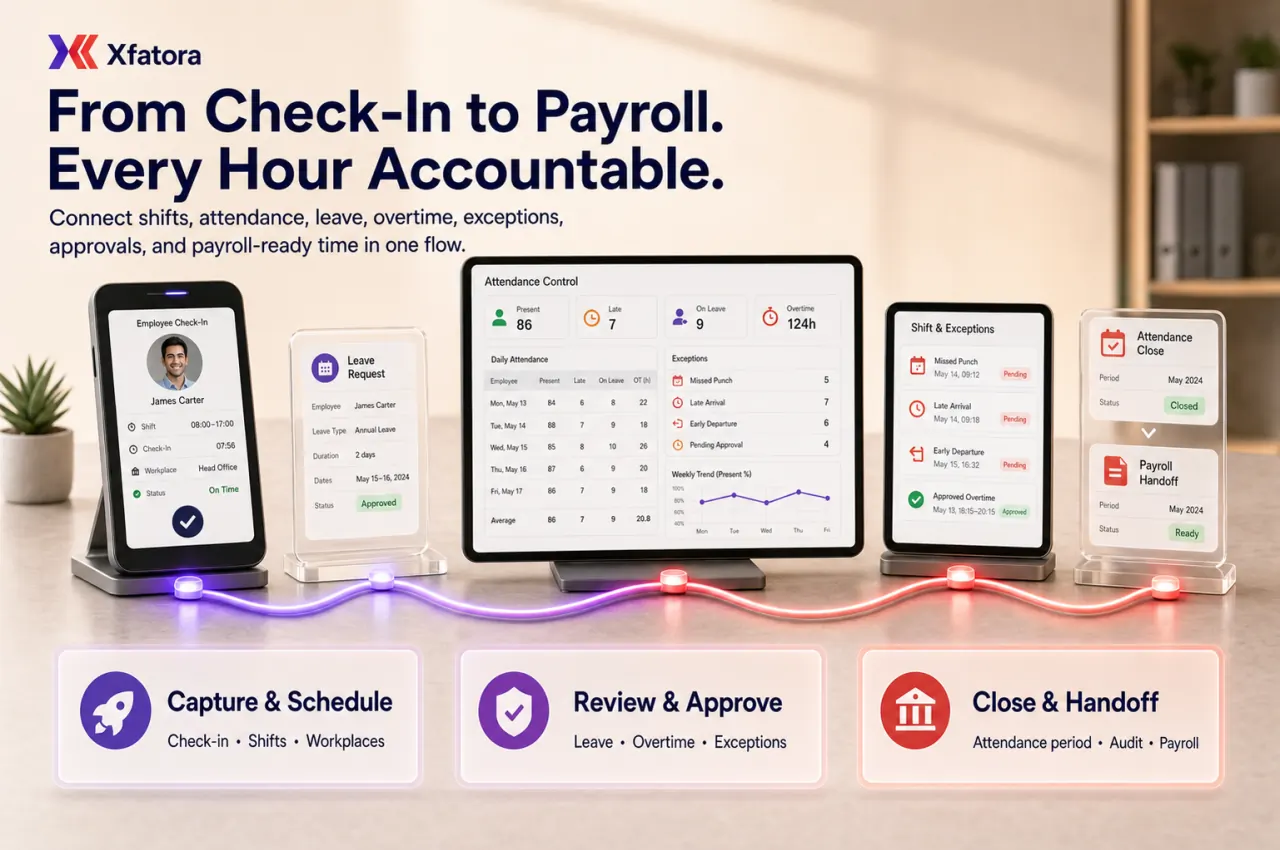
Manage attendance, check-in/out, leave approvals, shifts, overtime, workplace rules, attendance closing, and payroll-ready time inputs in one controlled workflow.
Xfatora Time & Attendance helps HR operations, managers, field supervisors, and payroll teams control attendance records, leave approvals, shift compliance, overtime, workplace rules, exceptions, and period closing before payroll review.
Approved app available now
Take HR & People to the frontline.
Bring attendance, leave, schedules, employee records, permission-aware payroll access, workload, and goals closer to every role.
What this module helps you control
Check-in/check-out logs, missed punches, late arrivals, and early departures
Annual leave, leave types, leave cycles, balances, limits, and approval deadlines
Approval process for leave, additional work hours, corrections, and exceptions
Shift categories, shift codes, work shift tables, and expected working windows
Workplace allocation, coordinates, radius rules, IP rules, QR code, and timeclock options
Route-based and field-team attendance proof for site or customer visits
Overtime and additional work hours review before payroll handoff
Attendance close, controlled reopening, audit evidence, and payroll-ready values
Handoffs to HR records, payroll, workload planning, projects, and data exports
Business outcomes teams expect
Improve attendance visibility daily with clean check-in/out records by staff and shift.
Reduce disputes about worked hours using timestamped check-in/out logs and attendance history.
Handle annual leave requests and approvals with clearer balances and ownership.
Strengthen shift discipline through shift categories and work shift table allocation.
Track lateness and early leave exceptions before they become monthly surprises.
Control field and location-based attendance using workplace coordinates and route rules.
Apply a controlled approval process for additional work hours before period close.
Run a cleaner month-end attendance close before payroll review starts.
Give managers stronger exception reporting by department, workplace, and policy type.
Reduce spreadsheet-based attendance administration across operations and HR teams.
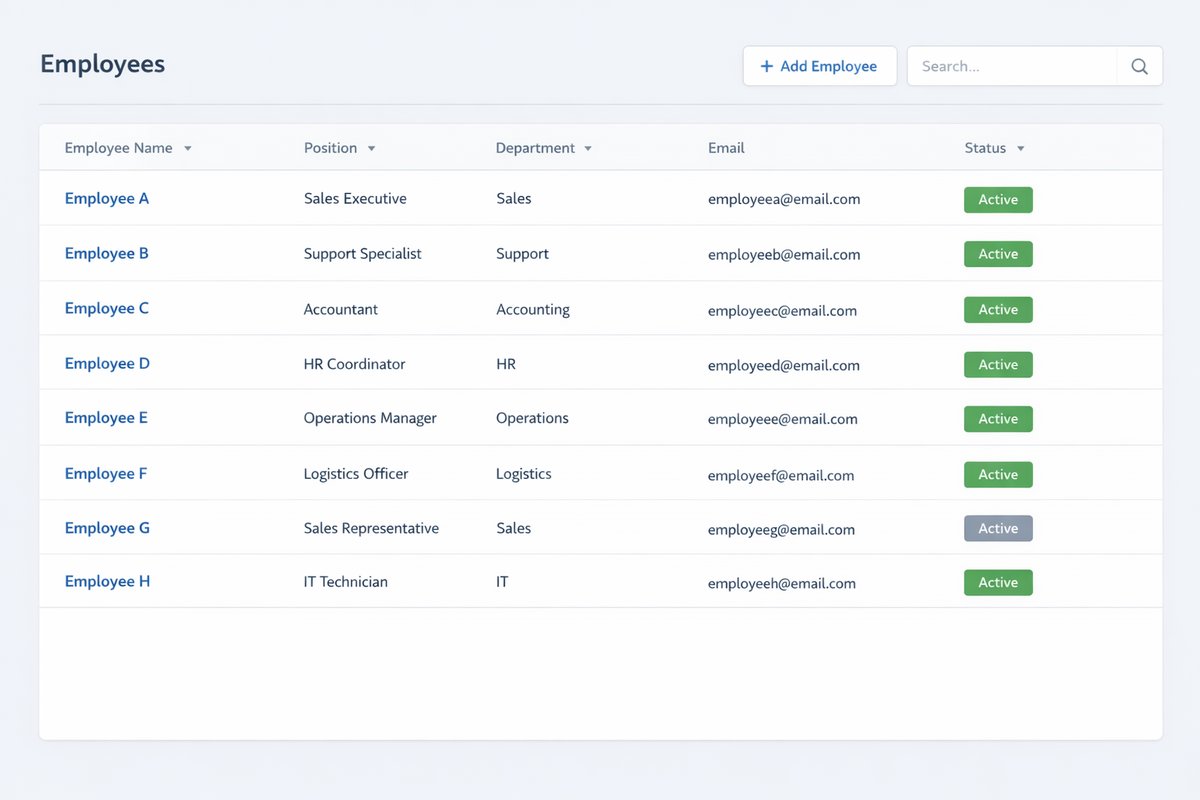
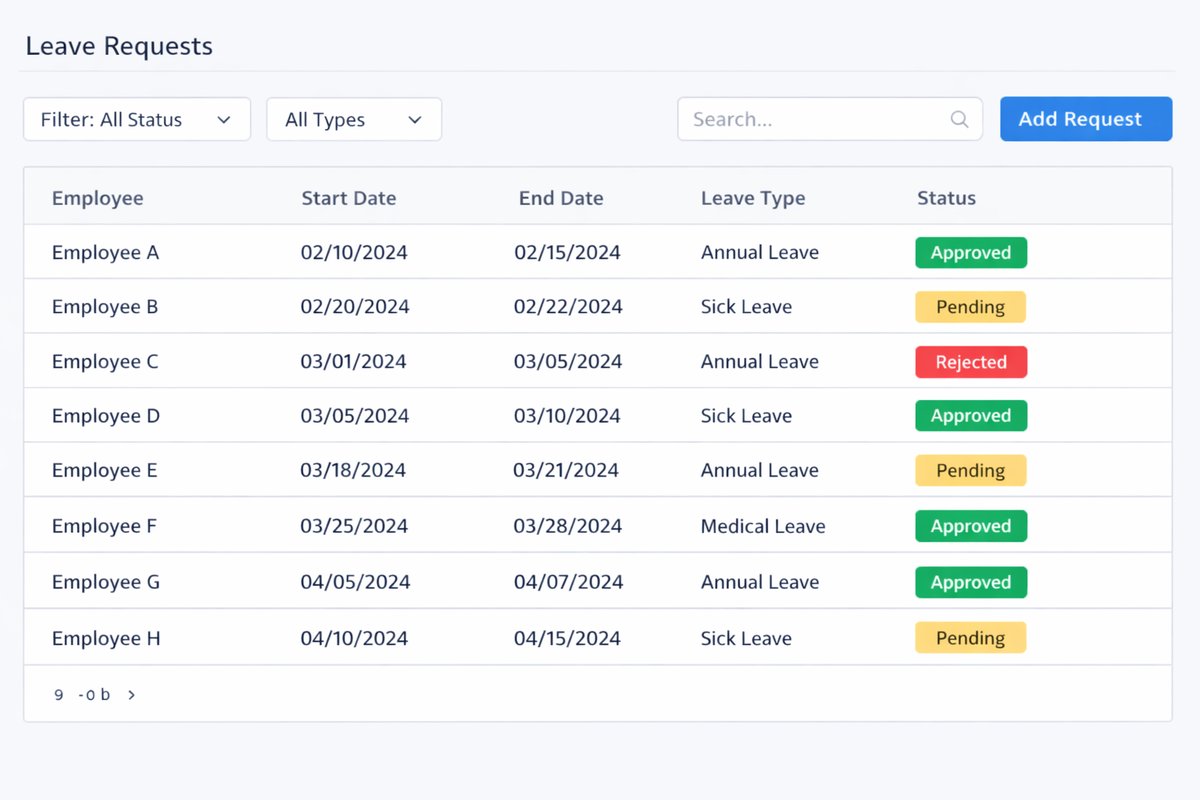
Screenshots
Real screens from the platform.
What teams use most in this module
Practical capabilities that make day-to-day execution faster, cleaner, and easier to govern.
Attendance Capture and Check-in/Check-out
Capture attendance with clear check-in and check out events, then maintain traceable check-in/out logs for operational review and dispute resolution.
Attendance check-in and check out by configured method
Checked in at / checked out at timestamps per employee
Check-in/out logs for daily operational visibility
Attendance history by staff and day
Exception monitoring for missed or incomplete records
Leave Management and Annual Leave
Manage annual leave with leave application workflows, leave type governance, and controlled balance tracking across cycle rules.
Annual leave setup and leave type definitions
Leave application with reason for time off
Remaining leave days visibility by employee
Leave cycle rules and maximum leave limits
Approval deadline governance for leave requests
Approval Process
Apply a formal approval process with controlled approver ownership for leave and additional work hours.
Approver routing to manager, head of department, direct manager, or specific personnel
Pending / approved / rejected request flow
Approval notifications and reminders
Controlled request ownership and audit trail
Escalation visibility for overdue approvals
Shift Categories and Work Shift Table
Define shift categories and standard work shift table structures for consistent shift execution across teams.
Shift code and shift name definitions
Shift start/end time with lunch break setup
Work shift table templates for standard workdays
Shift schedule allocation by employee or group
Controlled expected working window by policy
Additional Work Hours / Overtime
Control additional work hours requests and approvals so overtime values are reviewed before payroll handoff.
Additional work hours and overtime request capture
Approval process for extra hours by owner
Total approved work hours by employee and period
Month-end review before payroll consumption
Controlled exception handling for disputed entries
Workplace-Based Attendance Rules
Enforce workplace attendance policy through workplace allocation, coordinates, and radius-based validation.
Workplace definition with workplace address
Workplace allocation by employee or team
Radius and coordinates rule configuration
Attendance by coordinates control for valid check-ins
Default workplace rules to prevent attendance from wrong location
Route and Field Attendance
Support route-based attendance for field operations where teams move across route points or customer sites.
Work routes and route points planning
Route-based attendance progression by team
Field teams and customer-site attendance use cases
Check-in/out progress according to route status
Operational proof for site or customer visits
QR, IP, and Timeclock Options
Use deployment-specific attendance capture options such as QR Code scanning, IP allowlisting, and timeclock integration.
QR Code and Scan QR Code attendance modes
IP allowlisting for office-based check-in controls
timeclock integration where deployed
Manual vs imported timesheets support
Capture flexibility by operational environment
Attendance Closing and Reopening
Run attendance closing and controlled reopening as a period governance process before downstream payroll review.
Close attendance by payroll period or cutoff
Reopen attendance only through policy-based exception path
Exception handling before closure and final sign-off
Period discipline to limit late edits
Payroll-readiness finalization control
Reports and Exception Monitoring
Monitor attendance, leave, and shift performance through operational reports and exception-focused reviews.
Late arrivals and early leave analysis
Attendance report and annual leave report
Working hours statistics and leave by department
Ratio of check-in/out by workplace
Additional work hours review for month-end
Leave Types, Rules, and Norms
Configure type of leave policy with symbols, cycle rules, and leave norms that align with annual leave governance.
Type of leave configuration and leave symbols
Maximum leave and repeat/cycle controls
Leave norms by policy group
Borrowed leave handling where policy allows
Accumulated leave logic where enabled
Start with this workflow
Follow these structured steps to launch one controlled process first, then expand.
Attendance rollout readiness
1
Define attendance owners, employee groups, shifts, workplaces, leave types, approval paths, and payroll cutoff rules
2
Choose the first workflow to stabilize: check-in/out, leave approvals, shift exceptions, overtime, or attendance close
3
Prepare one real attendance period with late arrivals, leave requests, overtime, missing punches, and one payroll-impacting correction
4
Test daily attendance capture, exception review, approval routing, period close, and payroll handoff
5
Agree who can reopen a closed period, what evidence is required, and how corrections are audited
Configure leave and attendance rules
1
Define leave types
2
Define annual leave cycle and limits
3
Set approval paths
4
Configure shift categories and schedules
5
Configure workplace or route rules if used
6
Validate attendance policy before go-live
Daily attendance and check-in/out
1
Employee checks in
2
Attendance is recorded by the configured method
3
Employee checks out
4
Manager or admin reviews anomalies
5
Log is preserved for reporting
Leave request and approval
1
Employee submits leave request
2
Selects leave type and date range
3
Adds reason and attachments if needed
4
Approver reviews
5
Request is approved/rejected
6
Balance and records update
Shift allocation and attendance review
1
Assign shift category or work shift table
2
Confirm expected working window
3
Review check-in/out against shift
4
Flag lateness or early departure
5
Correct exceptions where policy allows
Additional work hours approval
1
Create additional work hours request
2
Link to employee and date/time
3
Approve or reject
4
Include approved hours in period review
5
Prepare for payroll handoff
Month-end attendance close
1
Review attendance exceptions
2
Review leave approvals
3
Review overtime/additional hours
4
Close attendance for the period
5
Export or hand off finalized values to payroll review
6
Reopen only by exception if policy allows
Who this module is for
Attendance Officer / HR Operations
Team Managers / Approvers
Payroll Liaison
Field Operations Supervisors
Employees using self-service leave and attendance workflows
Compliance or audit reviewers
Common problems this module helps solve
Attendance is tracked manually across spreadsheets, messages, and supervisor notes
Employees and managers dispute worked hours because check-in/out evidence is incomplete
Leave balances and approvals are unclear before payroll cutoff
Shift schedules exist, but late arrival and early leave exceptions are reviewed too late
Field teams check in without reliable workplace, route, or site evidence
Overtime and additional work hours are submitted late or approved outside the system
Payroll starts before attendance exceptions, leave, and overtime are finalized
Managers cannot see daily attendance exceptions by department, workplace, or policy type
Attendance periods are reopened without enough control or audit discipline
Where teams apply this module
Companies that need daily attendance, check-in/out, and exception control
HR operations teams managing leave requests, balances, approvals, and annual leave cycles
Shift-driven businesses that need work shift tables and schedule discipline
Field operations teams that need workplace, route, QR, or location-based attendance evidence
Payroll teams that need finalized attendance, leave, and overtime before salary processing
Managers reviewing late arrivals, early leave, missing punches, and additional work hours
Organizations preparing audit evidence for attendance close and payroll inputs
Connected records across modules
HR and People Records: employee profiles, departments, managers, workplace assignments, and reporting lines support attendance governance.
HR Payroll: finalized attendance, leave, unpaid absence, and approved additional work hours feed payroll review.
Workload Planner: leave, holidays, and attendance exceptions reduce available capacity for realistic planning.

Projects and Services: attendance and timesheet context can support project effort and delivery visibility.
Smart Mentions: attendance exceptions and approval delays can be escalated inside operational records.

Data Exporter: attendance logs, leave approvals, overtime, and close evidence can be exported for audit and management review.
Built-in Reports & Analytics
Daily attendance and check-in/check-out report
Late arrival, early leave, missed punch, and incomplete log exceptions
Annual leave report and remaining leave balance review
Leave by department, manager, leave type, and approval status
Shift compliance and work shift table review
Workplace attendance ratio and route/site attendance proof
Additional work hours and overtime approval review
Attendance close evidence pack before payroll
Payroll-ready attendance and leave handoff summary
Exportable attendance audit pack for management or external review
Compliance & Implementation Resources
Practical guides to help you rollout and validate workflows.
FAQ
Can we manage attendance and leave in one module?
Yes. Time & Attendance combines attendance tracking, annual leave workflows, shift management, and approval process controls in one operational module.
Can employees apply for leave and managers approve it?
Yes. Employees can submit leave application requests, and approvers can process pending requests through approved/rejected flow with notifications.
Can we define shifts and work shift tables?
Yes. You can define shift categories and work shift table structures with shift code, shift name, start/end time, and lunch break rules.
Can we track lateness and early leave?
Yes. Attendance logs and shift comparison allow managers to monitor late arrivals, early departures, and other attendance exceptions.
Can we restrict attendance by workplace coordinates or route?
Yes. Teams can use workplace coordinates, radius rules, and route-based attendance controls for field and site operations.
Can we approve additional work hours before payroll?
Yes. Additional work hours requests can go through approval process and month-end review before values are handed off for payroll review.
Can attendance be closed and reopened by policy?
Yes. Attendance can be closed for period discipline, and reopened only by approved exception process when policy allows.
How is this module different from Payroll?
Time & Attendance controls operational time, leave, shift, and attendance events. Payroll is the downstream gross-to-net salary processing and payslip release module.
How is this module different from People Records?
People Records manages employee master data and reporting structure. Time & Attendance manages day-to-day attendance, leave, shifts, and period close workflows.
What should be finalized before attendance is handed to payroll?
Finalize attendance exceptions, leave approvals, approved additional work hours, and period close status before payroll review begins.
How does Time & Attendance connect to Payroll?
Payroll should consume finalized attendance, approved leave, unpaid absence, approved additional work hours, and period close status after HR operations completes exception review.
Can managers approve leave and overtime?
Yes. Leave requests and additional work hours can follow controlled approval paths so pending, approved, and rejected requests are visible before period close.
Can attendance support field teams?
Yes. Workplace coordinates, radius rules, route-based attendance, QR code, IP rules, and timeclock options can support office, site, and field attendance scenarios where deployed.
What should we prepare before a Time & Attendance demo?
Prepare one attendance period with employees, shifts, leave requests, late arrivals, missed punches, overtime, workplace or route rules, payroll cutoff, and one correction example.
Plans that include this module
Confirm commercial fit before rollout planning.
Business Plan
Enterprise Plan
Ready to evaluate Time attendance and leave management ERP software with your team?
We will map this module to your current process, owners, controls, and rollout timeline.
User guide
How to use Time attendance and leave management ERP software
Setup checklist, key workflows, reports, and troubleshooting.
Talk to our solution team
Tell us what you need and we will reply with a rollout plan and recommended modules.
Fields marked with * are required.
Related content
Related Modules
AI Sales Assistant
Use AI-assisted calling and qualification workflows to improve first-contact consistency, lead follow-up, call summaries, and CRM handoff discipline.
Often fits plan: Field Service · Scale
Asset Management
Control asset records, custody, locations, maintenance, audits, depreciation, and lifecycle accountability from one controlled workspace.
Often fits plan: Field Service · Scale
Asset Management
Manage company assets, custody, locations, maintenance, audits, depreciation, and lifecycle accountability from one controlled workspace.
Related Use Cases
Accelerate Order to Cash
Connect sales, fulfillment, invoicing, and collections to reduce revenue leakage and improve cash conversion.
order-to-cash
revenue-operations
cash-flow
Control Production Costs
Tie material usage, labor capture, and overhead allocation to each production order for reliable margins.
manufacturing-management
costing
inventory-warehousing
Related Industries
ERP for Manufacturing Operations
Manufacturing ERP for production planning, MRP, inventory, quality, costing, and shop-floor control across growing factories.
manufacturing
mrp
production
ERP for Clinics and Outpatient Networks
Sector playbook covering pain points, workflows, module fit, and buying checklist for erp for clinics and outpatient networks.
industry
operations
erp
Related Guides
Build ZATCA audit trail controls for SMB finance teams
Practical guide for build zatca audit trail controls for smb finance teams with execution steps and buying support links.
zatca
saudi
compliance
ERP Implementation Playbook
A practical, phased guide to planning, launching, and scaling ERP adoption across teams with measurable outcomes.
implementation
operations
change-management