Article categories, article owners, draft/published states, and review cadence
 Module
Knowledge base and help center ERP software
Create a searchable source of truth for customer answers, internal SOPs, onboarding guides, support articles, approved playbooks, and self-service help.
Xfatora Knowledge Base helps support, sales, HR, onboarding, implementation, and operations teams publish approved articles, reduce repeated questions, improve answer consistency, and keep guidance reviewable.
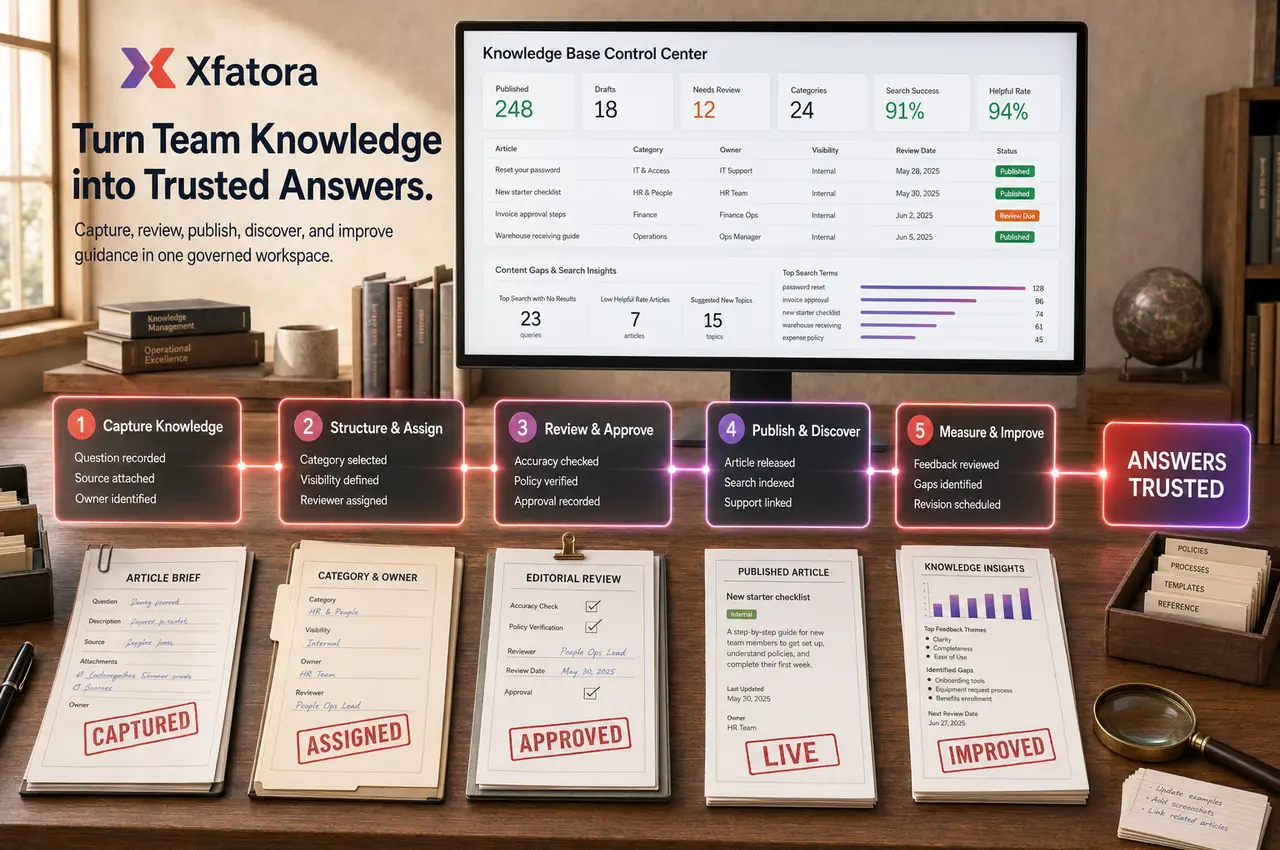
What this module helps you control
Customer-facing help center content and internal-only SOPs
Approved answers for repeated support, sales, onboarding, HR, and operational questions
Search, category browsing, popular content, recently updated content, and content-gap review
Visibility rules for public, customer-facing, internal, and role-sensitive guidance
Support Desk article linking, ticket deflection, and repeated-issue reduction
Onboarding content for new employees, customers, implementation teams, and daily users
Version discipline for outdated articles, policy changes, feature updates, pricing updates, and compliance-related guidance
Feedback loops for helpful/not-helpful signals, article gaps, and search terms with no useful result
Governance for who writes, reviews, publishes, updates, and retires knowledge content
Business outcomes teams expect
Reduce repeated support questions with self-service answers
Keep internal SOPs and policies searchable for teams
Publish clear product and process documentation
Control visibility: internal-only vs customer-facing content
Improve consistency by standardizing answers and procedures
Use feedback and views to continuously improve articles
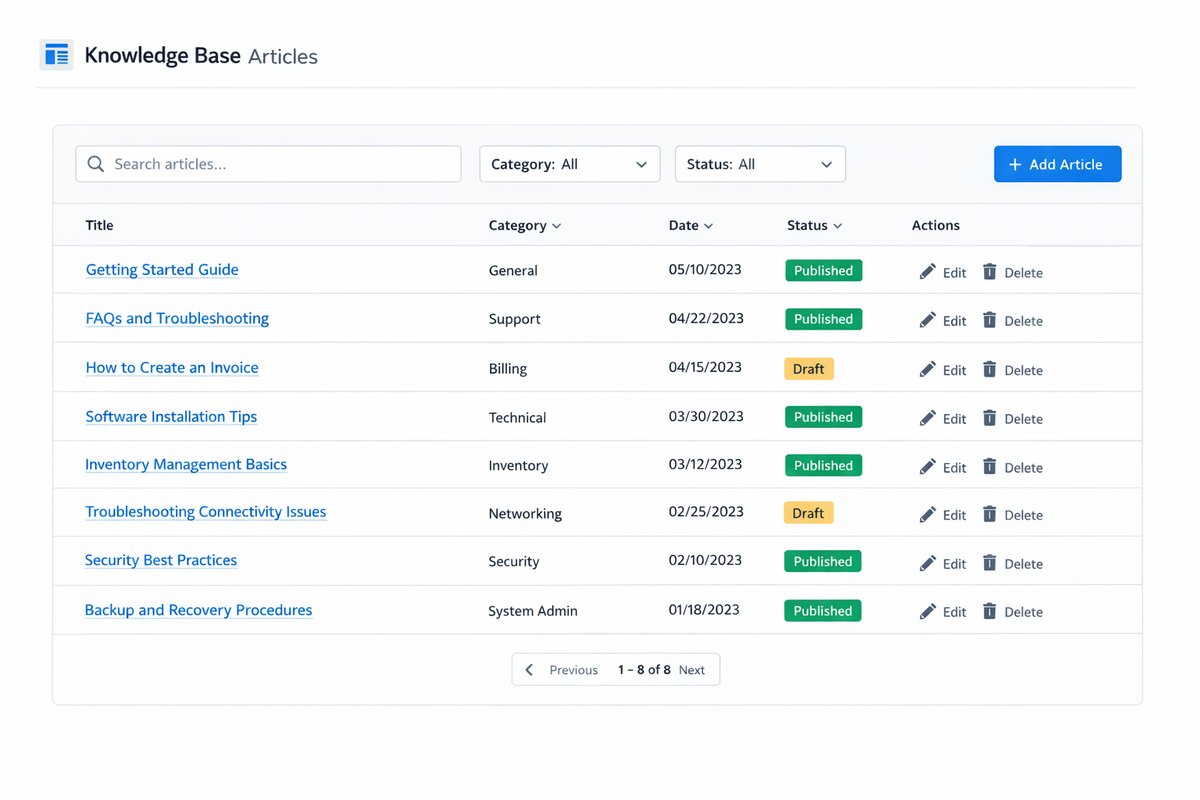
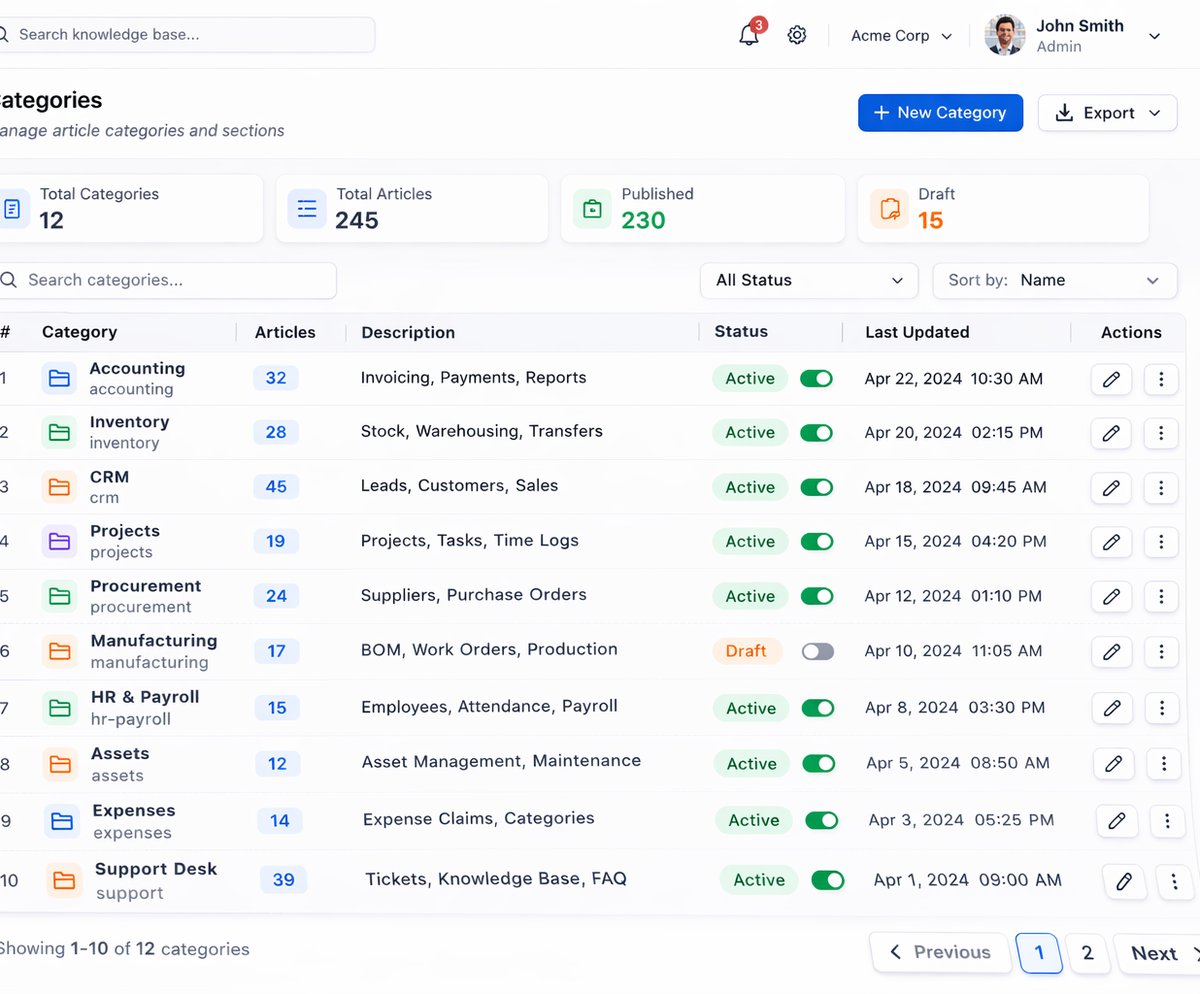
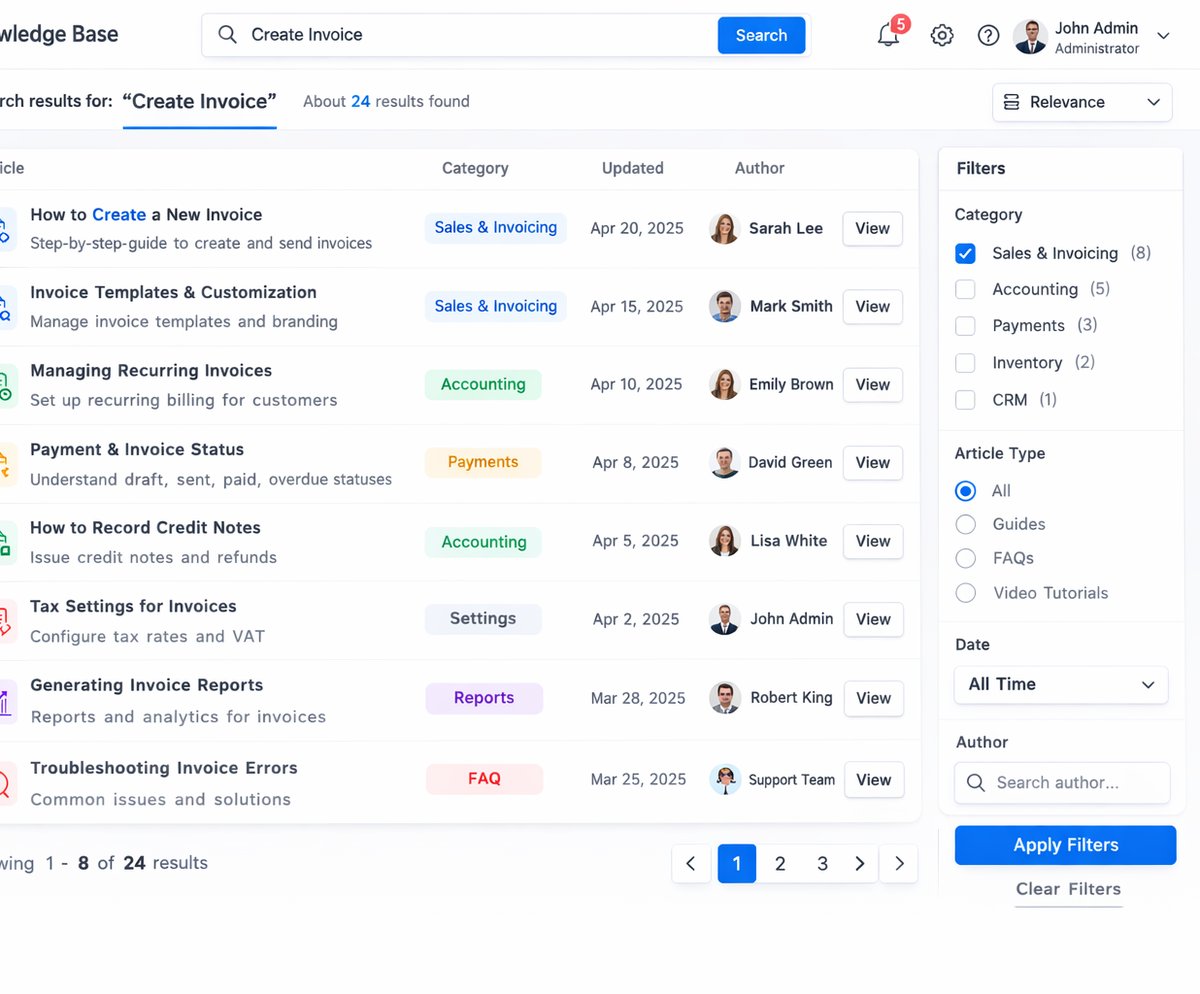
Screenshots
Real screens from the platform.
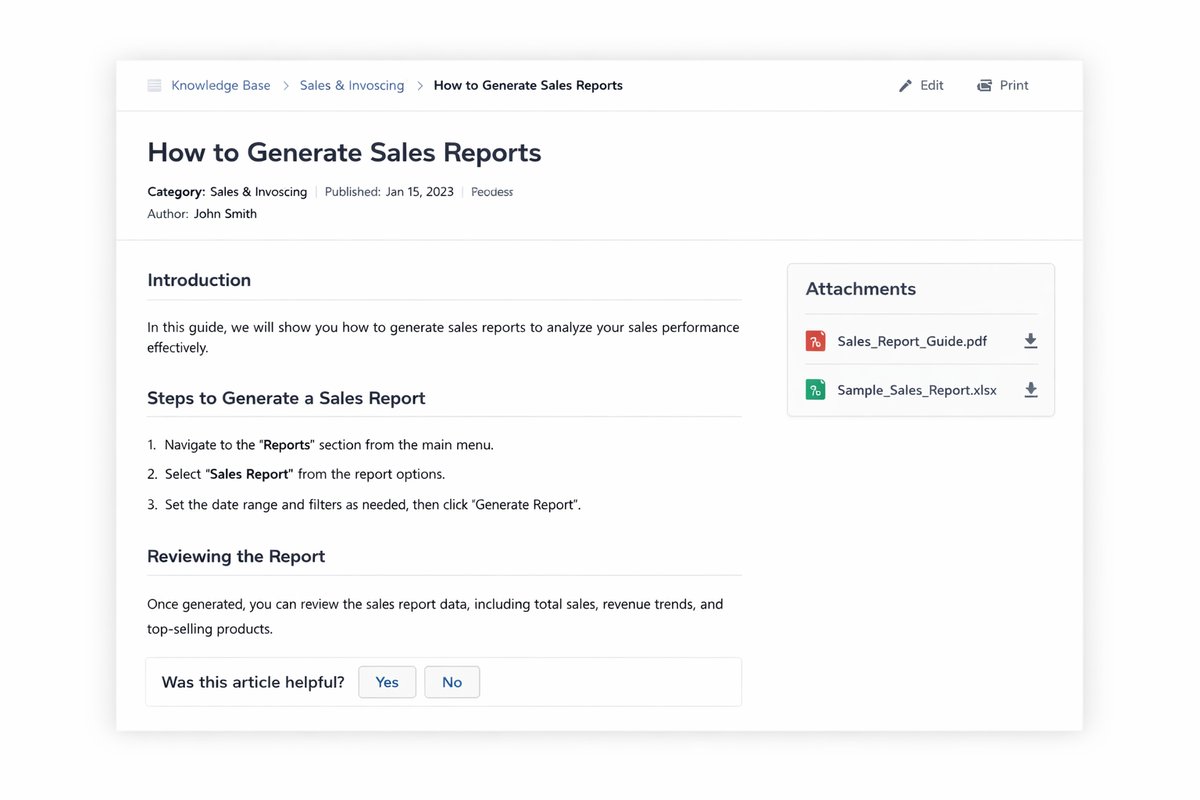
What teams use most in this module
Practical capabilities that make day-to-day execution faster, cleaner, and easier to govern.
Categories & articles
Organize content into categories so users can browse and find answers quickly.
Category-based organization
Rich article editor (text, images, attachments)
Draft and published states
Article links you can share with customers or teams
Related articles and browsing
Visibility control
Publish the right content to the right audience—without duplicating documentation.
Internal-only articles for staff
Customer-facing articles for self-service
Permissions and access control (where configured)
Clear separation of internal notes vs public help
Consistent publishing workflow
Search & discovery
Help users reach answers fast with search and structured navigation.
Keyword search
Category browsing
Popular and recently updated articles
Clear article structure for readability
Reduce time-to-answer for common questions
Feedback & improvement
Collect signals that help teams improve content over time.
Helpful / not helpful feedback
Identify content gaps based on searches
Prioritize article updates based on usage
Keep documentation accurate as processes evolve
Support Desk enablement
Use Knowledge Base as your first line of support—then link articles when a ticket needs help.
Standard answers for repeated questions
Link articles in Support Desk replies
Reduce ticket volume with self-service content
Faster resolution when tickets do arrive
Start with this workflow
Follow these structured steps to launch one controlled process first, then expand.
Knowledge base rollout readiness
1
Collect ten repeated questions, two internal procedures, one outdated answer, and one onboarding topic
2
Define the first categories, article owners, visibility rules, review cadence, and approval process
3
Write short articles that answer the exact user question before adding broader explanation
4
Link articles to Support Desk replies, onboarding flows, CRM context, and internal SOP use cases
5
Review search terms, feedback, repeated tickets, and outdated content in a weekly improvement loop
Create and publish help content
1
List the most common questions or process steps
2
Write an article with clear steps and screenshots
3
Place it in the right category
4
Publish for customers or keep internal-only
5
Review feedback and update regularly
Deflect repeated tickets
1
Create articles for the top repeated requests
2
Share links with customers when needed
3
Standardize replies by referencing the same articles
4
Measure article views and helpful feedback
5
Iterate on content to reduce future tickets
Common problems this module helps solve
Support answers live in chat, email, old documents, or personal memory
New employees ask the same onboarding questions because procedures are not searchable
Customers receive inconsistent answers because agents do not share one approved source
Support tickets repeat because no one turns frequent questions into help articles
Articles are published but no owner reviews them after process, pricing, policy, or feature changes
Teams create too many categories before knowing which topics are actually searched
Internal SOPs and customer-facing articles are mixed without clear visibility rules
Managers cannot see which knowledge gaps create tickets, delays, or repeated escalations
Sales, support, onboarding, and operations teams use different wording for the same process
Where teams apply this module
Customer self-service help center for FAQs, troubleshooting, how-to guides, and product answers
Support Desk answer reuse so agents can link approved articles instead of rewriting replies
Internal SOP library for finance, HR, operations, sales, implementation, and service teams
Employee onboarding content for policies, procedures, system usage, and role-based guidance
Customer onboarding content for setup steps, launch checklists, common questions, and support paths
Knowledge governance for article owners, review dates, outdated content, and access rules
Content-gap review based on repeated tickets, search terms, feedback, and escalation patterns
Implementation playbooks and project-delivery checklists connected to service workflows
Connected records across modules

Support Desk: agents can reuse approved articles in replies, reduce repeated tickets, and identify content gaps from recurring issues.

Customer Support: repeated customer questions can become knowledge articles and help protect answer consistency.
CRM and Sales: approved commercial, onboarding, renewal, and account-handling answers help sales teams avoid inconsistent messaging.

HR Records and Payroll: internal policies, onboarding steps, payroll cutoff guidance, and employee self-service answers can be organized for staff.

Projects and Services: delivery playbooks, customer onboarding steps, implementation checklists, and acceptance guidance can be documented.
Smart Mentions: content gaps can be assigned to owners for review, correction, or approval.

Data Exporter and Reporting: article usage, gaps, feedback, and support deflection evidence can be reviewed in management packs.
Built-in Reports & Analytics
Most viewed articles
Recently updated and stale articles
Articles without owners or review dates
Search terms with no useful result
Helpful / not helpful feedback trends
Repeated support topics that need new articles
Support Desk deflection opportunities
Customer-facing vs internal article coverage
Onboarding and SOP content completeness
Knowledge quality review pack for managers
Compliance & Implementation Resources
Practical guides to help you rollout and validate workflows.
FAQ
Is Knowledge Base the same as a Help Center?
A help center is usually the customer-facing part of the knowledge base. Knowledge Base can also include internal SOPs, onboarding guides, support playbooks, and role-sensitive procedures.
Should articles be long or short?
Start short and answer the exact question first. Add screenshots, examples, and related links only when they help the user complete the task.
How do we know which articles to create first?
Start with repeated support tickets, onboarding questions, sales questions, high-risk procedures, and questions managers answer manually every week.
Who should own the knowledge base?
A knowledge owner should govern structure and standards, while each category needs a content owner responsible for accuracy, review, and updates.
How does Knowledge Base reduce support tickets?
Repeated questions become approved articles that customers or agents can reuse. Managers can then review content gaps and improve articles instead of only closing tickets one by one.
Plans that include this module
Confirm commercial fit before rollout planning.
Enterprise Plan
Ready to evaluate Knowledge base and help center ERP software with your team?
We will map this module to your current process, owners, controls, and rollout timeline.
User guide
How to use Knowledge base and help center ERP software
Setup checklist, key workflows, reports, and troubleshooting.
Request a Demo
Tell us what you need and we will reply with a rollout plan and recommended modules.
Fields marked with * are required.
Related content
Related Modules
AI Sales Assistant
Use AI-assisted calling and qualification workflows to improve first-contact consistency, lead follow-up, call summaries, and CRM handoff discipline.
Often fits plan: Field Service · Scale
Asset Management
Control asset records, custody, locations, maintenance, audits, depreciation, and lifecycle accountability from one controlled workspace.
Often fits plan: Field Service · Scale
Asset Management
Manage company assets, custody, locations, maintenance, audits, depreciation, and lifecycle accountability from one controlled workspace.
Related Use Cases
Accelerate Order to Cash
Connect sales, fulfillment, invoicing, and collections to reduce revenue leakage and improve cash conversion.
order-to-cash
revenue-operations
cash-flow
Control Production Costs
Tie material usage, labor capture, and overhead allocation to each production order for reliable margins.
manufacturing-management
costing
inventory-warehousing
Related Industries
ERP for Manufacturing Operations
Manufacturing ERP for production planning, MRP, inventory, quality, costing, and shop-floor control across growing factories.
manufacturing
mrp
production
ERP for Clinics and Outpatient Networks
Sector playbook covering pain points, workflows, module fit, and buying checklist for erp for clinics and outpatient networks.
industry
operations
erp
Related Guides
Build ZATCA audit trail controls for SMB finance teams
Practical guide for build zatca audit trail controls for smb finance teams with execution steps and buying support links.
zatca
saudi
compliance
ERP Implementation Playbook
A practical, phased guide to planning, launching, and scaling ERP adoption across teams with measurable outcomes.
implementation
operations
change-management