Equipment master records with category, serial or tag, model, location, owner, operating team, status, and attachments
 Module
Fixed equipment and equipment maintenance ERP software
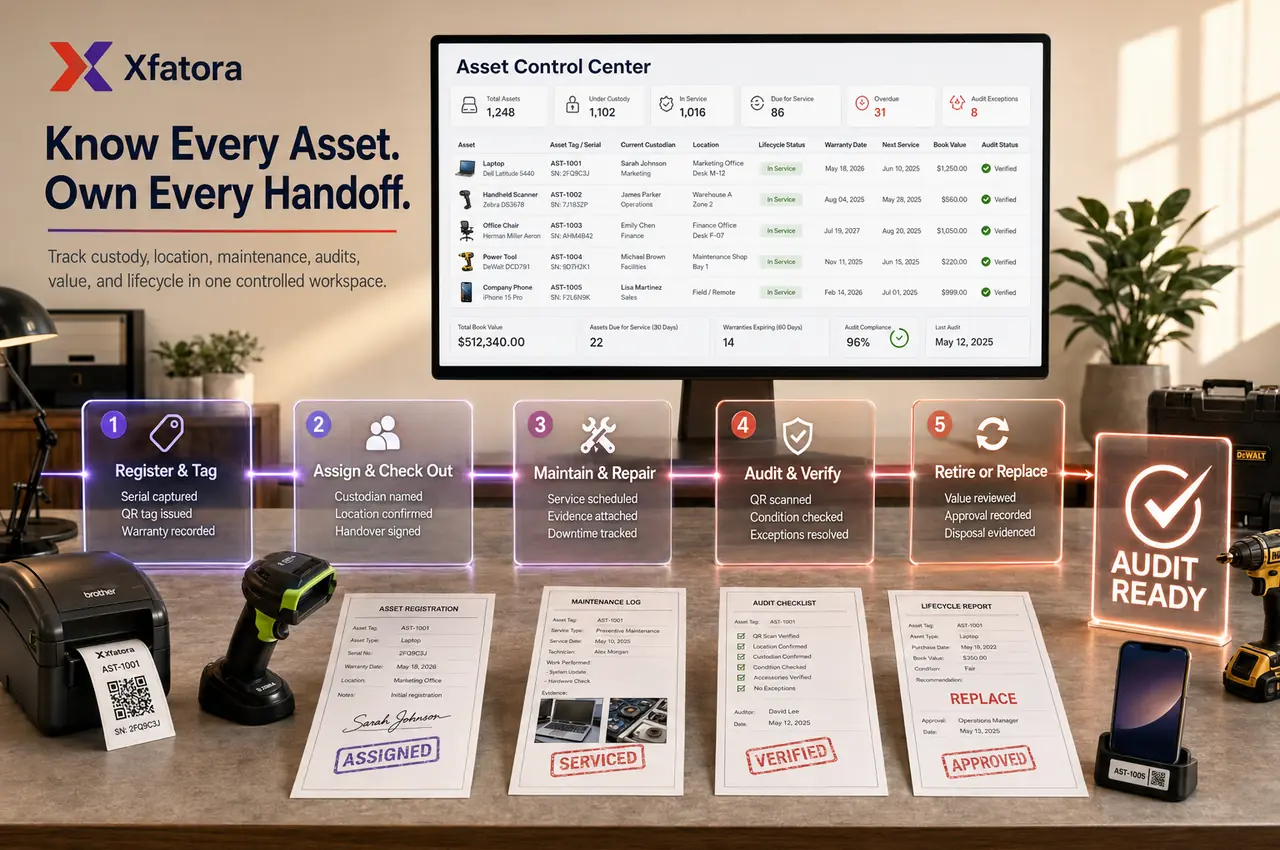
Control equipment records, custody, locations, maintenance schedules, inspections, downtime, service evidence, repair cost, renewal dates, and lifecycle decisions.
Xfatora Fixed Equipment helps operations, maintenance, finance, branch, workshop, and project teams manage operational equipment from registration and custody through maintenance, inspection, downtime, transfer, disposal, and finance review.
Approved app available now
Take Field Service to the frontline.
Connect dispatch and technicians across assigned jobs, inspections, diagnosis, work and parts, time, evidence, customer signatures, completion, and service reports.
What this module helps you control
Custody, assignment, transfer, handover, return, and location movement history
Maintenance schedules, preventive maintenance, repair logs, service notes, technician notes, and service evidence
Inspection schedules, inspection due dates, pass/fail notes, safety checks, certification or renewal dates, and overdue actions
Downtime tracking, issue reporting, reason codes, downtime evidence, return-to-service history, and repeated failure review
Repair cost, service cost, spare parts context, acquisition context, capitalization review, disposal, and finance handoff
Equipment lifecycle from active to under repair, transferred, due for inspection, retired, disposed, or replaced
Connections with Asset Management, Accounting, Projects & Services, Fleet Management, Warranty Management, Procurement, and Data Exporter
Business outcomes teams expect
Keep one trusted record for machines, fixed devices, workshop assets, site equipment, tools, and operational equipment.
Clarify who owns each equipment item, where it is located, and who is responsible for updates.
Reduce unplanned downtime by making maintenance schedules, inspection dates, and issue reports visible earlier.
Preserve repair evidence, service history, handover notes, and inspection outcomes for audit and management review.
Improve cost review by connecting repair cost, downtime, disposal, and replacement decisions to the equipment record.
Separate controlled equipment from consumable inventory so high-risk items receive the right lifecycle treatment.
Support site, project, branch, workshop, and production teams with consistent equipment status and custody discipline.
Give finance and operations a shared view before capitalization, repair, disposal, or replacement decisions.
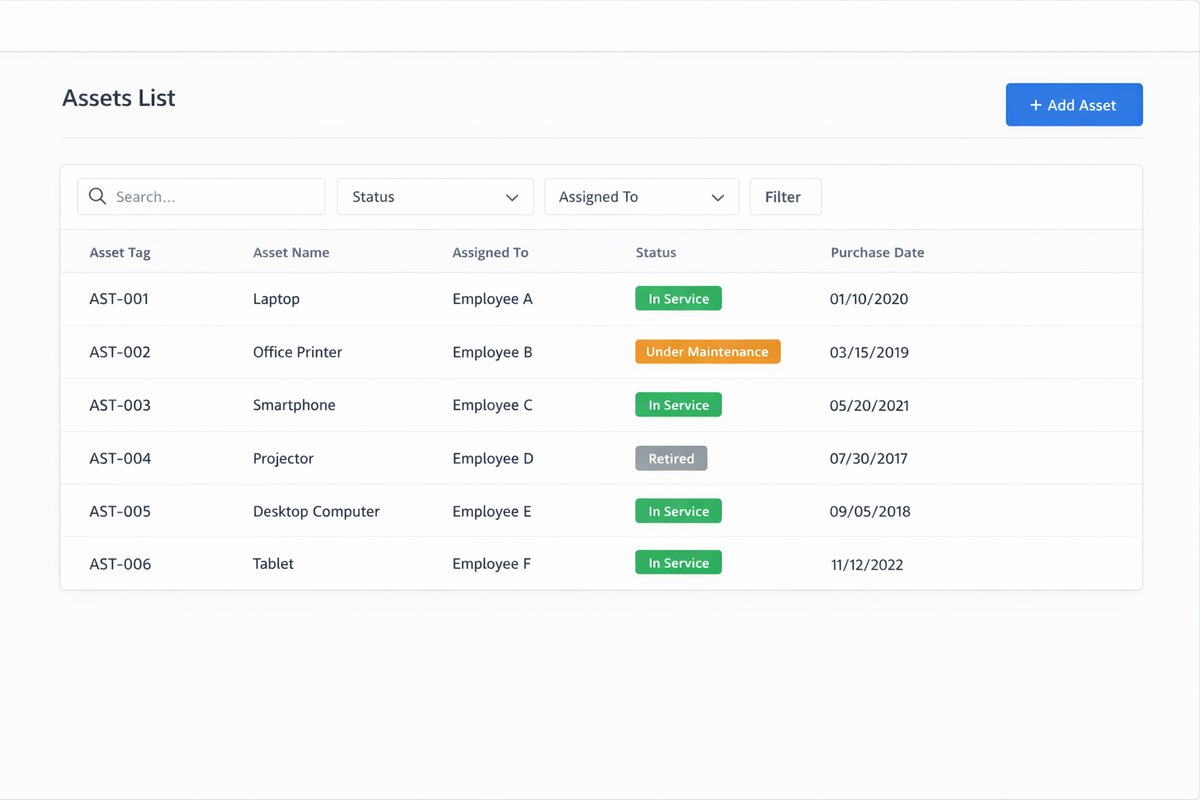
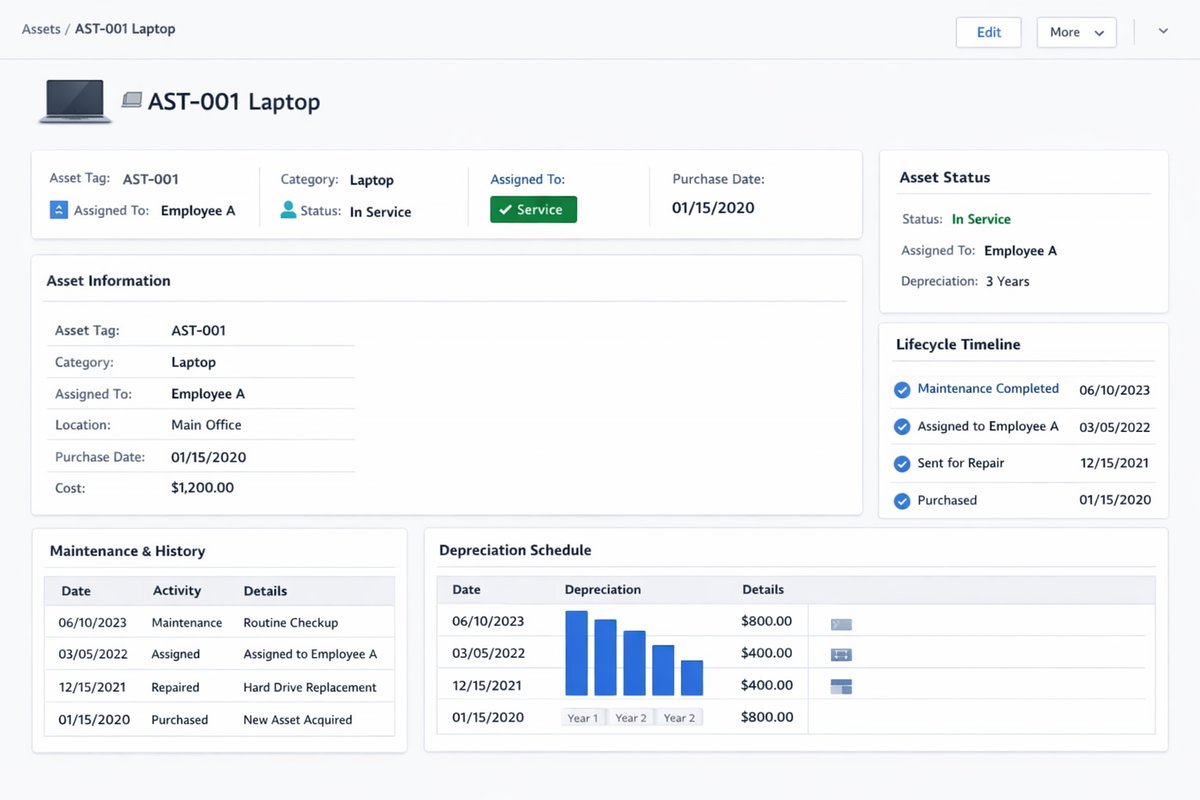
Screenshots
Real screens from the platform.
What teams use most in this module
Practical capabilities that make day-to-day execution faster, cleaner, and easier to govern.
Equipment Register and Master Records
Create controlled records for machines, fixed devices, workshop assets, site equipment, tools, and operational equipment.
Equipment name, category, model, serial number, and tag
Location, branch, department, project, and operating team
Owner and custody context
Status labels for active, under repair, retired, or disposed equipment
Files, photos, manuals, invoices, and service attachments
Custody, Assignment, and Handover
Keep ownership and movement traceable when equipment moves between employees, branches, workshops, projects, or sites.
Custody owner and responsible team
Transfer and handover notes
Return and reassignment history
Location movement trail
Evidence retention for audit and accountability
Maintenance and Repair History
Record maintenance and repair activity so repeated failures, service cost, and readiness decisions are visible.
Preventive and corrective maintenance logs
Repair notes, completion dates, and technician context
Service evidence and attachments
Repair cost and service cost review
Return-to-service status updates
Inspections, Renewals, and Certifications
Track inspection and renewal dates before missed checks create safety, compliance, or uptime issues.
Inspection schedule and due dates
Pass/fail and corrective action notes
Certification or renewal tracking where relevant
Overdue inspection reporting
Evidence for safety or operational reviews
Downtime and Availability Control
Make downtime visible with owner, reason, impact, and next action so managers can prevent repeated disruptions.
Downtime reason and issue notes
Under repair and unavailable status
Repeated failure review
Return-to-service evidence
Downtime trends by category, site, or owner
Finance and Lifecycle Review
Support finance review for acquisition, repair cost, disposal, write-off, and replacement planning.
Acquisition and cost context
Repair cost and downtime cost review
Disposal or replacement evidence
Capitalization or asset-register context
Shared operations-finance review pack
Reports and Management Review
Use operational and finance views to monitor equipment health, ownership, maintenance, inspection, downtime, and cost.
Equipment by status, location, category, and owner
Maintenance backlog and overdue inspections
Downtime and repeated issue review
Repair cost and disposal candidates
Audit-ready equipment lifecycle history
Start with this workflow
Follow these structured steps to launch one controlled process first, then expand.
Register controlled equipment
1
Create equipment record
2
Assign category, location, owner, and operating team
3
Add serial number, tag, model, and attachments
4
Set initial status and custody context
5
Verify reporting visibility
Transfer or hand over equipment
1
Open current equipment record
2
Confirm current location and custody owner
3
Choose new owner, branch, project, or site
4
Record handover notes and evidence
5
Update status and preserve movement history
Record maintenance or repair
1
Flag equipment for maintenance or repair
2
Add maintenance log and issue details
3
Attach service evidence and technician notes
4
Record repair or service cost
5
Update readiness status after completion
Run inspection and renewal review
1
Review due inspections or renewals
2
Complete inspection or certification check
3
Record pass/fail and corrective notes
4
Escalate overdue or failed items
5
Update next due date and evidence
Downtime and replacement review
1
Review equipment with repeated downtime
2
Compare repair cost, service history, and business impact
3
Decide repair, retain, transfer, replace, or dispose
4
Record decision evidence
5
Include item in finance and operations review
Who this module is for
Operations managers
Maintenance supervisors
Workshop teams
Production and site managers
Finance reviewers
Asset administrators
Project managers using shared equipment
Leadership teams reviewing downtime and cost
Common problems this module helps solve
Equipment ownership is unclear after transfers between branches, sites, projects, or teams
Maintenance evidence is scattered in spreadsheets, messages, photos, or supplier documents
Downtime is recorded manually and cannot be linked to equipment history or repair cost
Inspection and renewal dates are missed until equipment becomes unavailable or unsafe
Repair cost is visible to finance but not connected to operating impact or repeated failures
Equipment is mixed with consumable inventory even though it needs custody, inspection, and lifecycle tracking
Management cannot decide whether to repair, replace, transfer, or dispose because evidence is incomplete
Where teams apply this module
Production equipment, machines, workshop assets, site equipment, tools, fixed devices, and operational equipment with maintenance or custody risk
Equipment handover between branches, projects, teams, operators, workshops, or storage locations
Preventive maintenance, corrective repair, inspection, renewal, and downtime management
Finance review for capitalization, repair cost, disposal, write-off, and replacement planning
Audit preparation for custody, service evidence, inspection history, and lifecycle decisions
Connected records across modules
Asset Management: equipment can connect with broader asset lifecycle, custody, audit, depreciation, and replacement planning.

Accounting: acquisition cost, repair cost, disposal, write-off, and capitalization review support finance close and reporting.
Projects and Services: equipment assigned to projects, jobs, or sites can keep ownership and usage context visible.

Fleet Management: mobile or vehicle-linked equipment can connect with fleet availability, maintenance, and operating history.

Warranty Management: service history, repair evidence, serial numbers, and warranty dates can support warranty decisions.
Procurement: maintenance suppliers, spare parts, service purchases, and equipment acquisition can connect with purchase approval.
Data Exporter: equipment register, maintenance, inspection, downtime, and cost review packs can be exported for audits.
Built-in Reports & Analytics
Equipment register completeness by category, location, owner, and status
Equipment by active, assigned, under repair, due for inspection, retired, disposed, or replaced status
Custody, transfer, handover, return, and location movement history
Maintenance schedules, maintenance backlog, repair logs, and service evidence
Inspection due dates, failed inspections, overdue renewals, and certification gaps
Downtime by equipment, category, site, owner, issue reason, and period
Repair cost, service cost, repeated failures, replacement candidates, and disposal review
Finance and operations equipment review pack for monthly or quarterly governance
Compliance & Implementation Resources
Practical guides to help you rollout and validate workflows.
FAQ
Should fixed equipment be managed in inventory or assets?
If an item has custody, lifecycle, depreciation, maintenance, inspection, downtime, audit, or replacement risk, manage it as an asset or equipment record rather than simple stock.
What should be tracked first?
Start with location, owner, status, maintenance schedule, inspection dates, warranty or certification dates, service evidence, and financial value.
How do we reduce downtime?
Make maintenance schedules, inspection dates, issue reports, ownership, repair cost, and return-to-service evidence visible before failure becomes urgent.
What should we prepare before a Fixed Equipment demo?
Prepare ten equipment records: active, under repair, transferred, due for inspection, unclear ownership, repeated downtime, high repair cost, project-assigned, missing evidence, and disposal candidate.
How is this different from Fleet Management?
Fleet Management focuses on vehicles, drivers, fuel, renewals, and fleet availability. Fixed Equipment focuses on operational equipment, machines, tools, maintenance, inspections, downtime, custody, and lifecycle evidence.
Plans that include this module
Confirm commercial fit before rollout planning.
Business Plan
Enterprise Plan
Ready to evaluate Fixed equipment and equipment maintenance ERP software with your team?
We will map this module to your current process, owners, controls, and rollout timeline.
Talk to our solution team
Tell us what you need and we will reply with a rollout plan and recommended modules.
Fields marked with * are required.
Related content
Related Modules
Often fits plan: Enterprise
AI Sales Assistant
Use AI-assisted calling and qualification workflows to improve first-contact consistency, lead follow-up, call summaries, and CRM handoff discipline.
Often fits plan: Enterprise
Asset Management
Control asset records, custody, locations, maintenance, audits, depreciation, and lifecycle accountability from one controlled workspace.
Often fits plan: Enterprise
Asset Management
Manage company assets, custody, locations, maintenance, audits, depreciation, and lifecycle accountability from one controlled workspace.
Related Use Cases
Accelerate Order to Cash
Connect sales, fulfillment, invoicing, and collections to reduce revenue leakage and improve cash conversion.
order-to-cash
revenue-operations
cash-flow
Control Production Costs
Tie material usage, labor capture, and overhead allocation to each production order for reliable margins.
manufacturing-management
costing
inventory-warehousing
Related Industries
ERP for Manufacturing Operations
Manufacturing ERP for production planning, MRP, inventory, quality, costing, and shop-floor control across growing factories.
manufacturing
mrp
production
ERP for Clinics and Outpatient Networks
Sector playbook covering pain points, workflows, module fit, and buying checklist for erp for clinics and outpatient networks.
industry
operations
erp
Related Guides
Build ZATCA audit trail controls for SMB finance teams
Practical guide for build zatca audit trail controls for smb finance teams with execution steps and buying support links.
zatca
saudi
compliance
ERP Implementation Playbook
A practical, phased guide to planning, launching, and scaling ERP adoption across teams with measurable outcomes.
implementation
operations
change-management