Finance is the bottleneck
Start with accounting, invoicing, ZATCA, receivables, payables, and reporting.
Review fitERP module hub
Compare finance, sales, operations, HR, compliance, and productivity modules by the business problem they solve. Use the guided paths below to start focused, stabilize ownership, then connect the next workflow.
Start from the business pain
These starting paths help you identify the first module group before you expand into the full ERP footprint.
Start with accounting, invoicing, ZATCA, receivables, payables, and reporting.
Review fitStart with CRM, quotations, estimates, contracts, invoices, and payment follow-up.
Review fitStart with inventory, procurement, receiving, transfers, reorder controls, and vendor flow.
Review fitStart with manufacturing orders, bills of materials, material consumption, and finished goods movement.
Review fitMost evaluated modules
These modules sit closest to revenue, cash, stock, production, and compliance decisions.
Control journals, receivables, payables, reconciliations, closing work, and financial reports from one finance workspace.
Best fit: Best when month-end close, audit history, or management reporting needs discipline.
Connect leads, customers, quotations, estimates, invoices, payments, contracts, and follow-up activity.
Best fit: Best when sales work is split between spreadsheets, calls, and disconnected invoices.
Track items, warehouses, receipts, issues, transfers, stock counts, reorder points, and stock movement.
Best fit: Best when stock accuracy and handoffs between sales, purchasing, and operations affect daily decisions.
Manage purchase requests, suppliers, quotations, purchase orders, goods receipt, vendor bills, credits, and payment follow-up.
Best fit: Best when purchasing needs approval control before stock and finance are affected.
Connect demand-driven MRP, capacity scheduling, MES execution, shifts, quality, downtime, OEE, traceability, governance, and edge telemetry.
Best fit: Best when planning, shop-floor execution, inventory movement, and production evidence must stay in one operating flow.
Support Saudi e-invoicing readiness with seller data, tax number checks, QR workflows, XML files, and reporting or clearance preparation.
Best fit: Best for Saudi companies that need compliance connected to sales and finance records.
Recommended rollout paths
A good ERP start point has a visible business pain, a clear first owner, and a handoff that other teams already depend on.
Start with Accounting
Invoices, receivables, payables, tax evidence, and reports are not trusted quickly enough.
Target outcome: Faster close, clearer audit trail, and management reports that finance can defend.
Start with CRM
Leads, quotations, invoices, contracts, and payment follow-up are split between teams.
Target outcome: Cleaner handoff from sales activity to invoicing, collection, and customer history.
Start with Inventory
Teams cannot trust available quantity, purchase status, receiving, or vendor follow-up.
Target outcome: Better stock visibility, purchasing control, receiving evidence, and reorder decisions.
Start with Manufacturing
Production orders, bills of materials, shortages, consumption, and finished goods are not connected.
Target outcome: A clearer path from BOM and stock availability to production execution and finished goods.
Start with HR records
Employee records, attendance, payroll inputs, project capacity, and execution goals are disconnected.
Target outcome: Cleaner employee data, attendance inputs, payroll readiness, and realistic workload planning.
Start with ZATCA readiness
Invoice data, tax fields, QR, XML, and evidence for ZATCA readiness are handled after the fact.
Target outcome: Compliance work stays connected to invoice records, seller data, tax checks, and finance review.
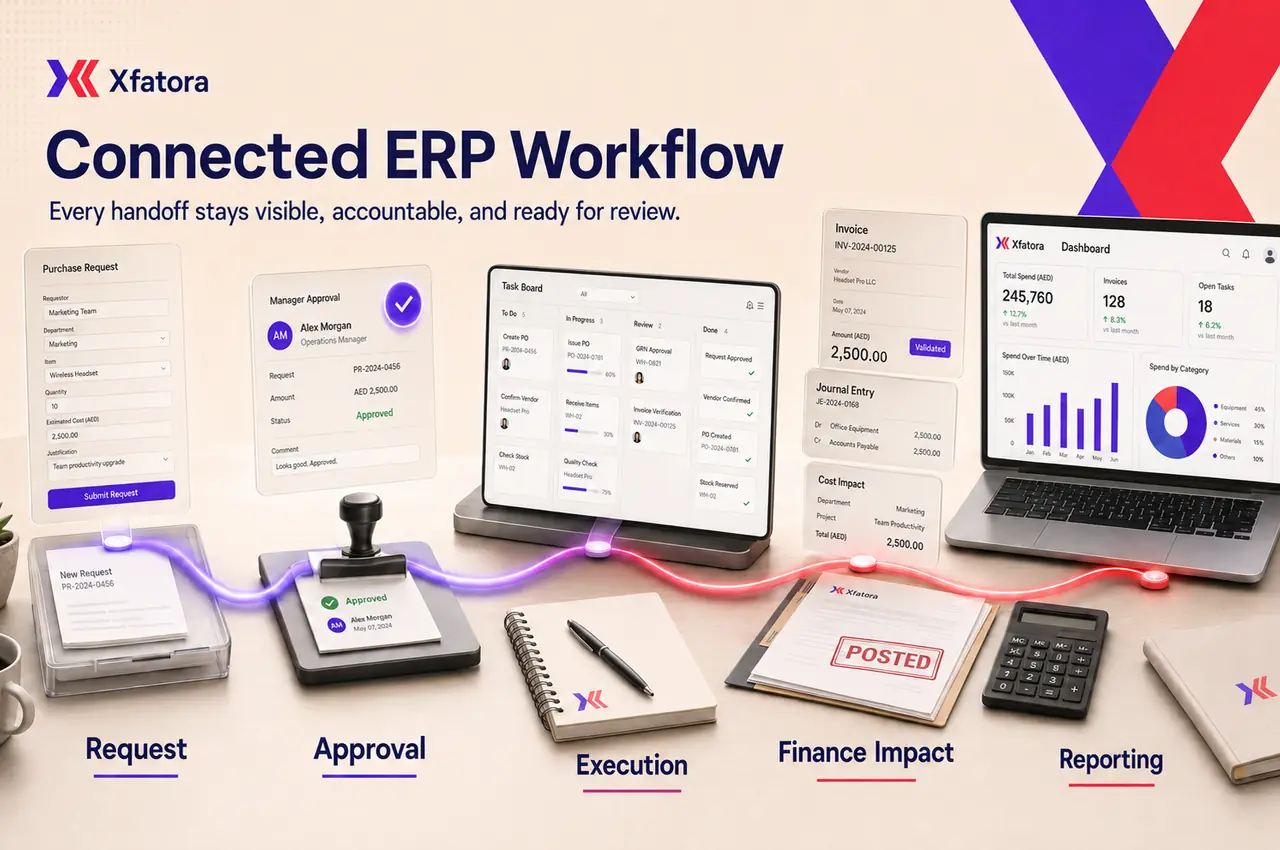
Connected handoffs
Use this map to understand which records should connect after the first workflow is stable.
CRM → Accounting
Sales and finance work from one customer and document trail.
Procurement → Inventory and finance
Purchasing affects stock and payables with clearer approval evidence.
Manufacturing → Inventory
Production planning and stock movement stay visible together.
Attendance → Payroll
Payroll closes with fewer manual corrections and clearer approvals.
Invoices → ZATCA readiness
Compliance evidence is connected to the finance record instead of being rebuilt later.
Projects → Service delivery
Delivery teams can see ownership, capacity, and customer-facing progress.
Cash, close, and audit trail
Use these modules when invoices, journals, receivables, assets, and financial reporting need a more dependable operating record.
Track assets, assignments, locations, maintenance, depreciation, audits, and lifecycle records.
Best fit: Best when fixed assets and equipment need ownership beyond purchase records.
Control journals, receivables, payables, reconciliations, closing work, and financial reports from one finance workspace.
Best fit: Best when month-end close, audit history, or management reporting needs discipline.
Leads, customers, quotations, and feedback
Use these modules when growth depends on clearer lead follow-up, customer context, quotations, renewals, and feedback loops.
Use AI-assisted sales workflows to qualify calls, capture summaries, support campaigns, and hand cleaner context to the sales team.
Best fit: Best when sales teams need faster lead qualification and better call follow-up.
Connect leads, customers, quotations, estimates, invoices, payments, contracts, and follow-up activity.
Best fit: Best when sales work is split between spreadsheets, calls, and disconnected invoices.
Create recurring feedback programs, collect customer or employee responses, review results, and convert feedback into action.
Best fit: Best when feedback needs to become an operational improvement loop.
Stock, purchasing, projects, production, and field execution
Use these modules when materials, purchasing, production, service delivery, logistics, and fleet work need shared ownership.
Manage vehicles, drivers, assignments, maintenance, fuel, inspections, renewals, reservations, and operating costs.
Best fit: Best when fleet cost and availability affect service reliability.
Track items, warehouses, receipts, issues, transfers, stock counts, reorder points, and stock movement.
Best fit: Best when stock accuracy and handoffs between sales, purchasing, and operations affect daily decisions.
Coordinate recipients, advance notices, parcels, pickups, consolidated shipments, tracking history, delivery confirmation, and proof of receipt.
Best fit: Best when delivery status needs to be visible to operations and customer-facing teams.
Connect demand-driven MRP, capacity scheduling, MES execution, shifts, quality, downtime, OEE, traceability, governance, and edge telemetry.
Best fit: Best when planning, shop-floor execution, inventory movement, and production evidence must stay in one operating flow.
Manage purchase requests, suppliers, quotations, purchase orders, goods receipt, vendor bills, credits, and payment follow-up.
Best fit: Best when purchasing needs approval control before stock and finance are affected.
Manage scope, owners, milestones, tasks, dependencies, files, notes, timesheets, and customer-facing delivery progress.
Best fit: Best for service teams that need delivery accountability after the sale.
Register warranty coverage, claims, intake steps, ownership, timing, and claim status.
Best fit: Best when after-sales service needs predictable handling and evidence.
Employee records, attendance, payroll, capacity, and goals
Use these modules when HR records, attendance inputs, payroll readiness, team capacity, and execution goals need cleaner governance.
Connect goals, owners, updates, risk visibility, and execution reviews.
Best fit: Best when strategy needs clearer operational follow-through.
Run payroll cycles with earnings, deductions, taxes, insurance, attendance checks, approvals, and payslip records.
Best fit: Best when payroll needs a stronger approval trail and cleaner inputs.
Manage employee files, organization structure, contracts, onboarding, offboarding, training, dependents, and lifecycle history.
Best fit: Best when HR records are scattered and payroll depends on manual updates.
Manage attendance, leave, shifts, worksite rules, overtime approval, exceptions, and period closing.
Best fit: Best when attendance exceptions delay payroll or capacity planning.
Compare capacity, planned hours, actual hours, leave impact, billable load, and overload risk before delivery slips.
Best fit: Best when project delivery depends on realistic team capacity.
Saudi and regional invoice readiness
Use these modules when invoice data, tax readiness, XML generation, QR requirements, and regulatory evidence must stay connected to finance work.
Prepare structured e-invoice data and XML files for supported electronic invoicing workflows.
Best fit: Best when invoice validation and structured file readiness need a controlled process.
Support Saudi e-invoicing readiness with seller data, tax number checks, QR workflows, XML files, and reporting or clearance preparation.
Best fit: Best for Saudi companies that need compliance connected to sales and finance records.
Export, collaboration, and focused industry records
Use these modules when teams need cleaner exports, record-level collaboration, or specialized operational files.
Organize beneficiary profiles, required documents, aid delivery, attendance, activities, follow-up, and claims.
Best fit: Best for organizations managing beneficiary services and case records.
Export structured CSV files from business modules for audit, reconciliation, migration, analysis, and periodic reviews.
Best fit: Best when finance or operations teams need controlled data extraction.
Review this module to understand workflow fit, ownership, data needs, and the next rollout step.
Best fit: Best when this workflow needs clearer accountability.
Review this module to understand workflow fit, ownership, data needs, and the next rollout step.
Best fit: Best when this workflow needs clearer accountability.
Review this module to understand workflow fit, ownership, data needs, and the next rollout step.
Best fit: Best when this workflow needs clearer accountability.
Review this module to understand workflow fit, ownership, data needs, and the next rollout step.
Best fit: Best when this workflow needs clearer accountability.
Review this module to understand workflow fit, ownership, data needs, and the next rollout step.
Best fit: Best when this workflow needs clearer accountability.
Mention teammates, reference records, and keep ownership, follow-up, and decisions inside the work record.
Best fit: Best when teams lose decisions inside chat threads.
Review this module to understand workflow fit, ownership, data needs, and the next rollout step.
Best fit: Best when this workflow needs clearer accountability.
Rollout sequence
Xfatora works best when the first workflow has a clear owner, clear records, and a measurable improvement target.
Start with the workflow causing the clearest business cost: finance control, sales follow-up, inventory accuracy, procurement approvals, manufacturing execution, or ZATCA readiness.
Yes. Xfatora supports staged rollout so teams can stabilize one workflow before adding the next connected module.
The modules are designed around connected workflows, so sales, inventory, purchasing, finance, HR, and operations can work from cleaner shared records.
The manufacturing workflow supports production orders, bills of materials, material consumption, and finished goods movement. A stronger MRP rollout should also define planning rules, lead times, reorder points, inventory availability, and procurement handoffs.
Compare modules by the handoff they fix, the owner who will maintain the data, the reports the team needs, and the first measurable improvement expected after rollout.