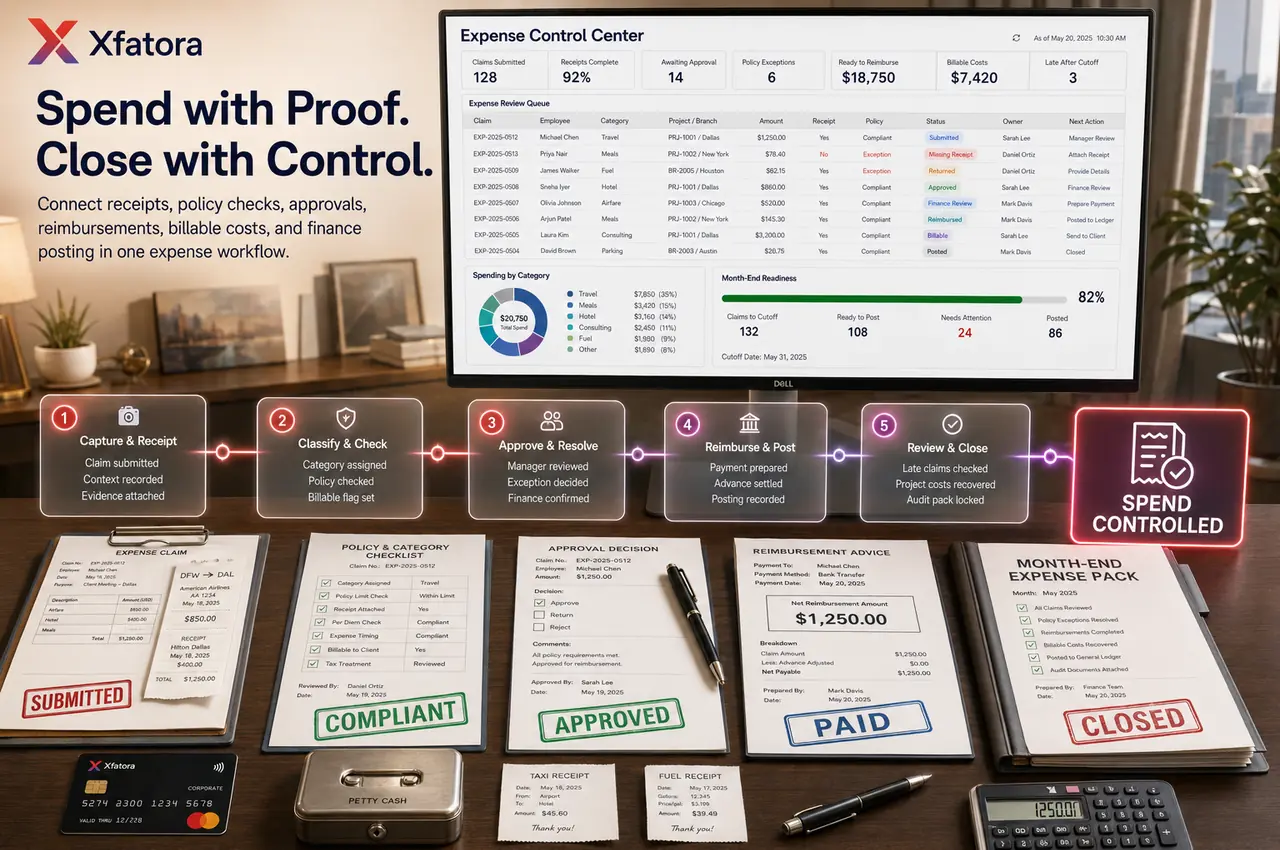
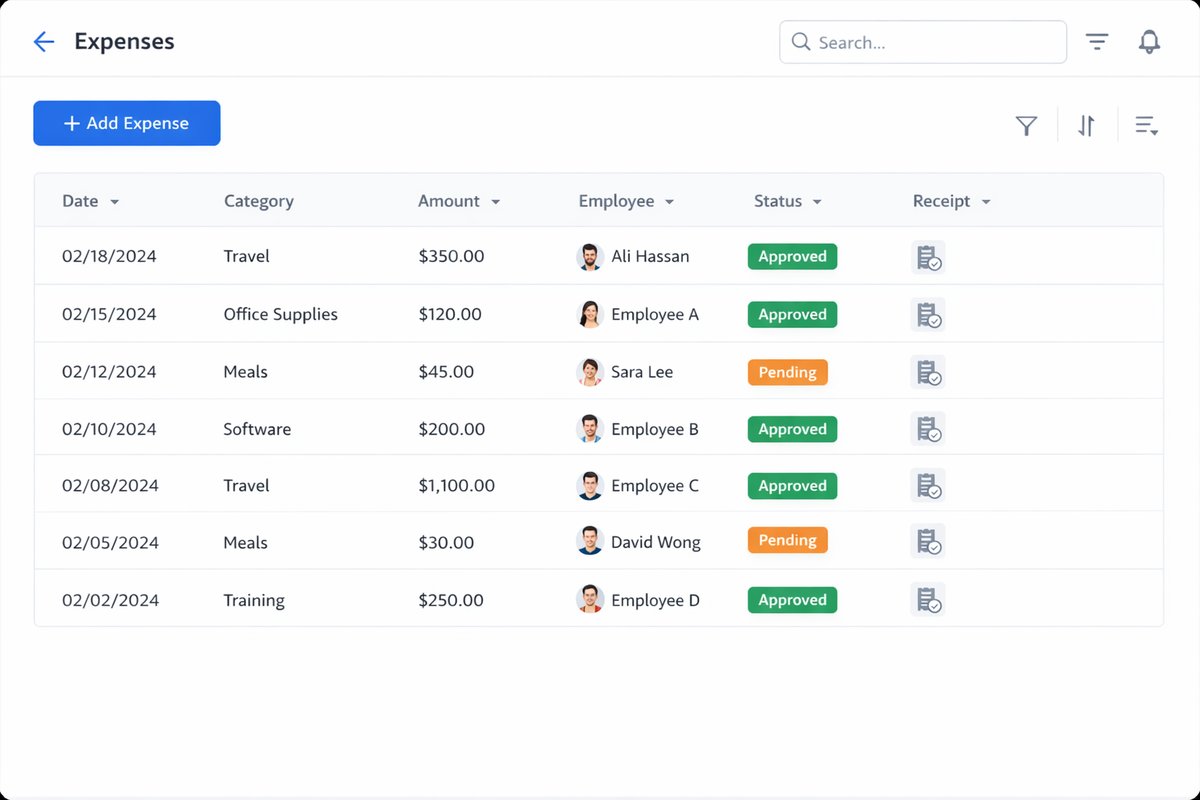
Expense submission with employee, branch, department, project, customer, amount, date, category, purpose, and notes
 Module
Expense management and reimbursement control ERP software
Control expense submissions, receipts, categories, approvals, reimbursements, petty cash, billable expenses, policy exceptions, and finance reporting.
Xfatora Expense Management helps finance, HR, managers, employees, projects, branches, and operations teams manage expense evidence, policy checks, approvals, reimbursements, posting readiness, and month-end control from one workflow.

Approved app available now
Take Accounting to the frontline.
Keep accounts, journals, balances, receivables, payables, and financial reporting connected to XFatora data and role permissions.
What this module helps you control
Receipt attachments, missing receipt handling, evidence requirements, and audit-ready documentation
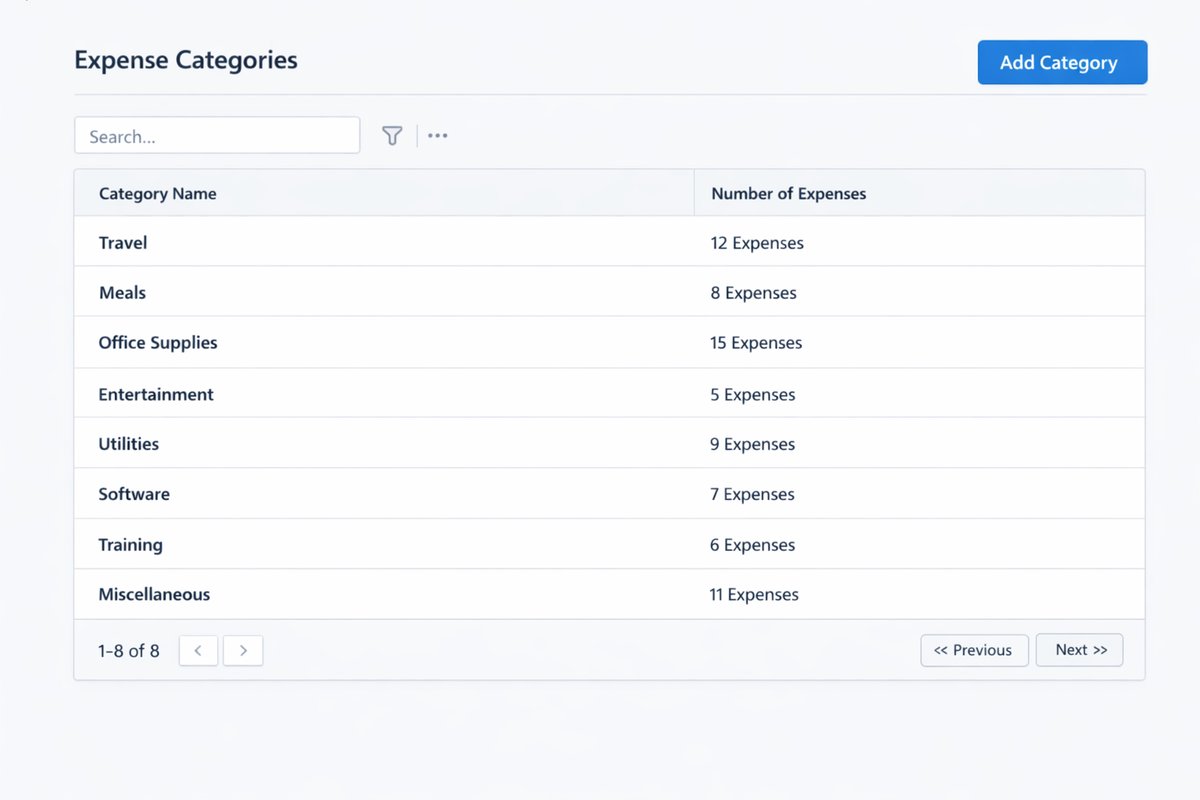
Expense categories, tax context, billable vs non-billable, reimbursable vs non-reimbursable, and policy classification
Approval routes by amount, role, department, project, branch, expense type, or exception reason
Rejected, returned, pending, approved, reimbursed, paid, posted, and late expense status visibility
Petty cash, cash advances, reimbursements, employee claims, branch expenses, project expenses, fuel, meals, and travel costs
Duplicate claim checks, policy exception review, finance correction, and month-end cutoff discipline
Finance posting readiness, accounting handoff, exports, reimbursement packs, and management reporting
Business outcomes teams expect
Reduce missing receipts by making evidence requirements visible before submission.
Shorten approval delays with clearer owner, amount, category, and exception routing.
Improve reimbursement confidence by tracking approved, rejected, returned, reimbursed, and finance-ready claims.
Give finance cleaner expense records before month-end close instead of late spreadsheet cleanup.
Separate billable, project-related, branch, employee, petty cash, and internal operating expenses for better reporting.
Make policy exceptions visible with reason, owner, and decision history.
Support project profitability and customer billing when reimbursable or billable costs must be recovered.
Prepare audit and export packs with receipts, categories, statuses, approval history, and reimbursement evidence.
Screenshots
Real screens from the platform.
What teams use most in this module
Practical capabilities that make day-to-day execution faster, cleaner, and easier to govern.
Expense Submission and Evidence
Capture expense claims with the details finance and managers need before the record reaches approval.
Employee, branch, department, project, customer, and category context
Date, amount, payment method, purpose, and notes
Receipt and evidence attachments
Missing receipt handling and correction flow
Clear history of who submitted and edited each record
Categories and Policy Rules
Standardize expense classification so reporting and review do not depend on free-text descriptions.
Expense category governance
Taxable, reimbursable, billable, or non-claimable classification
Project, branch, department, and cost center context
Policy exception reason capture
Cleaner monthly reporting by category and owner
Approval Workflows
Route expenses to the right reviewer based on amount, role, team, project, branch, or exception type.
Manager approval before finance review
Amount threshold routing
Returned or rejected claim handling
Policy exception visibility
Approval history for audit review
Reimbursements, Petty Cash, and Advances
Track employee claims, petty cash, and cash advances with clear reimbursement and settlement visibility.
Reimbursement readiness status
Petty cash and field expense context
Cash advance settlement support
Paid, unpaid, reimbursed, and pending statuses
Finance review before payment or posting
Billable and Project Expenses
Keep customer or project-related expenses separate so teams can recover costs and protect margins.
Link expenses to projects, customers, jobs, or service delivery
Billable vs internal cost control
Unbilled expense visibility
Support for project profitability review
Handoff to billing or project review where configured
Finance Posting and Month-End Control
Help finance review expense records before they become late close corrections.
Finance-ready expense status
Month-end cutoff visibility
Duplicate and incomplete claim checks
Accounting handoff and posting readiness
Export packs for reconciliation and audit
Reports and Review Packs
Review spending by category, employee, branch, project, status, and period with fewer manual corrections.
Pending, approved, rejected, returned, and reimbursed claims
Late expenses after cutoff
Missing receipt and policy exception reports
Spend by category, branch, department, project, and period
Reimbursement and audit review packs
Start with this workflow
Follow these structured steps to launch one controlled process first, then expand.
Expense rollout readiness
1
Prepare ten recent expenses: approved claim, rejected claim, missing receipt, project expense, petty cash, branch expense, fuel, travel, policy exception, and late-after-cutoff item
2
Define required fields, receipt rules, categories, tax context, and billable/reimbursable classification
3
Map approval routes by amount, employee, department, project, branch, and exception type
4
Agree reimbursement timing, finance review, posting readiness, and month-end cutoff rules
5
Review first reports for incomplete claims, approval delay, rejected reasons, missing receipts, and late expenses
Submit and correct an expense
1
Employee submits expense with amount, date, category, purpose, and context
2
Attach receipt or explain missing evidence
3
System or reviewer identifies policy issues
4
Claim is approved, rejected, or returned for correction
5
Corrected claim keeps history for finance and audit review
Approve and reimburse a claim
1
Manager reviews business purpose and policy compliance
2
Finance checks category, evidence, tax, and posting readiness
3
Claim is marked approved for reimbursement or payment
4
Reimbursement or posting follows the approved record
5
Status remains visible for employee and finance review
Handle billable project expenses
1
Mark expense as billable where appropriate
2
Link to project, customer, job, or service delivery context
3
Review approved and unbilled expenses
4
Prepare billing or recovery handoff
5
Track whether expense has been invoiced or recovered
Month-end expense review
1
Review pending, rejected, missing receipt, and returned claims
2
Check late expenses after cutoff
3
Export finance-ready expense pack
4
Post approved expenses or prepare reimbursement batch
5
Review trends by category, branch, project, and exception reason
Who this module is for
Finance teams
Employees submitting claims
Managers approving expenses
HR or payroll teams reviewing reimbursements
Project managers tracking billable costs
Branch managers controlling local spend
Operations teams managing field expenses
Leadership teams reviewing spend and policy exceptions
Common problems this module helps solve
Expenses are approved in chat or email without a reliable claim record
Receipts are missing or attached late during month-end close
Finance receives claims without category, project, branch, tax, or purpose context
Employees cannot tell whether a claim is pending, rejected, approved, reimbursed, or returned
Managers approve exceptions without a clear reason or policy trail
Project and customer expenses are not recovered because billable costs are not separated
Petty cash and field expenses are settled manually without consistent evidence
Late expenses after cutoff create accounting corrections and reporting delays
Where teams apply this module
Employee reimbursements, travel claims, meals, fuel, petty cash, field expenses, branch expenses, and operating costs
Project and customer-related expenses that need billable or reimbursable tracking
Finance teams closing the month and reducing late expense corrections
Managers approving expenses by policy, amount, department, project, branch, or exception type
Organizations replacing chat, email, or spreadsheet expense approvals with controlled records
Connected records across modules

Accounting: approved expenses, categories, payables, reimbursements, posting readiness, and month-end review support finance control.

Projects and Services: project-linked expenses can support profitability, customer billing, and delivery cost review.

HR Records: employee, department, role, manager, and approval line context can support routing and reimbursement control.
HR Payroll: employee advances, reimbursements, and finance-ready claim context can support payroll-related settlement where configured.

Procurement: supplier-paid-on-behalf items and operating expenses can connect with purchasing policy where needed.

CRM and Sales: customer-related billable expenses can support account and billing follow-up.
Data Exporter: expense, receipt, approval, reimbursement, and audit packs can be exported for finance review.
Built-in Reports & Analytics
Expenses by category, employee, branch, department, project, customer, and period
Pending, approved, rejected, returned, reimbursed, paid, and posted expense status
Missing receipts, incomplete claims, duplicate claims, and policy exceptions
Approval delay by manager, department, project, branch, and amount threshold
Reimbursement readiness and unpaid employee claims
Billable, unbilled, reimbursable, non-reimbursable, taxable, and non-claimable expenses
Late expenses after cutoff and month-end correction risk
Finance audit pack with receipts, approval history, notes, and export-ready records
Compliance & Implementation Resources
Practical guides to help you rollout and validate workflows.
FAQ
Should every expense require approval?
Not always. Low-risk expenses can use simpler rules, but high-value, unusual, project-related, branch-level, or policy-exception expenses should be controlled.
Who owns expense policy?
Finance usually owns posting and control rules. HR and operations may own employee communication, practical policy definitions, and reimbursement timing.
What should we prepare before an Expenses demo?
Prepare ten recent expenses: approved claim, rejected claim, missing receipt, project expense, petty cash, branch expense, travel, fuel, policy exception, and late-after-cutoff item.
How does Expenses connect with Accounting?
Approved expenses can support posting readiness, reimbursement review, payables, category reporting, and month-end close control.
What should managers measure first?
Track incomplete claim rate, approval delay, rejected claims by reason, missing receipts, reimbursement delay, and late expenses after cutoff.
Plans that include this module
Confirm commercial fit before rollout planning.
Business Plan
Enterprise Plan
Ready to evaluate Expense management and reimbursement control ERP software with your team?
We will map this module to your current process, owners, controls, and rollout timeline.
User guide
How to use Expense management and reimbursement control ERP software
Setup checklist, key workflows, reports, and troubleshooting.
Talk to our solution team
Tell us what you need and we will reply with a rollout plan and recommended modules.
Fields marked with * are required.
Related content
Related Modules
AI Sales Assistant
Use AI-assisted calling and qualification workflows to improve first-contact consistency, lead follow-up, call summaries, and CRM handoff discipline.
Often fits plan: Field Service · Scale
Asset Management
Control asset records, custody, locations, maintenance, audits, depreciation, and lifecycle accountability from one controlled workspace.
Often fits plan: Field Service · Scale
Asset Management
Manage company assets, custody, locations, maintenance, audits, depreciation, and lifecycle accountability from one controlled workspace.
Related Use Cases
Accelerate Order to Cash
Connect sales, fulfillment, invoicing, and collections to reduce revenue leakage and improve cash conversion.
order-to-cash
revenue-operations
cash-flow
Control Production Costs
Tie material usage, labor capture, and overhead allocation to each production order for reliable margins.
manufacturing-management
costing
inventory-warehousing
Related Industries
ERP for Manufacturing Operations
Manufacturing ERP for production planning, MRP, inventory, quality, costing, and shop-floor control across growing factories.
manufacturing
mrp
production
ERP for Clinics and Outpatient Networks
Sector playbook covering pain points, workflows, module fit, and buying checklist for erp for clinics and outpatient networks.
industry
operations
erp
Related Guides
Build ZATCA audit trail controls for SMB finance teams
Practical guide for build zatca audit trail controls for smb finance teams with execution steps and buying support links.
zatca
saudi
compliance
ERP Implementation Playbook
A practical, phased guide to planning, launching, and scaling ERP adoption across teams with measurable outcomes.
implementation
operations
change-management