Inbound AI call handling with greeting, personality, context, and first-response quality controls
 Module
AI sales assistant, lead qualification, and calling automation ERP software
Qualify leads faster, capture cleaner call context, review summaries and transcripts, and hand qualified prospects into CRM follow-up with human control.
Xfatora AI Sales Assistant helps sales, RevOps, CRM, and customer-response teams run AI-assisted inbound and outbound calling, qualification campaigns, prompt-guided conversations, contact-list upload, call logs, summaries, transcripts, and CRM handoff.
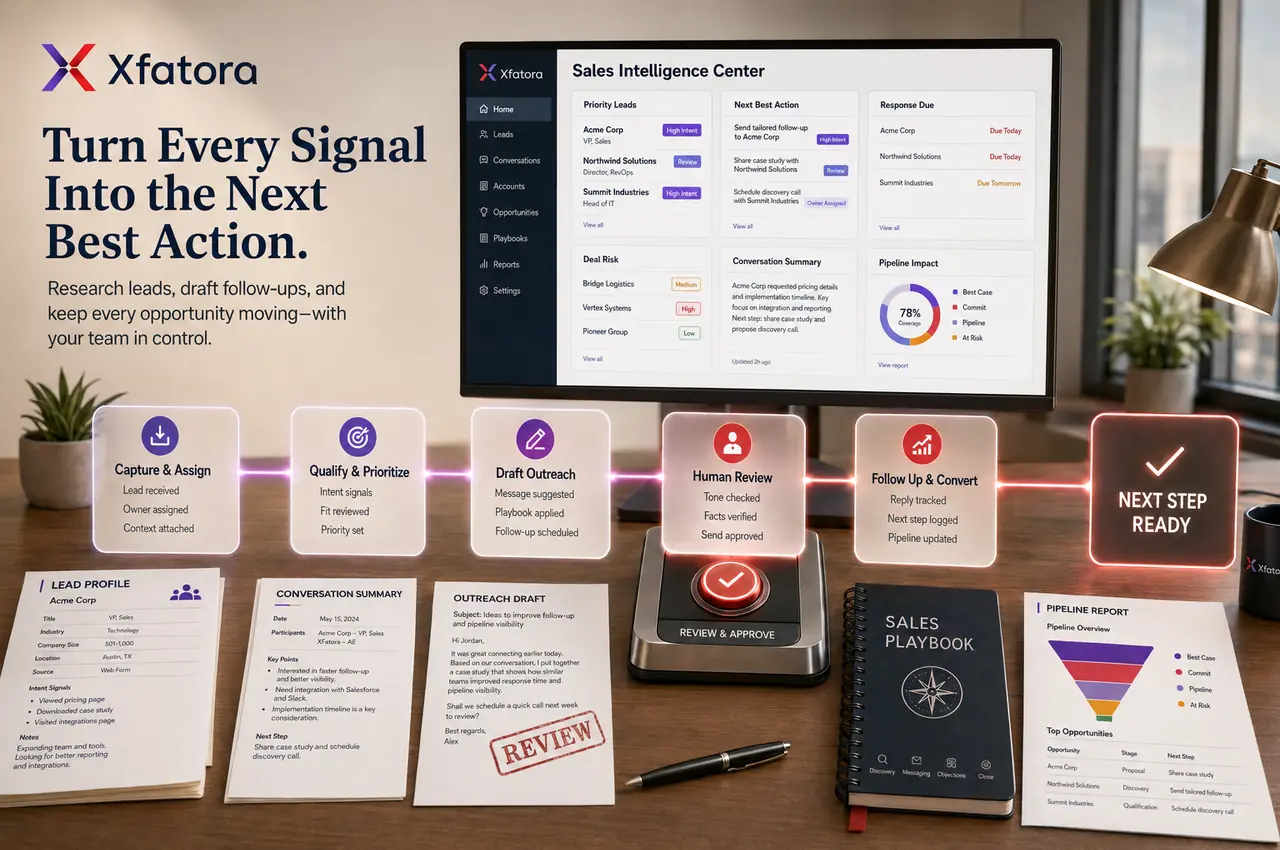
What this module helps you control
Outbound AI calling campaigns with contact-list CSV upload, launch controls, schedule, and max call attempts
Lead qualification criteria, smart qualification, call outcome review, and qualified-lead filtering
AI call logs, call details, summaries, transcripts, duration, ended reason, and inbound/outbound classification
Post-call lead source, lead status, CRM handoff, follow-up ownership, and campaign attribution
Assistant instructions, prompt templates, sales approach, conversation tone, and reusable role examples
Knowledge-base-assisted answers, approved information, test calls, web assistant testing, and pre-launch QA
Campaign statistics, success rate, average call duration, completed/failed calls, and leadership review packs
Business outcomes teams expect
Improve first-contact consistency when inbound and outbound calls are handled differently by each rep.
Scale lead qualification campaigns without losing visibility into what was said, what was promised, and what should happen next.
Give sales managers call summaries and transcripts for coaching, QA, and follow-up review.
Reduce missed opportunities by passing qualified prospects into CRM with clearer context and next-step ownership.
Use configured qualification criteria instead of relying only on memory or informal notes.
Control launch risk with test calls, web assistant testing, contact-list validation, launch schedule, and max call attempts.
Keep answers aligned with approved knowledge instead of freeform claims.
Support sales teams without replacing human ownership of pricing, commitments, negotiation, and final decisions.
What teams use most in this module
Practical capabilities that make day-to-day execution faster, cleaner, and easier to govern.
Inbound AI Call Assistant
Configure consistent first-response handling for inbound calls while keeping sales and service teams in control of follow-up.
Opening greeting message
Assistant personality and company context
Inbound call assistant settings
First-response quality checks
Routing context for CRM or service follow-up
Outbound AI Calling Campaigns
Run structured outbound call waves with controlled instructions, contact lists, launch timing, and retry behavior.
Campaign setup with name, description, and audience
Contact-list CSV upload and preview
Launch now or schedule later
Max call attempts
Completed, failed, and in-progress call visibility
Smart Lead Qualification
Use qualification criteria to separate qualified prospects from noisy call volume before human follow-up.
Smart qualification controls
Qualification criteria setup
Lead filtering by configured outcomes
Qualified-lead handoff to CRM follow-up
Review of unqualified or ambiguous calls
Call Logs, Summaries, and Transcripts
Review what happened in each AI-assisted conversation before deciding the next action.
AI call logs and call details
Summary and transcript review
Duration and ended reason
Inbound/outbound classification
Lead linkage and follow-up context
Assistant Instructions and Prompt Templates
Define the assistant role, tone, approach, qualification behavior, and conversation boundaries before launch.
Assistant instructions
Quick start templates
System prompt templates
Sales assistant instructions and approach
Role patterns such as lead qualification, appointment scheduling, information collection, support routing, and feedback gathering
Post-Call Processing and CRM Handoff
Standardize what happens after a call so qualified outcomes do not remain trapped in call notes.
Post-call lead source mapping
Post-call lead status mapping
CRM and Sales follow-up context
Attribution hygiene
Clear next-step ownership
Knowledge Base Assisted Responses
Connect approved knowledge so conversations use consistent information and safer responses.
Knowledge base selection
Approved answer context
Reduced freeform guesswork
Better alignment with product, service, pricing, or policy content
Knowledge review after transcript QA
Testing, QA, and Campaign Monitoring
Validate behavior before go-live and review campaign quality after launch.
Phone test call
Web assistant test
Start and end conversation checks
Campaign statistics
Success rate and average call duration review
Start with this workflow
Follow these structured steps to launch one controlled process first, then expand.
AI Sales Assistant rollout readiness
1
Prepare five real examples: new lead, delayed follow-up, dormant opportunity, quote pending, and post-call CRM handoff gap
2
Define target lead type, qualification criteria, and what remains human-owned
3
Clean contact data and required CRM fields
4
Configure assistant instructions, greeting, and knowledge base context
5
Run test calls, review transcripts, and approve controlled launch
Configure inbound assistant
1
Define opening greeting and first-response boundaries
2
Add company context and assistant personality
3
Connect approved knowledge where needed
4
Run phone and web tests
5
Review summaries and refine instructions before publishing
Launch outbound qualification campaign
1
Create campaign and define audience
2
Upload and preview contact CSV
3
Set launch date, time, and max attempts
4
Define sales assistant approach and qualification criteria
5
Launch controlled wave and monitor progress
Review and hand off qualified leads
1
Open AI call logs
2
Review summaries, transcripts, duration, and ended reason
3
Confirm qualification outcome
4
Map lead source and status
5
Hand off qualified prospect to CRM owner with next action
Improve campaign quality
1
Review failed calls and low-quality conversations
2
Check repeated objections and unclear answers
3
Update prompt templates and knowledge base content
4
Retest assistant behavior
5
Compare success rate and conversion quality before scaling
Who this module is for
Sales development teams
Inside sales teams
CRM owners
Revenue operations managers
Customer-response teams
Founders scaling first-contact workflows
Sales managers reviewing call quality
Teams with high lead volume and weak follow-up discipline
Common problems this module helps solve
Inbound leads are handled inconsistently and not all calls become clean CRM follow-up
Outbound campaigns are difficult to monitor beyond raw call volume
Sales managers cannot review what happened on first-contact calls
Call summaries are missing, vague, or scattered outside CRM
Qualification criteria are not clear before leads are handed to sales
Reps spend time on unqualified leads while high-intent prospects wait
Prompt, tone, and answer quality are not tested before launch
AI suggestions are treated as final commitments instead of reviewed sales assistance
Where teams apply this module
Inbound lead qualification before human sales follow-up
Outbound first-contact campaigns for selected lead lists
Appointment scheduling and information collection workflows
Dormant opportunity reactivation and delayed follow-up review
Post-call summary and transcript capture for CRM handoff
Sales manager QA, coaching, and campaign review
LeadPilot-style lead scoring, prioritization, and qualification workflows
Connected records across modules
CRM and Sales: qualified leads, call summaries, lead status, source, and next-step context should flow into customer and opportunity follow-up.

Knowledge Base: approved answers help the assistant respond more consistently during calls.
Smart Mentions: urgent or ambiguous call outcomes can be routed to internal owners for review.

Surveys: feedback-gathering call scenarios can support post-service or post-sale insight programs.

Data Exporter: campaign logs, call outcomes, summaries, and qualification review packs can be exported for RevOps analysis.

Accounting: quote, invoice, payment, or commercial handoff questions can be escalated to finance after qualified conversations.
Built-in Reports & Analytics
AI call logs by campaign, direction, status, and period
Call summary and transcript review packs
Qualified, unqualified, ambiguous, failed, and completed call outcomes
Success rate, average call duration, ended reason, and campaign progress
Lead source and post-call lead status review
Campaign QA findings and prompt improvement notes
Conversion-quality review after CRM handoff
Leadership pack for outreach quality and sales follow-up discipline
Compliance & Implementation Resources
Practical guides to help you rollout and validate workflows.
FAQ
Does AI Sales Assistant replace salespeople?
No. It supports first-contact consistency, qualification, summaries, and campaign review. Sales owners still manage relationships, pricing, commitments, negotiation, and final decisions.
Can it handle inbound and outbound calls?
Yes. The module supports inbound and outbound AI-assisted calling with separate settings and conversation guidance.
Can we upload contact lists for campaigns?
Yes. Campaign setup supports contact-list CSV upload, preview, and template-based preparation.
Can AI qualify leads automatically?
It can assist qualification using configured criteria and call outcomes, but teams should review quality and keep final sales ownership clear.
Can we review summaries and transcripts?
Yes. AI call logs include summaries and transcripts for post-call review, coaching, and CRM handoff.
What should we prepare before an AI Sales Assistant demo?
Prepare a small real lead list, current qualification rules, one inbound scenario, one outbound scenario, and an example of the CRM handoff you want to improve.
Plans that include this module
Confirm commercial fit before rollout planning.
Business Plan
Enterprise Plan
Ready to evaluate AI sales assistant, lead qualification, and calling automation ERP software with your team?
We will map this module to your current process, owners, controls, and rollout timeline.
User guide
How to use AI sales assistant, lead qualification, and calling automation ERP software
Setup checklist, key workflows, reports, and troubleshooting.
Talk to our solution team
Tell us what you need and we will reply with a rollout plan and recommended modules.
Fields marked with * are required.
Related content
Related Modules
Often fits plan: Field Service · Scale
Asset Management
Control asset records, custody, locations, maintenance, audits, depreciation, and lifecycle accountability from one controlled workspace.
Often fits plan: Field Service · Scale
Asset Management
Manage company assets, custody, locations, maintenance, audits, depreciation, and lifecycle accountability from one controlled workspace.
Attendance and Leave
Manage attendance exceptions, leave requests, approvals, employee availability, payroll cutoffs, and HR reporting from one workflow.
Related Use Cases
Accelerate Order to Cash
Connect sales, fulfillment, invoicing, and collections to reduce revenue leakage and improve cash conversion.
order-to-cash
revenue-operations
cash-flow
Control Production Costs
Tie material usage, labor capture, and overhead allocation to each production order for reliable margins.
manufacturing-management
costing
inventory-warehousing
Related Industries
ERP for Manufacturing Operations
Manufacturing ERP for production planning, MRP, inventory, quality, costing, and shop-floor control across growing factories.
manufacturing
mrp
production
ERP for Clinics and Outpatient Networks
Sector playbook covering pain points, workflows, module fit, and buying checklist for erp for clinics and outpatient networks.
industry
operations
erp
Related Guides
Build ZATCA audit trail controls for SMB finance teams
Practical guide for build zatca audit trail controls for smb finance teams with execution steps and buying support links.
zatca
saudi
compliance
ERP Implementation Playbook
A practical, phased guide to planning, launching, and scaling ERP adoption across teams with measurable outcomes.
implementation
operations
change-management