Employee profiles, staff codes, personal details, employment details, and required documents
 Module
People records and employee lifecycle management ERP software
Control employee master data, org structure, contracts, onboarding, offboarding, training, dependants, documents, and payroll-ready HR records.
Xfatora People Records helps HR, managers, payroll, and operations teams govern employee profiles, reporting lines, contracts, documents, onboarding, training, dependants, lifecycle changes, and audit-ready people data.
Approved app available now
Take HR & People to the frontline.
Bring attendance, leave, schedules, employee records, permission-aware payroll access, workload, and goals closer to every role.
What this module helps you control
Departments, units, branches, reporting lines, direct managers, and org chart visibility
Job groups, positions, position codes, job descriptions, and role placement
Contracts, contract types, signed files, expiry dates, salary references, and document evidence
Onboarding templates, checklist tasks, document collection, owners, and completion status
Offboarding, quit work, layoff checklists, asset handover, access handover, and closure evidence
Training libraries, training programs, completion, scores, overdue learning, and development history
Dependants, related employee information, relationship details, and supporting attachments
Workplace, manager, department, and responsibility mapping for payroll and attendance handoffs
People dashboards, contract expiry, headcount, movement trends, staff ratios, and audit exports
Business outcomes teams expect
One reliable employee record across HR operations
Cleaner organizational visibility through org chart and reporting structure
Fewer duplicated HR records and less spreadsheet drift
More consistent onboarding and offboarding controls
Better contract and document readiness
Clearer training history and training assignments
Better manager and workplace mapping
Stronger employee lifecycle traceability
Easier handoff to Payroll and related modules
Stronger audit and compliance readiness for people records
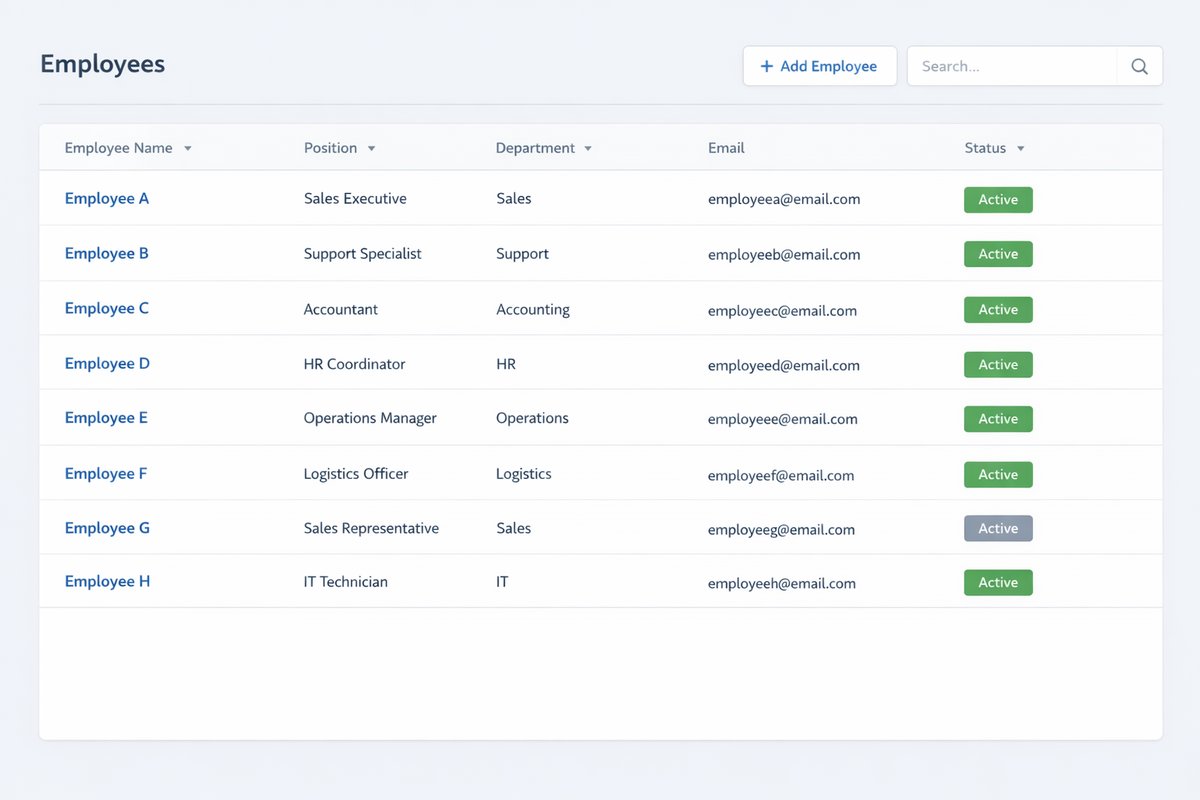
Screenshots
Real screens from the platform.
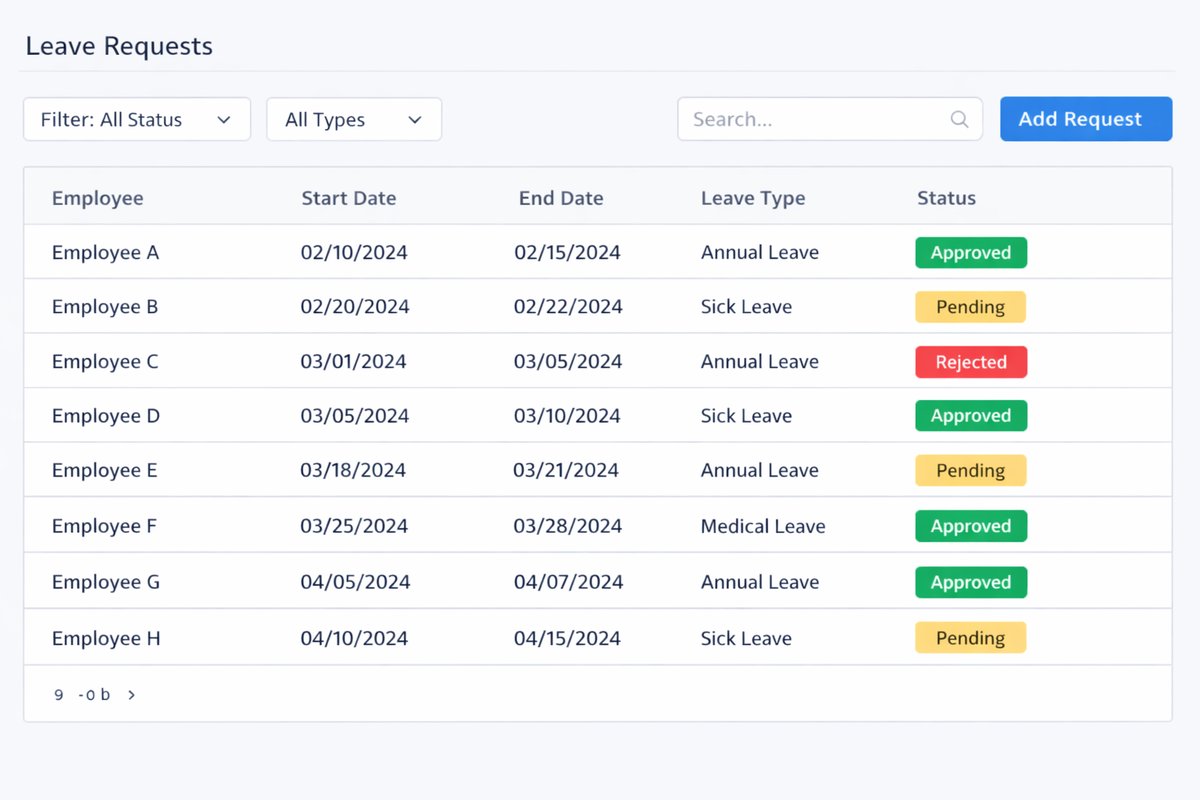
What teams use most in this module
Practical capabilities that make day-to-day execution faster, cleaner, and easier to govern.
Employee Records and Staff Profiles
Maintain complete employee records and searchable staff profiles as the core people-data reference.
Employee records with unique staff code policy
Personal details and employment details in one profile
Staff profile-level information for HR operations
Searchable people data across departments and managers
Identity-related fields and supporting attachments
Organizational Structure and Org Chart
Map departments, units, and reporting relationships with clearer organizational visibility.
Org chart visibility for department and unit structure
Parent unit and unit manager relationships
Reporting structure clarity for managers and teams
Department-level visibility for workforce planning
Staff chart clarity for operational reviews
Job Positions and Job Descriptions
Control role structure using job groups, positions, and job descriptions.
New position group setup and maintenance
Position records with position code
Job descriptions for role consistency
Role structure aligned to organizational planning
Department placement for each position
Contracts and Employment Terms
Track contract records, templates, and validity windows for employee contract governance.
Contract type and contract code tracking
Salary type and allowance type reference fields
Contract templates for consistency
Signed contract information and document linkage
Contract status and expiry monitoring
Onboarding and Reception Checklists
Execute structured onboarding templates and checklist tasks for new employees.
Onboarding template and Add checklist controls
Required setup tasks and ownership assignment
Evidence and document collection during onboarding
Completion status tracking by step
Follow-up on incomplete onboarding tasks
Offboarding and Layoff Procedures
Run controlled quitting-work and layoff checklist procedures with clear accountability.
Quit work and layoff checklist procedures
Reason, status, and progress tracking
Responsibility assignment for exit actions
Controlled employee exit process
Asset and account handover coordination
Training Libraries and Training Programs
Maintain employee development records through structured training libraries and programs.
Training libraries and training programs
Training type and scheduling setup
Results, score, and completion capture
Employee development record updates
Overdue and incomplete training follow-up
Workplace, Manager, and Related Information
Link workplace and manager assignments to strengthen daily administrative control.
Workplace assignment and workplace address
Direct manager assignment and updates
Related staff visibility for administrative ownership
Clearer responsibility mapping across units
Operational context for lifecycle workflows
Dependants and Related Employee Information
Maintain dependant records and supporting employee administration details.
Dependants and dependent person records
Relationship type and supporting details
Effective and expiration date fields where used
Supporting attachments for dependent records
Structured dependant administration history
Reports and People Visibility
Monitor employee lifecycle and organizational status using People Records reports.
People Records dashboard visibility
Contract expiry and overdue contract views
Staff ratio by department and by jobs
Movement and fluctuation reporting
Birthday, headcount, and department monitoring
Start with this workflow
Follow these structured steps to launch one controlled process first, then expand.
People records rollout readiness
1
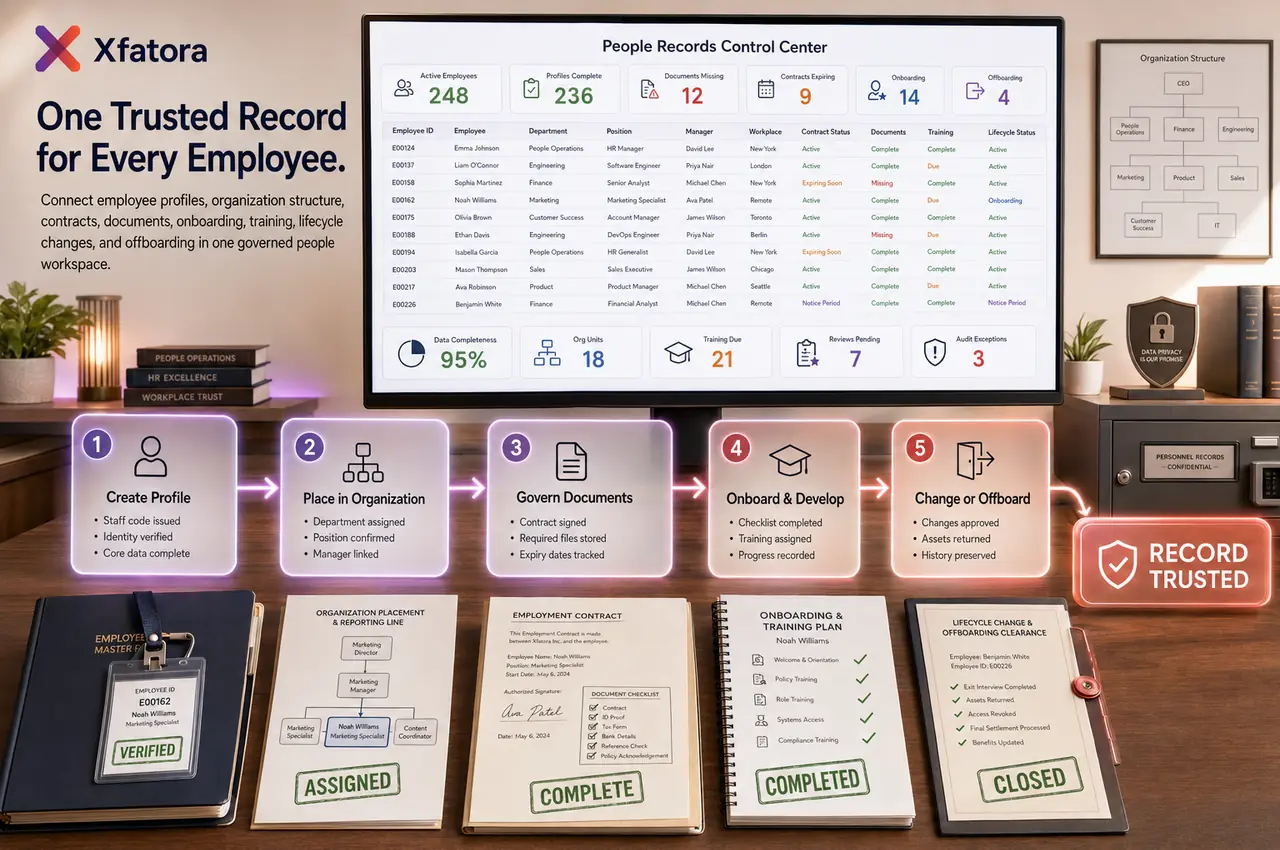
Define required employee fields, staff code rules, departments, managers, workplaces, positions, contract rules, and document checklist
2
Prepare one real employee sample set with active, new, missing-document, expiring-contract, training, and offboarding examples
3
Clean duplicates, inactive records, incomplete departments, missing managers, and outdated contract references
4
Test onboarding, contract tracking, training assignment, offboarding, and payroll handoff with owners
5
Agree who can edit sensitive fields, how changes are approved, and how HR evidence is exported for review
Create a new employee record
1
Create employee profile
2
Assign staff code
3
Fill personal and employment data
4
Assign department, manager, and workplace
5
Attach key documents
6
Verify employee appears in org and records views
Run onboarding checklist
1
Choose onboarding template
2
Assign tasks and owners
3
Collect required documents
4
Confirm access and setup steps
5
Track completion status
6
Mark onboarding complete
Create and manage employment contract
1
Choose contract type
2
Create contract record and contract code
3
Add salary and allowance references as needed
4
Attach contract document
5
Capture signing information
6
Monitor contract validity and expiry
Define job position and org placement
1
Assign or create job position
2
Link position group
3
Assign department or unit
4
Define reporting relationship
5
Verify org chart placement
Manage training program for an employee
1
Assign training program
2
Set type, dates, and requirements
3
Track completion and score
4
Update employee training history
5
Verify overdue or incomplete training
Run offboarding / layoff checklist
1
Initiate checklist
2
Assign responsible handlers
3
Collect exit-related confirmations
4
Confirm asset or access handover
5
Close checklist
6
Preserve history for compliance and audit
Who this module is for
HR Admin
HR Officer
HR / People Operations
Department Managers
Compliance and audit reviewers
Leadership teams needing organizational visibility
Common problems this module helps solve
Employee records are duplicated across spreadsheets, folders, payroll files, and manager messages
Contracts and required employee documents are missing, expired, or stored outside the profile
Payroll and attendance depend on outdated employee data, unclear managers, or incomplete departments
Onboarding tasks are inconsistent and depend on memory instead of a controlled checklist
Offboarding is weak, leaving assets, access, documents, or responsibilities unresolved
Org structure, reporting lines, job positions, and workplace assignments are not trusted
Training assignments and completion history are not visible enough for HR and managers
HR reports are rebuilt manually for headcount, movement, contract expiry, and missing records
Audit preparation takes too long because people evidence is scattered across systems
Where teams apply this module
HR teams building a single source of truth for employee profiles and documents
Companies cleaning employee master data before payroll or attendance rollout
Organizations tracking contracts, expiry dates, signed files, and employment terms
HR operations teams standardizing onboarding and offboarding checklists
Managers needing clearer reporting lines, departments, roles, and workplace assignment
Compliance teams preparing people records, document evidence, and audit packs
Companies managing training history, dependants, job positions, and employee lifecycle changes
Connected records across modules

HR Payroll: employee eligibility, salary references, contract data, departments, and manager context support payroll readiness.
Time & Attendance: employee, manager, department, workplace, and policy context improve attendance and leave governance.

Workload Planner: people records, departments, managers, and working context support realistic capacity review.

Smart Mentions: onboarding, offboarding, contract, document, and training follow-up can be escalated inside records.
Projects and Services: employee assignments and ownership context support delivery accountability.

Data Exporter: employee profiles, contracts, training, documents, and lifecycle evidence can be exported for audit packs.
Built-in Reports & Analytics
People Records dashboard and employee master-data completeness
Missing required fields and missing document review
Overdue and expiring contracts
Staff ratio by department, job, branch, or unit
Org chart, reporting-line, and manager assignment review
Current personnel, new staff, quit work, and movement trends
Onboarding completion and incomplete task exceptions
Offboarding and asset/access handover evidence
Training status, completion, scores, and overdue training visibility
Exportable HR audit pack for employee records, contracts, documents, and lifecycle history
Compliance & Implementation Resources
Practical guides to help you rollout and validate workflows.
FAQ
Can we keep all employee records in one place?
Yes. People Records centralizes employee profiles, organizational placement, contracts, checklists, training, and related records.
Can we map departments, managers, and org structure?
Yes. Org chart, department/unit structure, parent units, and direct manager relationships are part of core People Records controls.
Can we manage onboarding and offboarding checklists?
Yes. Onboarding template and layoff checklist workflows support owner assignment, progress tracking, and completion control.
Can we store contracts and signed documents?
Yes. Contract records include contract type/code, status, signing information, attachments, and expiry monitoring.
Can we track training history and completion?
Yes. Training libraries and programs support assignment, scheduling, results, scores, and completion status by employee.
Can we maintain dependants and related employee information?
Yes. Dependants, relationship details, and effective or expiration fields can be maintained where used by your policy.
How should this module differ from Payroll?
People Records controls employee master data and lifecycle administration, while Payroll controls salary-cycle calculation, deductions, and payslip release.
How should this module differ from Time & Attendance?
Time & Attendance handles time-based operational inputs; People Records remains the system of record for employee and contract master data.
Can this module support audits and HR data cleanup?
Yes. Standardized profiles, contract status views, checklist trails, and report outputs improve audit readiness and cleanup execution.
Who should own data quality in People Records?
HR Admin and People Operations should own data standards, while HR Officers and managers maintain assigned records under governance.
How do People Records connect to Payroll?
Payroll depends on trusted employee profiles, status, departments, managers, contract references, salary-related fields, and payroll eligibility before each pay cycle.
Should we start with People Records before Time & Attendance?
Usually yes. Attendance and leave rules need reliable employee, manager, department, workplace, and policy context before exceptions can be trusted.
Can HR control who edits sensitive employee fields?
Yes. HR should own sensitive master data, while managers may update operational fields or requests based on permissions and approval rules.
What should we prepare before a People Records demo?
Prepare a sample employee list, department structure, manager mapping, required documents, one contract expiry case, one onboarding checklist, one offboarding case, and one missing-data problem.
Plans that include this module
Confirm commercial fit before rollout planning.
Business Plan
Enterprise Plan
Ready to evaluate People records and employee lifecycle management ERP software with your team?
We will map this module to your current process, owners, controls, and rollout timeline.
User guide
How to use People records and employee lifecycle management ERP software
Setup checklist, key workflows, reports, and troubleshooting.
Talk to our solution team
Tell us what you need and we will reply with a rollout plan and recommended modules.
Fields marked with * are required.
Related content
Related Modules
AI Sales Assistant
Use AI-assisted calling and qualification workflows to improve first-contact consistency, lead follow-up, call summaries, and CRM handoff discipline.
Often fits plan: Field Service · Scale
Asset Management
Control asset records, custody, locations, maintenance, audits, depreciation, and lifecycle accountability from one controlled workspace.
Often fits plan: Field Service · Scale
Asset Management
Manage company assets, custody, locations, maintenance, audits, depreciation, and lifecycle accountability from one controlled workspace.
Related Use Cases
Accelerate Order to Cash
Connect sales, fulfillment, invoicing, and collections to reduce revenue leakage and improve cash conversion.
order-to-cash
revenue-operations
cash-flow
Control Production Costs
Tie material usage, labor capture, and overhead allocation to each production order for reliable margins.
manufacturing-management
costing
inventory-warehousing
Related Industries
ERP for Manufacturing Operations
Manufacturing ERP for production planning, MRP, inventory, quality, costing, and shop-floor control across growing factories.
manufacturing
mrp
production
ERP for Clinics and Outpatient Networks
Sector playbook covering pain points, workflows, module fit, and buying checklist for erp for clinics and outpatient networks.
industry
operations
erp
Related Guides
Build ZATCA audit trail controls for SMB finance teams
Practical guide for build zatca audit trail controls for smb finance teams with execution steps and buying support links.
zatca
saudi
compliance
ERP Implementation Playbook
A practical, phased guide to planning, launching, and scaling ERP adoption across teams with measurable outcomes.
implementation
operations
change-management